- Subscribe to RSS Feed
- Mark Topic as New
- Mark Topic as Read
- Float this Topic for Current User
- Bookmark
- Subscribe
- Mute
- Printer Friendly Page
DB Toolset - Slow Query
Solved!
 KowdTek
12-06-2010 01:35 PM
- Mark as New
- Bookmark
- Subscribe
- Mute
- Subscribe to RSS Feed
- Permalink
- Report to a Moderator
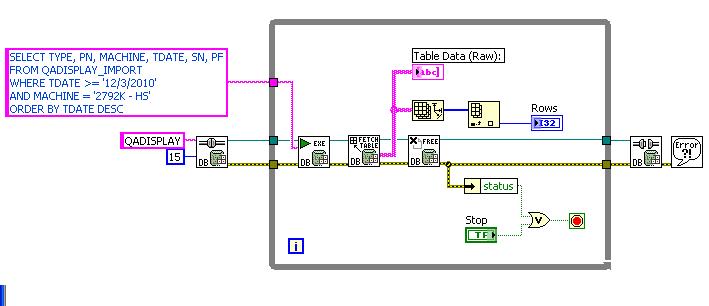
I'm using DB toolset to acquire data from the server and found it to be very slow. It takes almost 3 minutes to bring the data up using the toolset but there's almost no wait when I did the query in the MS SQL Server Management Studio. I'm not expecting the toolset to be as fast as SQL SMS but maybe a lil closer... Unless there's something wrong with my VI then it's a different story.
As I searched the forum this is seems to be an issue in the fast..
If there's any idea to speed this thing up please do advice..
Thank you very much..
KowdTek
LabVIEW 2009
One Step At A Time, Maybe Two...
Solved! Go to Solution.

 falkpl
12-06-2010 02:32 PM
- Mark as New
- Bookmark
- Subscribe
- Mute
- Subscribe to RSS Feed
- Permalink
- Report to a Moderator
How lrge is the table you are fetching (rows , columns)
12-06-2010 02:46 PM
- Mark as New
- Bookmark
- Subscribe
- Mute
- Subscribe to RSS Feed
- Permalink
- Report to a Moderator
Within our 6 months data it's about half a million rows x 12 columns. I think regardless of the date specifiedin the query, it will still scan the whole table that slows the process.
I've also tried other method (My Data Source, this came up after configuring the database.) it took around 30 seconds to bring up the data. After comparing the time with other 2 methods I'm thinking LabVIEW can do nearly as fast as the two.
Thanks for the reply..
KowdTek
LabVIEW 2009
One Step At A Time, Maybe Two...
falkpl
12-06-2010 03:10 PM
- Mark as New
- Bookmark
- Subscribe
- Mute
- Subscribe to RSS Feed
- Permalink
- Report to a Moderator
I dont think the querry is the issue but the conversion to string table that is slow, you are building a massive string table dynamically using this fetch table (I dont have this in my db 2009 palette?). You can try to fetch all and see if the speed is comparable. You can also limit the search more (LIMIT 1000) and view the table chunks at a time.

 Yamaeda
12-06-2010 05:20 PM
- Mark as New
- Bookmark
- Subscribe
- Mute
- Subscribe to RSS Feed
- Permalink
- Report to a Moderator
@KowdTek wrote:
Within our 6 months data it's about half a million rows x 12 columns. I think regardless of the date specifiedin the query, it will still scan the whole table that slows the process.
I've also tried other method (My Data Source, this came up after configuring the database.) it took around 30 seconds to bring up the data. After comparing the time with other 2 methods I'm thinking LabVIEW can do nearly as fast as the two.
Thanks for the reply..
Now why would you want to copy half a million rows over the network? What is it you really want to do with the query? (Also why are you looping the query?)
If you want to look through the data i'd recommend cursors and fetch data. Then the query will be faster and you transfer alot less data at a time.
Your query will probably work fine with a "top 1000" as mentioned to limit the data transferred. If you only want to count it a "select count(*)" will be alot faster.
So, what's the goal?
/Y


 blawson
12-06-2010
10:36 PM
- last edited on
03-24-2025
02:08 PM
by
 Content Cleaner
- Mark as New
- Bookmark
- Subscribe
- Mute
- Subscribe to RSS Feed
- Permalink
- Report to a Moderator
"Why Is the Database Toolset Slow in Returning Table Data?"
http://digital.ni.com/public.nsf/allkb/862567530005F0A186256A33006B917A
(I suspect that the database-variant to data at the core of Fetch Table is the culprit. Try the normal Fetch recordset that outputs an array of variants.)
CLD
12-07-2010 07:06 AM - edited 12-07-2010 07:14 AM
- Mark as New
- Bookmark
- Subscribe
- Mute
- Subscribe to RSS Feed
- Permalink
- Report to a Moderator
falkpl,
I just tried the fetch all and it did return the data with the same time so that wouldn't be an option. I'll try to limit the result though I'm not sure if it will work because the table's date column is not in order..
Thanks!
KowdTek
LabVIEW 2009
One Step At A Time, Maybe Two...
12-07-2010 07:12 AM - edited 12-07-2010 07:13 AM
- Mark as New
- Bookmark
- Subscribe
- Mute
- Subscribe to RSS Feed
- Permalink
- Report to a Moderator
KowdTek wrote:
Within our 6 months data it's about half a million rows x 12 columns. I think regardless of the date specifiedin the query, it will still scan the whole table that slows the process.
I've also tried other method (My Data Source, this came up after configuring the database.) it took around 30 seconds to bring up the data. After comparing the time with other 2 methods I'm thinking LabVIEW can do nearly as fast as the two.
Thanks for the reply..
Yamaeda wrote:
Now why would you want to copy half a million rows over the network? What is it you really want to do with the query? (Also why are you looping the query?)
If you want to look through the data i'd recommend cursors and fetch data. Then the query will be faster and you transfer alot less data at a time.Your query will probably work fine with a "top 1000" as mentioned to limit the data transferred. If you only want to count it a "select count(*)" will be alot faster.So, what's the goal?
/Y
Correct me if I'm wrong but I'm not copying the whole half million, yes I'm scanning the contents and bringing up the selected data base on the query.
The goal is to display the production number of each work station based on thier job type.
Thanks!
KowdTek
LabVIEW 2009
One Step At A Time, Maybe Two...
falkpl
12-07-2010 09:49 AM
- Mark as New
- Bookmark
- Subscribe
- Mute
- Subscribe to RSS Feed
- Permalink
- Report to a Moderator
If you are just interested in the number of records that satisfy your search parameters you should go with a 'count' querry instead of a fetch record sets. This is fast and will only return a single number. There is probably some overhead in the sql calls from labview. I have always been able to work around it but there are probably some limitations.

12-07-2010 11:15 AM
- Mark as New
- Bookmark
- Subscribe
- Mute
- Subscribe to RSS Feed
- Permalink
- Report to a Moderator
Hello,
I would agree with blawson. Try removing the while loop and using the native recordset data type to see if that reduces the execution time. Also, confirm that the SQL query you are writing returns the desired results with MS SQL Server Management Studio. If that query is correct, you should only be seeing results within the desired timeframe.
Regards,
Senior Systems Engineer
