ni.com is currently undergoing scheduled maintenance.
Some services may be unavailable at this time. Please contact us for help or try again later.
- Subscribe to RSS Feed
- Mark Topic as New
- Mark Topic as Read
- Float this Topic for Current User
- Bookmark
- Subscribe
- Mute
- Printer Friendly Page
DAQ Assist to block diagram code
Solved!
 super_saiyans
10-15-2014 01:16 PM
- Mark as New
- Bookmark
- Subscribe
- Mute
- Subscribe to RSS Feed
- Permalink
- Report to a Moderator
Hi,
I am fairly new to NI Signal Express.
I am using the NI 9214 for thermocouples and I have sucessfully communicated with the NI using DAQ assistant.
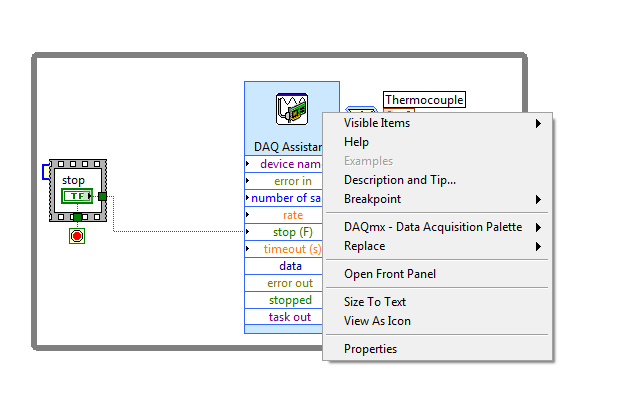
It generated the code below.
How can i have more control of my VI?
I want to be able to turn on and off my CHANNELS
i want to have graphs, etc.
can i expland the DAQ ASSISTANT ICON to something with more control?
thanks in advance.
Solved! Go to Solution.

 JÞB
JÞB
10-15-2014 01:56 PM
- Mark as New
- Bookmark
- Subscribe
- Mute
- Subscribe to RSS Feed
- Permalink
- Report to a Moderator
YES! right click the DAQ Assistant select "Generate code"
"Should be" isn't "Is" -Jay
10-15-2014 03:12 PM
- Mark as New
- Bookmark
- Subscribe
- Mute
- Subscribe to RSS Feed
- Permalink
- Report to a Moderator
yes...
thats what i thought would happen before too but i am using version 2014 and it doesnt show?

 GerdW
GerdW

10-15-2014 03:20 PM
- Mark as New
- Bookmark
- Subscribe
- Mute
- Subscribe to RSS Feed
- Permalink
- Report to a Moderator
Hi saiyans,
reading the LabVIEW help may give you the advice of selecting "Open Front Panel"…
GerdW
using LV2016/2019/2021 on Win10/11+cRIO, TestStand2016/2019
 crossrulz
10-15-2014 03:23 PM
- Mark as New
- Bookmark
- Subscribe
- Mute
- Subscribe to RSS Feed
- Permalink
- Report to a Moderator
Use the Open Front Panel to transform the Express VI into an actual VI.
There are only two ways to tell somebody thanks: Kudos and Marked Solutions
Unofficial Forum Rules and Guidelines
"Not that we are sufficient in ourselves to claim anything as coming from us, but our sufficiency is from God" - 2 Corinthians 3:5
JÞB
10-15-2014 03:24 PM - edited 10-15-2014 03:26 PM
- Mark as New
- Bookmark
- Subscribe
- Mute
- Subscribe to RSS Feed
- Permalink
- Report to a Moderator

Open your Task manager and ensure process "mxssvr" is running
What is the device- (this is a newer feature) what version of DAQmx?
"Should be" isn't "Is" -Jay
10-15-2014 03:28 PM - edited 10-15-2014 03:30 PM
- Mark as New
- Bookmark
- Subscribe
- Mute
- Subscribe to RSS Feed
- Permalink
- Report to a Moderator
are you guys using 2014?
i dont see any of the suggested ideas on my labview
i am using daqmx 14

 NIquist
10-15-2014 03:33 PM
- Mark as New
- Bookmark
- Subscribe
- Mute
- Subscribe to RSS Feed
- Permalink
- Report to a Moderator
Open Front Panel is in your screenshot. Use that.
10-15-2014 03:37 PM
- Mark as New
- Bookmark
- Subscribe
- Mute
- Subscribe to RSS Feed
- Permalink
- Report to a Moderator
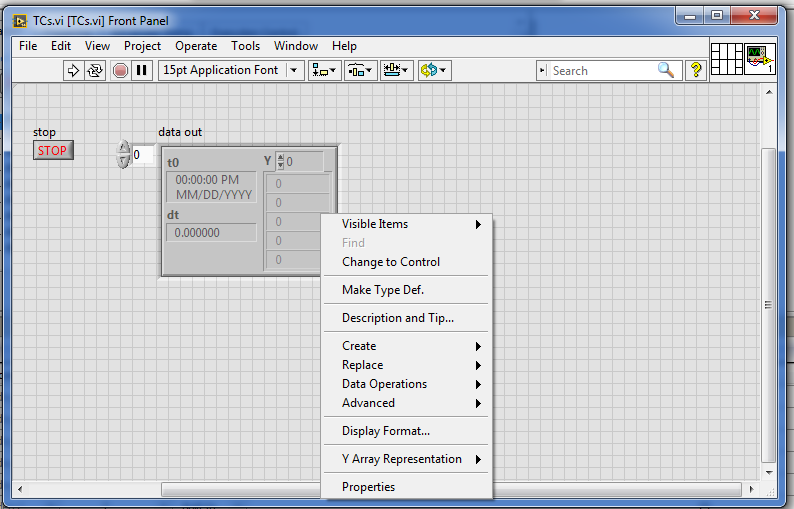
hmm...?
this?
 NIquist
10-15-2014 03:42 PM - edited 10-15-2014 03:46 PM
- Mark as New
- Bookmark
- Subscribe
- Mute
- Subscribe to RSS Feed
- Permalink
- Report to a Moderator
Oh, you already opened it.
Well we don't know what you want to do. Since you have a real VI to work with YOU need to decide how you want to enhance it. I would start with changing some of the constants on the block diagrams to controls. You can drop a chart on your front panel and wire DAQ out data right to it. If you get stuck, be specific about your goals and post your newly opened VI.
EDIT: BTW, if you want more help I suggest you use File > Save for Previous Version... and make it a 2013 or 2012. Many of us who could help out still haven't upgraded to 2014.  I saw that you wanted channel control and graphs but I can't open your code.
