- Subscribe to RSS Feed
- Mark Topic as New
- Mark Topic as Read
- Float this Topic for Current User
- Bookmark
- Subscribe
- Mute
- Printer Friendly Page
Creating subVI from Labview example
Solved!
 sevincom
01-21-2015 08:35 AM
- Mark as New
- Bookmark
- Subscribe
- Mute
- Subscribe to RSS Feed
- Permalink
- Report to a Moderator
Hi,
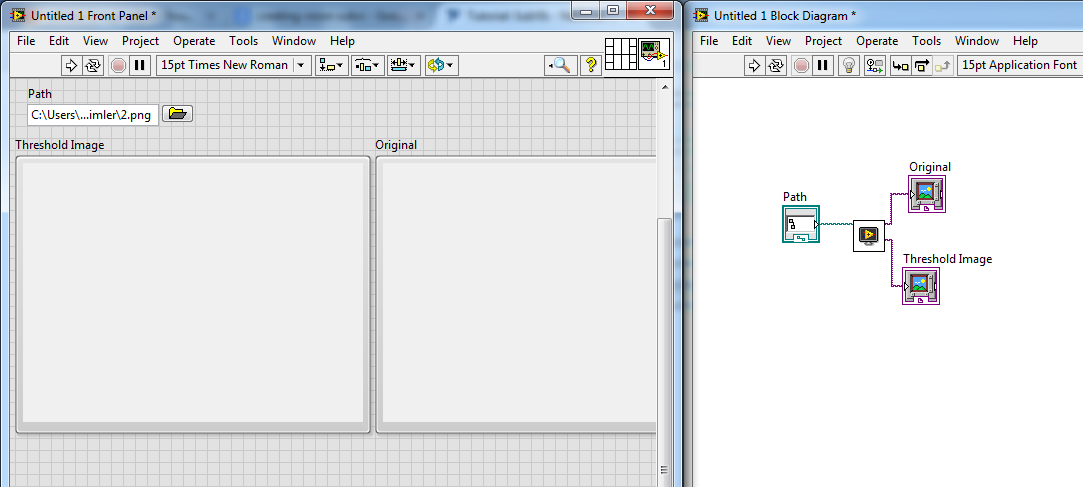
I'm trying to use a Labview example VI as a subVI in my projects. (examples/Vision/Image Processing/Image Treshold.vi)
I wired the path control and two image displays to terminals in the upper right of VI.
Then I created my main VI with one path control & two image displays, and add this example VI in my block diagram.
The path control is working correctly but I can't see the images loaded in my main VI.
What am I missing there?
Thanks in advance.
Solved! Go to Solution.

 Sam_Sharp

01-21-2015 08:40 AM
- Mark as New
- Bookmark
- Subscribe
- Mute
- Subscribe to RSS Feed
- Permalink
- Report to a Moderator
How did you modify the Example? The example has a loop so it will keep running until you press the stop button on the example and will only return a result to the caller then.
If you want to see the thresholding while it's running, you'll need to open the front panel of the SubVI - either from the VI properties, programmatically or by double clicking on it on the block diagram while it's running.

 crossrulz
01-21-2015 08:45 AM
- Mark as New
- Bookmark
- Subscribe
- Mute
- Subscribe to RSS Feed
- Permalink
- Report to a Moderator
Do not just edit an example. Make a copy of it for your project.
There are only two ways to tell somebody thanks: Kudos and Marked Solutions
Unofficial Forum Rules and Guidelines
"Not that we are sufficient in ourselves to claim anything as coming from us, but our sufficiency is from God" - 2 Corinthians 3:5
01-21-2015 09:17 AM
- Mark as New
- Bookmark
- Subscribe
- Mute
- Subscribe to RSS Feed
- Permalink
- Report to a Moderator
I changed only the path constant with a path control, and wired terminals. You can see in attachment.
My aim is: I will put this VI in a case/event structure. When user press the button this VI will run in a different window (configured it as dialog), and user will make treshold and when stop button pressed, the original and treshold images will come into the displays in main VI. Then I need to use those images for further processing.
All working but images do not displayed in main VI.
01-21-2015 12:09 PM
- Mark as New
- Bookmark
- Subscribe
- Mute
- Subscribe to RSS Feed
- Permalink
- Report to a Moderator
Problem solved.
Just forgot to remove IMAQ Dispose VIs 
Thank you for your interest and sorry for taking your time.
