- Subscribe to RSS Feed
- Mark Topic as New
- Mark Topic as Read
- Float this Topic for Current User
- Bookmark
- Subscribe
- Mute
- Printer Friendly Page
Create refnum for control programmatically

 sensorble
02-19-2003 08:15 AM
- Mark as New
- Bookmark
- Subscribe
- Mute
- Subscribe to RSS Feed
- Permalink
- Report to a Moderator
 mikeporter

02-19-2003 08:52 AM
- Mark as New
- Bookmark
- Subscribe
- Mute
- Subscribe to RSS Feed
- Permalink
- Report to a Moderator
Mike...
Certified Professional Instructor
Certified LabVIEW Architect
LabVIEW Champion
"... after all, He's not a tame lion..."
For help with grief and grieving.

 BrandonS
02-20-2003 11:30 AM
- Mark as New
- Bookmark
- Subscribe
- Mute
- Subscribe to RSS Feed
- Permalink
- Report to a Moderator
 FabiolaDelaCuev
09-14-2007 04:40 PM
- Mark as New
- Bookmark
- Subscribe
- Mute
- Subscribe to RSS Feed
- Permalink
- Report to a Moderator
What if the control is inside a tab?
I have most of my controls inside a tab and the property node of Controls for pane does not return those controls.
Check out DSH Pragmatic Software Development Workshop!
DQMH Lead Architect * DQMH Trusted Advisor * Certified LabVIEW Architect * Certified LabVIEW Embedded Developer * Certified Professional Instructor * LabVIEW Champion * Code Janitor
Have you been nice to future you?
 johnsold
09-17-2007 07:46 AM
- Mark as New
- Bookmark
- Subscribe
- Mute
- Subscribe to RSS Feed
- Permalink
- Report to a Moderator
Lynn

 Ben
Ben
09-17-2007 07:59 AM
- Mark as New
- Bookmark
- Subscribe
- Mute
- Subscribe to RSS Feed
- Permalink
- Report to a Moderator
To calify Lynn's reply
Tab ref >>> Pages >>> controls on page
And to update the original thread...
FP >>> Panes >>> controls
Ben
 Slyfer
05-27-2009 07:59 AM
- Mark as New
- Bookmark
- Subscribe
- Mute
- Subscribe to RSS Feed
- Permalink
- Report to a Moderator
What should I do if I want to get programmatically a control reference, and set his increment.
Do I have to iterate all the FP.controls[] ?
Example: When I click one of the buttons labeled "Multiplier x" (x=1,2,3, etc...), I want to change the "increment" property of another control labeled "Value x" (x=1,2,3, etc...).
See figure, confirm if there is better solution (that is *direct* access to a control reference by naming its label)
Thanks
johnsold
05-27-2009 08:09 AM
- Mark as New
- Bookmark
- Subscribe
- Mute
- Subscribe to RSS Feed
- Permalink
- Report to a Moderator
I think what you are showing will work. I do not know of any way to get the direct access you asked about.
What is your concern about this approach? The time it takes should be insignificant compared to the speed of the user, even if you have many controls on the panel.
Lynn
Slyfer
05-27-2009 08:38 AM
- Mark as New
- Bookmark
- Subscribe
- Mute
- Subscribe to RSS Feed
- Permalink
- Report to a Moderator
Indeed it's not working as I imagine because I just discovered there is no property access to "limit".
Even if it worked, it is suboptimal! 🙂

 Ben
Ben
05-27-2009 08:43 AM
- Mark as New
- Bookmark
- Subscribe
- Mute
- Subscribe to RSS Feed
- Permalink
- Report to a Moderator
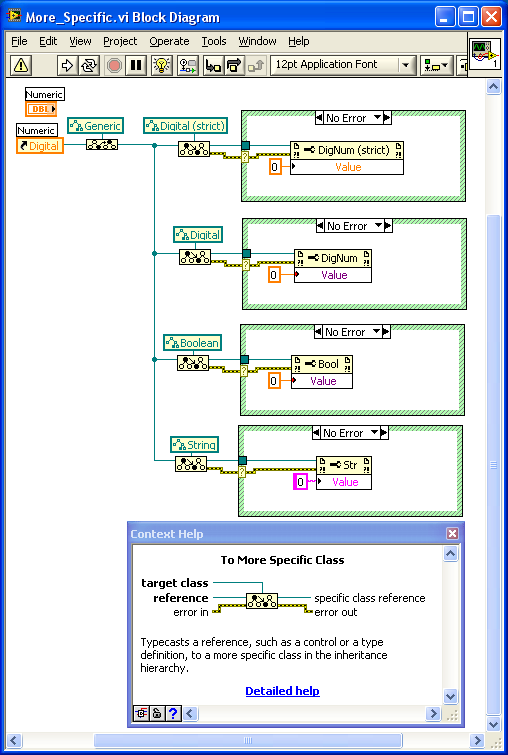
Take a look at this Nugget on using Control references. When you cast the reference as the proper type, you can access the properties of the widget. Here is a preview.
Ben
