- Subscribe to RSS Feed
- Mark Topic as New
- Mark Topic as Read
- Float this Topic for Current User
- Bookmark
- Subscribe
- Mute
- Printer Friendly Page
Convert integer to date
Solved!
 luisgepeto
12-10-2013 09:54 AM
- Mark as New
- Bookmark
- Subscribe
- Mute
- Subscribe to RSS Feed
- Permalink
- Report to a Moderator
Hello.
I have a question. I am importing some data from an excel file and a column of the data is in the date format. In LabView I am reading a number for example 4577. I know that the excel time reference is different from the labview reference and I am using this conversion factor:
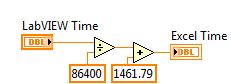
However my problem is that I do not know how to convert this number into a date string in the form DD/MM. I just want to display in LabView.
Any help would be appreciated.
Solved! Go to Solution.

 JÞB
JÞB
12-10-2013 09:57 AM
- Mark as New
- Bookmark
- Subscribe
- Mute
- Subscribe to RSS Feed
- Permalink
- Report to a Moderator
"Should be" isn't "Is" -Jay

 crossrulz

12-11-2013 07:23 AM - edited 12-11-2013 07:24 AM
- Mark as New
- Bookmark
- Subscribe
- Mute
- Subscribe to RSS Feed
- Permalink
- Report to a Moderator
luisgepeto wrote:However my problem is that I do not know how to convert this number into a date string in the form DD/MM. I just want to display in LabVIEW.
Just set the Display Format of a numeric indicator to "%<%m/%d>T". LabVIEW will take the time and format figure out your month and day for you.

There are only two ways to tell somebody thanks: Kudos and Marked Solutions
Unofficial Forum Rules and Guidelines
"Not that we are sufficient in ourselves to claim anything as coming from us, but our sufficiency is from God" - 2 Corinthians 3:5
