- Subscribe to RSS Feed
- Mark Topic as New
- Mark Topic as Read
- Float this Topic for Current User
- Bookmark
- Subscribe
- Mute
- Printer Friendly Page
Calling a LabVIEW-built DLL in Python
Solved!
 Gregory
04-10-2024 04:49 PM
- Mark as New
- Bookmark
- Subscribe
- Mute
- Subscribe to RSS Feed
- Permalink
- Report to a Moderator
I apologize in advance, as I think this is more of a Python question than a LabVIEW question. But, I think someone here probably has experience doing what I want to do.
I'm building a DLL with LabVIEW, and would like to test it with something else. I don't have much experience with other languages, so I chose to try Python.
I started with a simple example of adding two integers together, and that worked fine.
Now I've got a VI / function which just has a File Path control input. When I try to call this from Python, I'm getting access violation errors, so I think I'm passing in the file path incorrectly.
Python code:
import ctypes

dll = ctypes.cdll.LoadLibrary("C:\LabVIEW 2016\Misc\DLL Test\Builds\Build2\Build2.dll")

dll.ReadFile.argtypes = (ctypes.c_char_p,)
dll.ReadFile.restype = None

FilePath = b"C:\Users\gjacob\Desktop\File Parking\example.txt"

dll.ReadFile(FilePath)
I get the following error: OSError: exception: access violation reading 0x555C3A43
The header file for Build2.dll is below:
#include "extcode.h"
#pragma pack(push)
#pragma pack(1)

#ifdef __cplusplus
extern "C" {
#endif

/*!
 * ReadFile
 */
void __cdecl ReadFile(Path *FilePath);

MgErr __cdecl LVDLLStatus(char *errStr, int errStrLen, void *module);

#ifdef __cplusplus
} // extern "C"
#endif

#pragma pack(pop)
Thank you in advance!
Solved! Go to Solution.

 ZYOng
ZYOng
04-10-2024 08:05 PM
- Mark as New
- Bookmark
- Subscribe
- Mute
- Subscribe to RSS Feed
- Permalink
- Report to a Moderator
Are you using the same bitness for both LabVIEW and Python? 64-bit DLL and 64-bit Python work for me.
import os
import ctypes

dllPath = os.path.join(os.getcwd(), "lv-build", "lv-ReadFile.dll")
dll = ctypes.cdll.LoadLibrary(dllPath)

dll.ReadFile.argtypes = (ctypes.c_char_p,)
# dll.ReadFile.restype = None

filePath = os.path.join(os.getcwd(), "Test.txt").encode('utf-8')
count = dll.ReadFile(filePath)
print(count)
Applications Engineer | TME Systems
https://tmesystems.net/
-------------------------------------------------------
https://github.com/ZhiYang-Ong
04-11-2024 11:15 AM
- Mark as New
- Bookmark
- Subscribe
- Mute
- Subscribe to RSS Feed
- Permalink
- Report to a Moderator
Hi ZYOng, yes I am using 32-bit LabVIEW and Python 3.11. When I first tried I was using 64-bit Python by accident and get an error: %1 is not a valid windows process. When I switched to 32-bit I was able to get a simple use case of adding two integers to work. I've tried to form the FilePath exactly the same as yours, but I am still getting the access violation. The terminal output looks like this:
b'C:\\Users\\gjacob\\PycharmProjects\\Test LabVIEW DLL\\Test.txt'
Traceback (most recent call last):
File "C:\Users\gjacob\PycharmProjects\Test LabVIEW DLL\simple_test_2.py", line 11, in <module>
dll.ReadFile(FilePath)
OSError: exception: access violation reading 0x555C3A43
Process finished with exit code 1
The first line is the printed FilePath. Below is the Python File:
import ctypes
import os

dll = ctypes.cdll.LoadLibrary("C:\LabVIEW 2016\Misc\DLL Test\Builds\Build2\Build2.dll")
dll.ReadFile.argtypes = (ctypes.c_char_p,)
dll.ReadFile.restype = None

FilePath = os.path.join(os.getcwd(), "Test.txt").encode('utf-8')
print(FilePath)

dll.ReadFile(FilePath)
 rolfk
rolfk

04-11-2024 11:16 AM - edited 04-11-2024 11:18 AM
- Mark as New
- Bookmark
- Subscribe
- Mute
- Subscribe to RSS Feed
- Permalink
- Report to a Moderator
A LabVIEW path is NOT a string and neither a C string pointer. Trying to match any sort of LabVIEW handle (Array, String and Path) with Python ctypes is not only an exercise in advanced C compiler details but pretty much an exercise in vain since you can’t match the management contract of LabVIEW handles with ctypes as it is.
Make this a string on the VI frontpanel and configure it as C string pointer in the DLL function configuration of the DLL Build dialog and then it will match with your current ctypes declaration in Python.
 ZYOng
ZYOng
04-11-2024 11:25 AM
- Mark as New
- Bookmark
- Subscribe
- Mute
- Subscribe to RSS Feed
- Permalink
- Report to a Moderator
I guess you didn't open my attachment. I forgot to mention that I use String Control instead of File Path Control.
Applications Engineer | TME Systems
https://tmesystems.net/
-------------------------------------------------------
https://github.com/ZhiYang-Ong
04-11-2024 11:31 AM
- Mark as New
- Bookmark
- Subscribe
- Mute
- Subscribe to RSS Feed
- Permalink
- Report to a Moderator
Ah thank you both. I was previously able to pass string data to a different DLL, so this should not be a problem.
This is one of the reasons I want to test the DLL with something besides LabVIEW, to figure out where the pain points are.
I'll get rid of the filepath controls and switch them to strings. Thanks!
04-11-2024 12:11 PM
- Mark as New
- Bookmark
- Subscribe
- Mute
- Subscribe to RSS Feed
- Permalink
- Report to a Moderator
If anyone stumbles across this trying to figure out how to read a string output from a LabVIEW-built DLL in Python, you can do the following.
The example VI takes in the "FilePath" and outputs the file name as "Name".
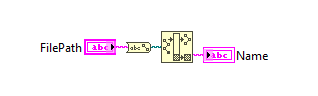
When you build this function into a DLL, it will automatically create a length parameter for "Name". The Python file is shown below. It doesn't seem to matter whether you input FilePath or ctypes.c_char_p(FilePath) into the function call. I think due to the argtypes definition it knows how to send the string.
import ctypes
import os

dll = ctypes.cdll.LoadLibrary("C:\LabVIEW 2016\Misc\DLL Test\Builds\Build2\Build2.dll")

# void __cdecl ReadFile(char FilePath[], char Name[], int32_t len);
dll.ReadFile.argtypes = (ctypes.c_char_p,
                         ctypes.c_char_p,
                         ctypes.c_int)
dll.ReadFile.restype = None

FilePath = b'C:\\Users\\gjacob\\PycharmProjects\\Test LabVIEW DLL\\Test.txt'
len = 1024
Name = ctypes.create_string_buffer(len)

# dll.ReadFile(ctypes.c_char_p(FilePath), Name, len)
dll.ReadFile(FilePath, Name, len)

print(FilePath)
print(Name.value)
