- Subscribe to RSS Feed
- Mark Topic as New
- Mark Topic as Read
- Float this Topic for Current User
- Bookmark
- Subscribe
- Mute
- Printer Friendly Page
Building an Array

 CastleWorks
01-24-2017 08:00 AM
- Mark as New
- Bookmark
- Subscribe
- Mute
- Subscribe to RSS Feed
- Permalink
- Report to a Moderator
I have what is a probably a very basic question and need some direction on building an array.
I want to graph the following equation Y=a0+a1x+a2x^2. for values of x that are equally spaced at 1mSec. I can calculate Y, no problem but struggling with how to build an array of X & Y values that I can plot.
I have tried using a for loop and building an array within the loop and sending it to a waveform graph but end up with a crazy amount of plots. Not sure what I am doing wrong.
Thanks
Newbie

 aputman
01-24-2017 08:06 AM
- Mark as New
- Bookmark
- Subscribe
- Mute
- Subscribe to RSS Feed
- Permalink
- Report to a Moderator
Attach a snippet of what you have tried, an example dataset, and what you expect to see from the dataset. And by snippet, I mean, click Edit -> Create VI Snippet from Selection.

 daveTW
01-24-2017 08:09 AM - edited 01-24-2017 08:11 AM
- Mark as New
- Bookmark
- Subscribe
- Mute
- Subscribe to RSS Feed
- Permalink
- Report to a Moderator
Look at the help window of the graph indicator, or open the Help / Find Examples - Window, then type "graphs" into the search field. This guides you to the different datatypes a graph indicator accepts.
Btw. it is a difference between the graph and chart indicator
01-24-2017 08:46 AM
- Mark as New
- Bookmark
- Subscribe
- Mute
- Subscribe to RSS Feed
- Permalink
- Report to a Moderator
I tried to first just create a simple random number for Y and increment x by 0.001 on each itteration of the for loop.
Here is the code

 RavensFan

01-24-2017 08:50 AM
- Mark as New
- Bookmark
- Subscribe
- Mute
- Subscribe to RSS Feed
- Permalink
- Report to a Moderator
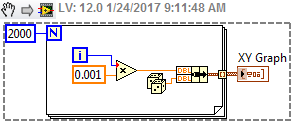
Okay. So now you have a 2-D array where column 0 is your "Y" random value. Column 1 is your "X" value ( 0, .001, .002, .....) (I would have swapped the inputs to the build array so that X is column 0 and Y is column 1.)
So now you should be able to figure out how to apply your equation to the X value to get your Y value.
01-24-2017 08:57 AM
- Mark as New
- Bookmark
- Subscribe
- Mute
- Subscribe to RSS Feed
- Permalink
- Report to a Moderator
I swapped the array inputs as you suggested.
The part I am not getting, is the plot....here is the graph that is being generated. Do I need to generate the graph inside the for loop?
aputman
01-24-2017 09:07 AM
- Mark as New
- Bookmark
- Subscribe
- Mute
- Subscribe to RSS Feed
- Permalink
- Report to a Moderator
Did you do what Dave suggested? Look at the help file for the waveform graph and you will see the datatypes that are accepted and the resulting graph. A 2D array results in multiple plots rather than a single plot.
aputman
01-24-2017 09:13 AM
- Mark as New
- Bookmark
- Subscribe
- Mute
- Subscribe to RSS Feed
- Permalink
- Report to a Moderator
Maybe an XY Graph is what you need?

 RavensFan
01-24-2017 09:31 AM
- Mark as New
- Bookmark
- Subscribe
- Mute
- Subscribe to RSS Feed
- Permalink
- Report to a Moderator
Since your X values are evenly spaced, that suggests a waveform chart/graph would work. If you want to do it within the loop, just use a waveform chart as that maintains the history of past points. So just wire the Y value to a waveform chart.
01-24-2017 09:41 AM
- Mark as New
- Bookmark
- Subscribe
- Mute
- Subscribe to RSS Feed
- Permalink
- Report to a Moderator
Hmmm....I am using a waveform graph in several other places inthe program and wanted to stick with that.
Rethinking here.....else where I am only plotting a 1D array, perhaps I do not need to generate the x values and the waveform will space them equally, which would allow me to compare them to other waveforms
