- Subscribe to RSS Feed
- Mark Topic as New
- Mark Topic as Read
- Float this Topic for Current User
- Bookmark
- Subscribe
- Mute
- Printer Friendly Page
Building a LabView executable with supporting files

 nonone01
08-01-2017 05:53 PM
- Mark as New
- Bookmark
- Subscribe
- Mute
- Subscribe to RSS Feed
- Permalink
- Report to a Moderator
Hello, I have a simple vi that uses relative addresses for supporting files (image and text files). The vi works fine but I don;t know how to create the exe file with the relative address links. Suggestions? Thanks

 Gregory
08-01-2017 06:06 PM - edited 08-01-2017 06:09 PM
- Mark as New
- Bookmark
- Subscribe
- Mute
- Subscribe to RSS Feed
- Permalink
- Report to a Moderator
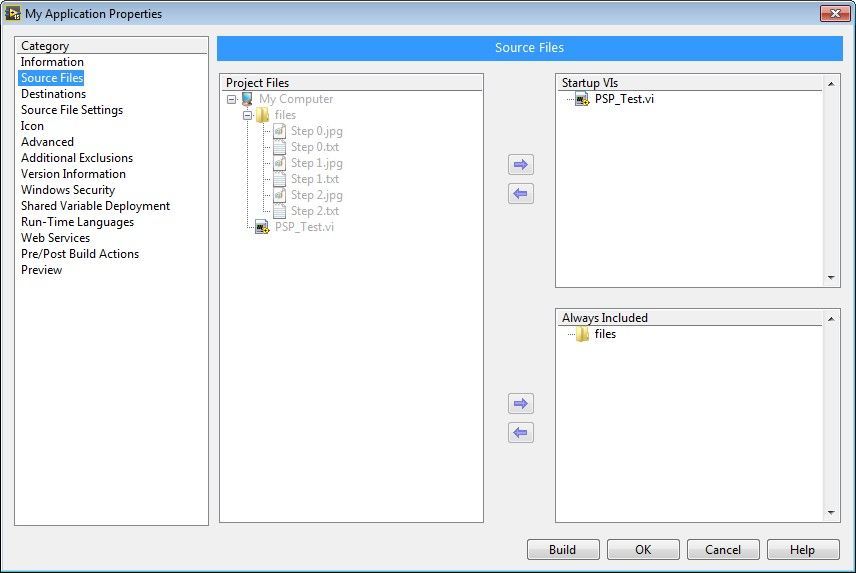
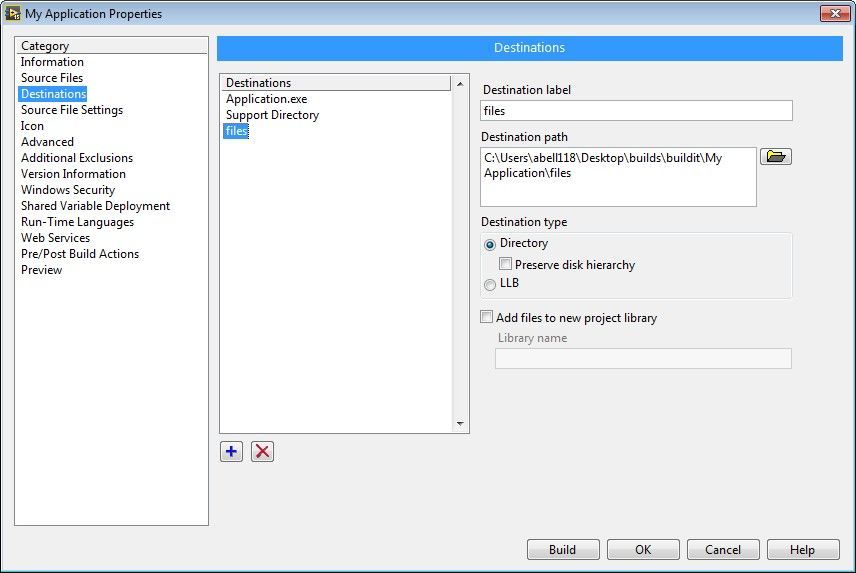
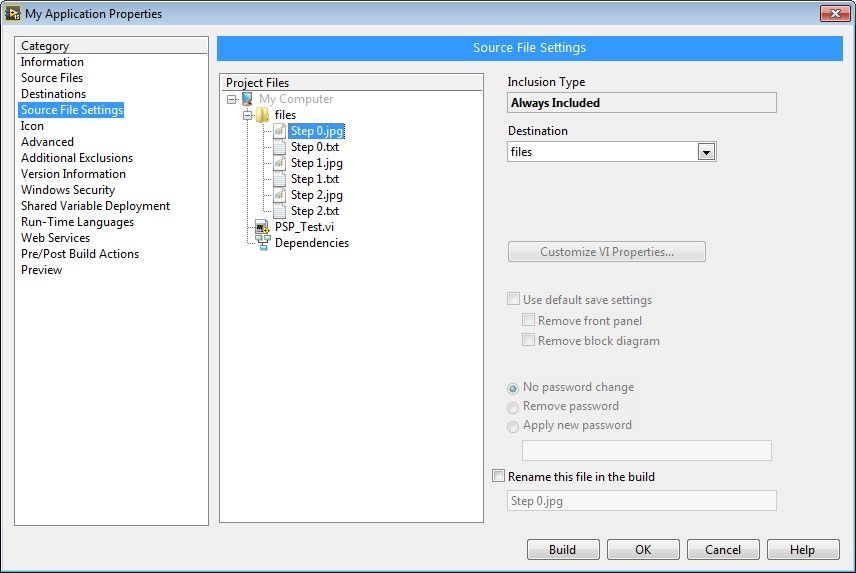
On your build specifications, you will use the 2nd, 3rd, and 4th categories to include files in the right locations.
Under Source Files, find any files you need and set them to "Always Included". Under Destinations, make a new destination for each subfolder you need (the default support directory is \data). Under Source File Settings, you can pair up your files with the appropriate destinations.

08-01-2017 06:28 PM
- Mark as New
- Bookmark
- Subscribe
- Mute
- Subscribe to RSS Feed
- Permalink
- Report to a Moderator
Sorry but what are the 2nd, 3rd, and 4th categories?
Gregory
08-01-2017 06:32 PM
- Mark as New
- Bookmark
- Subscribe
- Mute
- Subscribe to RSS Feed
- Permalink
- Report to a Moderator
I list them one-by-one: Source Files, Destinations, and Source File Settings.
08-01-2017 07:10 PM
- Mark as New
- Bookmark
- Subscribe
- Mute
- Subscribe to RSS Feed
- Permalink
- Report to a Moderator
08-01-2017 07:32 PM
- Mark as New
- Bookmark
- Subscribe
- Mute
- Subscribe to RSS Feed
- Permalink
- Report to a Moderator
This didn't work either. The exe file still cannot find the supporting files.

 crossrulz

08-01-2017 08:09 PM
- Mark as New
- Bookmark
- Subscribe
- Mute
- Subscribe to RSS Feed
- Permalink
- Report to a Moderator
I cannot look at your code right now, but make sure you are using Application Folder for building paths to support files that will be outside of your executable.
There are only two ways to tell somebody thanks: Kudos and Marked Solutions
Unofficial Forum Rules and Guidelines
"Not that we are sufficient in ourselves to claim anything as coming from us, but our sufficiency is from God" - 2 Corinthians 3:5
Gregory
08-01-2017 08:13 PM
- Mark as New
- Bookmark
- Subscribe
- Mute
- Subscribe to RSS Feed
- Permalink
- Report to a Moderator
@nonone01 wrote:
This didn't work either. The exe file still cannot find the supporting files.
Yes, like Crossrulz said, it's not that it didn't work, it's just that you probably aren't building a path to the place you think you are. Can you post a snippet of code that shows how you build the path to these files in LabVIEW?
08-02-2017 12:43 PM
- Mark as New
- Bookmark
- Subscribe
- Mute
- Subscribe to RSS Feed
- Permalink
- Report to a Moderator
 Gregory
08-02-2017 12:51 PM
- Mark as New
- Bookmark
- Subscribe
- Mute
- Subscribe to RSS Feed
- Permalink
- Report to a Moderator
Yes, as Crossrulz said you want to use "Application Directory", not "Current VIs Path". The Application Directory will be the location of your project (.lvproj) file in the development environment, and the location of your your executable (.exe) file in runtime. So when you build your paths and place your folders on disk, make sure your lvproj is in the same relative location to your supporting files as your exe.
