- Subscribe to RSS Feed
- Mark Topic as New
- Mark Topic as Read
- Float this Topic for Current User
- Bookmark
- Subscribe
- Mute
- Printer Friendly Page
2D Picture to Intensity Graph
Solved!
 Cepera
03-15-2013 01:30 PM
- Mark as New
- Bookmark
- Subscribe
- Mute
- Subscribe to RSS Feed
- Permalink
- Report to a Moderator
I have three 2D arrays of U8 representing red, green and blue components of an image. I can easily combine them into one 2D U32 array using "RGB to Color.vi" and display it as a picture (see attached VI). What I need though is to display the same image not as a picture, but as an intensity graph, with colors matching those of the picture (i.e. true RGB colors). How can I generate the color table for the intensity graph that would allow me to get the same image as a picture indicator using the same 2D U32 array as my data source? Thanks!
Solved! Go to Solution.

 Darin.K
03-15-2013 02:03 PM
- Mark as New
- Bookmark
- Subscribe
- Mute
- Subscribe to RSS Feed
- Permalink
- Report to a Moderator
The Z-scale of the intensity graph is 8-bit, so the closest you can come is by converting the picture to 8-bit using Picture to Pixmap.vi and Unflatten Pixmap.vi.
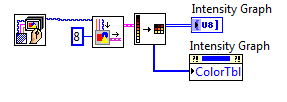
Then you need to set the intensity graph so that it transposes the array (right-click option) and change the y-scale so it increases from the top (type 0 into the top marker and it will flip).
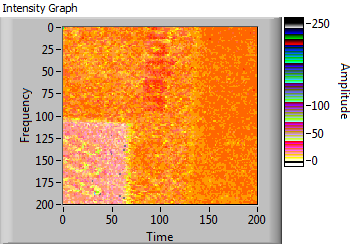
03-15-2013 03:39 PM
- Mark as New
- Bookmark
- Subscribe
- Mute
- Subscribe to RSS Feed
- Permalink
- Report to a Moderator
Thanks Darin! I was missing the "8".
