- Subscribe to RSS Feed
- Mark Topic as New
- Mark Topic as Read
- Float this Topic for Current User
- Bookmark
- Subscribe
- Mute
- Printer Friendly Page
error 5005/-1073807343

 nellly
12-20-2012 09:36 AM
- Mark as New
- Bookmark
- Subscribe
- Mute
- Subscribe to RSS Feed
- Permalink
- Report to a Moderator
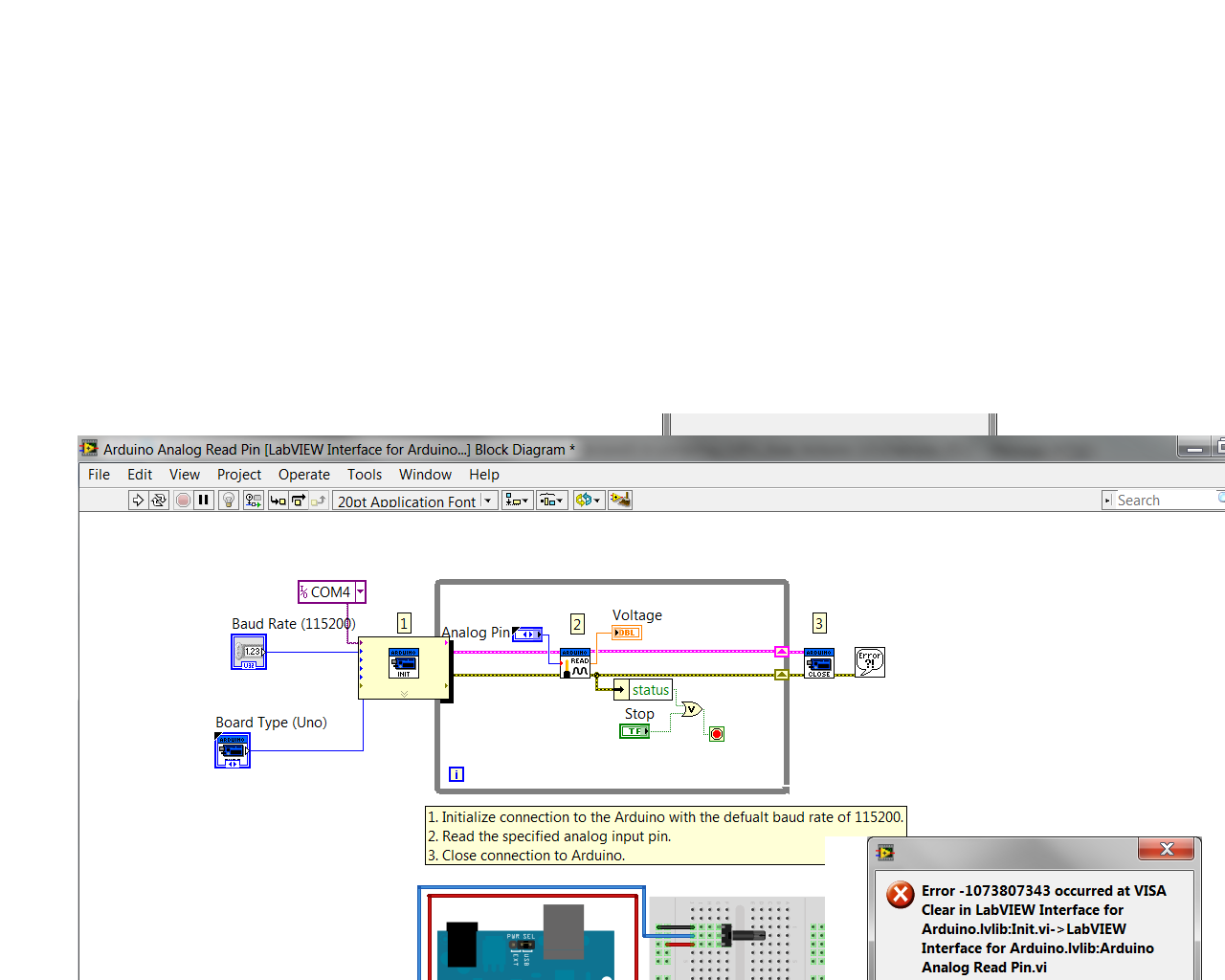
Anyone tried using Labview 2012 with LIFA version 2.2.0.79 and arduino IDE 1.0.3? LIFA uploaded ok to arduino uno. Labview 2012 gives error 5005, can't find arduino. Device manager sees arduino COM4. I set up COM4 as my port in Labview but still error 5005?see picture below, gave a different error when I actually wired the COM PRT to the init.vi. error -1073807343.


01-02-2013 01:45 PM
- Mark as New
- Bookmark
- Subscribe
- Mute
- Subscribe to RSS Feed
- Permalink
- Report to a Moderator
Does the baud rate specified in the control match the baud rate set in the Arduino IDE? Try running it with the default, unmodified LIFA firmware and only the VISA resource contanst wired to the Init VI (don't wire in a baud rate).
Hope that helps.
-Sam K
LIFA Developer
01-07-2013 11:04 AM
- Mark as New
- Bookmark
- Subscribe
- Mute
- Subscribe to RSS Feed
- Permalink
- Report to a Moderator
YES
 teuchter
03-03-2013 07:20 AM
- Mark as New
- Bookmark
- Subscribe
- Mute
- Subscribe to RSS Feed
- Permalink
- Report to a Moderator
I was (still am actually) having problems with the same error. I have managed to gain improvements but still get the fault using auto detect.
Although I only downloaded the NI MAX earlier this week, it was not showing (finding) the Arduino as connected , indeed no devices and interfaces tab available.
So I downloaded it again and replaced the original files and lo, up it came with Devices and interfaces. I ensured the baud rate was set correctly then I went back to the 'Arduino analogue read pin vi' but it still came up with same error. I then double clicked on the 'analogue read pin sub vi', and set the Visa resource to COM5 and it read the analogue pin, a major leap forward. (Use Windows, Arduino IDE or NI MAX to determine correct COM port setting)
I downloaded the code used in the KITT example http://vishots.com/getting-started-with-the-labview-interface-for-arduino/ and changed the COM port to 5 and it worked. At least I can use that vi so here's hoping I can use more examples and modify them to create my project.
In conclusion, my thinking is to avoid the auto-detect sub vi and manually set COM port until someone like Sam K can hopefully investigate.
I am relatively new to both Labview and Arduino so if I've done something wrong, I can at least say I tried.

 Nathan_B.
03-04-2013 02:25 AM
- Mark as New
- Bookmark
- Subscribe
- Mute
- Subscribe to RSS Feed
- Permalink
- Report to a Moderator
To manually set a COM port for Arduino, just wire a constant to Init.vi (right click on the resource terminal and then create constant). You should be able to choose from available COM ports there.
