- Subscribe to RSS Feed
- Mark Topic as New
- Mark Topic as Read
- Float this Topic for Current User
- Bookmark
- Subscribe
- Mute
- Printer Friendly Page
Problem with Serial Communication

 quartey
09-08-2015 02:20 PM
- Mark as New
- Bookmark
- Subscribe
- Mute
- Subscribe to RSS Feed
- Permalink
- Report to a Moderator
I am trying to write "\x59c\x3aimagesnap" to a scanner using the VISA serial read and write vi and I'm having problems reading the image from the scanner. When i type the same command in a terminal. I get the Image Data, the command read back to me in ASCII as well as any barcode scanned. When I use the VISA serial write and read vi., I receive just the information scanned from a barcode.
I'm using one of the Example serial vi's as a test. the "Continous serial read and write.vi" under help / find examples and type serial. Could I get help in how to create a terminal-like output within LabVIEW through a serial connected scanner?
Please and Thanks
 iBrent
09-08-2015 02:48 PM
- Mark as New
- Bookmark
- Subscribe
- Mute
- Subscribe to RSS Feed
- Permalink
- Report to a Moderator
Without seeing the VI, it seems like there is more data in the buffer. You are probably reading it once and the VISA Read.vi is reading up to the first termination character or all of the bytes you are asking it to read.
Try putting your read in a loop until Bytes at Port equal 0.
09-10-2015 10:01 AM
- Mark as New
- Bookmark
- Subscribe
- Mute
- Subscribe to RSS Feed
- Permalink
- Report to a Moderator
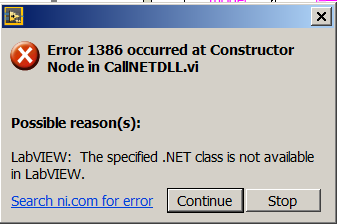
I attempted that and didn't get any far. I've decided to try to communicate it through .NET assemblys but I'm having a problem loading an example assembly and running it. I keep getting an error .
https://decibel.ni.com/content/docs/DOC-5921
theyre both in the same directory and I also tried to put them under the same project file.
I'm running an evaluation LabVIEW program if that helps at all

 Dennis_Knutson
09-10-2015 10:20 AM
- Mark as New
- Bookmark
- Subscribe
- Mute
- Subscribe to RSS Feed
- Permalink
- Report to a Moderator
09-10-2015 10:30 AM - edited 09-10-2015 10:31 AM
- Mark as New
- Bookmark
- Subscribe
- Mute
- Subscribe to RSS Feed
- Permalink
- Report to a Moderator
Sorry, the assembly( vi and dll) is provided through the link. I just loaded the vi and dll in the same directory and ran it through labview. initially I received this error:
Later, I double clicked on the construction node and input the TI83.dll into the assembly and received this error:
I'm an evaluation version of LAbVIEW 2014 if that helps.
 iBrent
09-10-2015 10:37 AM
- Mark as New
- Bookmark
- Subscribe
- Mute
- Subscribe to RSS Feed
- Permalink
- Report to a Moderator
do you have the .NET framework installed?
Dennis_Knutson
09-10-2015 10:42 AM
- Mark as New
- Bookmark
- Subscribe
- Mute
- Subscribe to RSS Feed
- Permalink
- Report to a Moderator
09-10-2015 10:46 AM - edited 09-10-2015 10:50 AM
- Mark as New
- Bookmark
- Subscribe
- Mute
- Subscribe to RSS Feed
- Permalink
- Report to a Moderator
I'm using a dll to get an image, serially, from a scanner. it works as a dll and im just using that post as an example of accessing .net assemblys. I'm attempted to try to read and write serially through VISA but it does not send me anything except what the barcode information that the scanner scans. If I talk to the scanner on a terminal, it sends me everything, including the barcode information.
09-10-2015 10:48 AM
- Mark as New
- Bookmark
- Subscribe
- Mute
- Subscribe to RSS Feed
- Permalink
- Report to a Moderator
Yeah, It says i have Microsoft .NET Framework 4.6 installed
Dennis_Knutson
09-10-2015 11:03 AM
- Mark as New
- Bookmark
- Subscribe
- Mute
- Subscribe to RSS Feed
- Permalink
- Report to a Moderator
