Instrument Control (GPIB, Serial, VISA, IVI)
- Inscrever-se no RSS Feed
- Marcar tópico como novo
- Marcar tópico como lido
- Flutuar este Tópico do usuário atual
- Favorito
- Inscrever-se
- Emudecer
- Página amigável para impressora
Help understanding this manual VISA write command

 labview212
em 05-18-2016 07:48 AM
- Marcar como novo
- Favorito
- Inscrever-se
- Emudecer
- Inscrever-se no RSS Feed
- Realçar
- Imprimir
- Relatar conteúdo como inapropriado
, The hardware manual says:
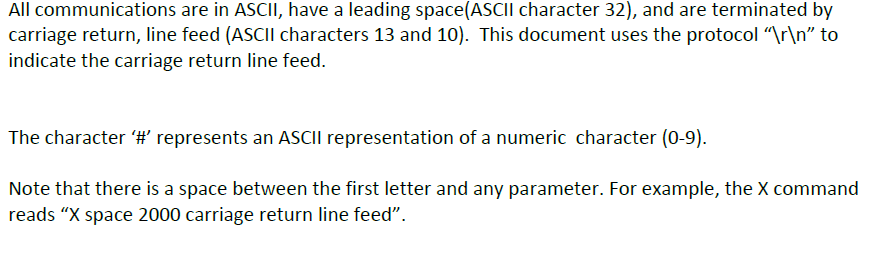
What does this look like on labview, right now I have it looking like this for a Z command is it correct:


 Wayne.C
05-18-2016 08:26 AM - editado 05-18-2016 08:27 AM
- Marcar como novo
- Favorito
- Inscrever-se
- Emudecer
- Inscrever-se no RSS Feed
- Realçar
- Imprimir
- Relatar conteúdo como inapropriado
 The attached snippet should be what you are looking for. It would be helpful in the future if you stated exactly what hardware you are trying to communicate with.
em 05-18-2016 08:29 AM
- Marcar como novo
- Favorito
- Inscrever-se
- Emudecer
- Inscrever-se no RSS Feed
- Realçar
- Imprimir
- Relatar conteúdo como inapropriado
It's just a gas sensor that outputs over serial. How did you get that little n next to the Z? and the concatenated string goes straight ot the visa write block yes?
@Wayne.C wrote:
Wayne.C
em 05-18-2016 08:35 AM
- Marcar como novo
- Favorito
- Inscrever-se
- Emudecer
- Inscrever-se no RSS Feed
- Realçar
- Imprimir
- Relatar conteúdo como inapropriado
If you right click the string constant and select Visible Items > Display Style it will indicate what display style it is configured for. You can then left click the constant to change the display style .

 crossrulz

em 05-18-2016 10:58 AM
- Marcar como novo
- Favorito
- Inscrever-se
- Emudecer
- Inscrever-se no RSS Feed
- Realçar
- Imprimir
- Relatar conteúdo como inapropriado
I would advise against using the End Of Line Constant since it is platform dependent. Use an actual string constant with "\r\n" when in "\ Codes" display.
There are only two ways to tell somebody thanks: Kudos and Marked Solutions
Unofficial Forum Rules and Guidelines
"Not that we are sufficient in ourselves to claim anything as coming from us, but our sufficiency is from God" - 2 Corinthians 3:5
