- Subscribe to RSS Feed
- Mark Topic as New
- Mark Topic as Read
- Float this Topic for Current User
- Bookmark
- Subscribe
- Mute
- Printer Friendly Page
Error command with NI Interactive Control

 ChuChuNice
12-12-2022 10:57 AM
- Mark as New
- Bookmark
- Subscribe
- Mute
- Subscribe to RSS Feed
- Permalink
- Report to a Moderator
Dear All,
I got a problem when I use NI Interactive Control(NIIC).
I can successfully connect my PC and Instrument.
After I write the command "*OPC?", I could get the correct return data.
(correct return data = Instrument Name)
But when I try another command, it will show error.

I write command: CALCulate:Data:SNP:PORTs:SAVE "1,2,3,4","C:\User\Instrument\Downloads\test11302.s4p"
and push the "write button"
After the above action, I got the wrong message.
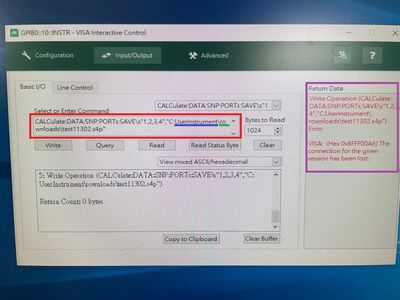
Error 1: Return Data form show "Write operation error" and error code "VISA: Hex 0xBFFF00A6"
Error 2: It changed my command text(Red Square)
"User\Instrument" was changed to "UserInstrument" (Blue line)
"Downloads" was changed to "rownloads" (Green line)
This part is the most confusing for me.
PC: Windows 10
Software: NI Interactive Control
Hardware: USB-GPIB-HS
Instrument: PNA N5227B

 santo_13

12-12-2022 12:22 PM
- Mark as New
- Bookmark
- Subscribe
- Mute
- Subscribe to RSS Feed
- Permalink
- Report to a Moderator
The string uses a ' \' code display, to use a '\' you need to use '\\'
This means '\n' is used to denote a new line character, '\s' is used to indicate a space constant and so on.
Soliton Technologies
New to the forum? Please read community guidelines and how to ask smart questions
Only two ways to appreciate someone who spent their free time to reply/answer your question - give them Kudos or mark their reply as the answer/solution

 cstorey
12-16-2022 10:49 AM
- Mark as New
- Bookmark
- Subscribe
- Mute
- Subscribe to RSS Feed
- Permalink
- Report to a Moderator
Also note that the
"CALCulate:Data:SNP:PORTs:SAVE "1,2,3,4","C:\User\Instrument\Downloads\test11302.s4p"
refers to a directory on the instrument, not your PC hard drive. So the directory must exist, or you get an error.
You can also shorten the command to ..
CALC:DATA:SNP:PORT:SAVE "1,2,3,4", "C:\User\Instrument\Downloads\test11302.s4p"
Craig
