ni.com is currently undergoing scheduled maintenance.
Some services may be unavailable at this time. Please contact us for help or try again later.
NEW Version 3.2! Variant Reconnecting Stream with Connection Manager
 migration-bot
12-29-2023
02:07 PM
migration-bot
12-29-2023
02:07 PM
- Subscribe to RSS Feed
- Mark as New
- Mark as Read
- Bookmark
- Subscribe
- Printer Friendly Page
- Report to a Moderator
Products and Environment
This section reflects the products and operating system used to create the example.To download NI software, including the products shown below, visit ni.com/downloads.
- LabVIEW
Software
Code and Documents
Attachment
Description
Description-Separate-1Overview
This example provides an reconnecting network stream class that can be used to create applications that communicate over the network.
Description
The Stream.lvclass implements an asynchronous daemon that handles the two way connection of a network stream. The daemon is spawned dynamically when you create a stream and you enqueue messages to the outgoing queue that the daemon needs to send over the network. The messages that are transmitted back are read by the daemon and enqueued locally in the incoming queue.
IP with context is required because network streams connect to endpoints in executables based on the executables context (the name of the executable).
This is covered here: Specifying Network Stream Endpoint URLs
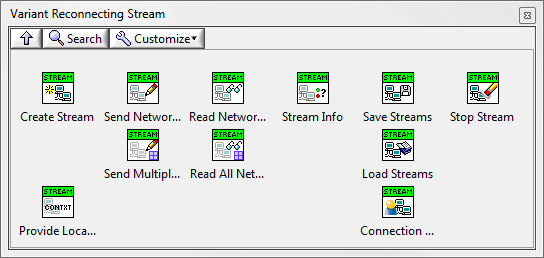
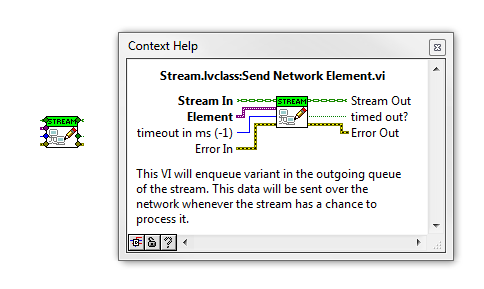

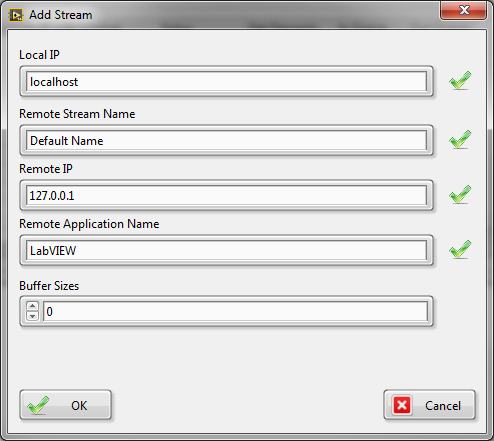
Steps to Implement or Execute Code
1. Make sure that your VI Package manager is in version 14 or higher.
2. Install the package.
3. Find the Object Reconnecting Stream in Addons palette in LabVIEW.
4. Run the Example VI for Example palette.
5. Experiment with the code and connection manager.
Requirements
- VI Package Manager 2014
- LabVIEW 2014
There is experimental 2011 version available but it was not tested. Use at your own risk.
Additional Images or Video
https://www.youtube.com/watch?v=3fn1T9z85ac&feature=youtu.be
Changes in Version 3.2.0.1
- Changed the Connection Manager to be a dialog box (based on user feedback)
- Changed the behavior of loading streams in connection manager. Now they are added instead of overwriting existing connections (based on user feedback)
- Marked all VIs of API to separate from compiled code so they do not require to be recompiled after loading
Changes in Version 3.1.0.7 (minor bug fix)
- Fixed a bud that did not allow to use dot and underscore chars in the stream names
Changes in Version 3.1.0.6
- New look for the connection manager and stream adder.
- Added limited size to buffer queues in the stream. That way the user can monitor timeout on writing.
- Speed up to the writer and reader daemon loops.
- Modified a little the example to show new features.
- Added monitoring the size and usage of buffer queues to connection manager
Certified TestStand Architect
Certified LabVIEW Architect
Example code from the Example Code Exchange in the NI Community is licensed with the MIT license.

- Mark as Read
- Mark as New
- Bookmark
- Permalink
- Report to a Moderator
Please post any bugs or bug fixes that you found while using this, so I can make the modifications.
Please also rate and comment.
Certified TestStand Architect
Certified LabVIEW Architect


- Mark as Read
- Mark as New
- Bookmark
- Permalink
- Report to a Moderator
Any chance you can save it back a version or three? 2012 would do for me, but others might benefit from 2010.
- Mark as Read
- Mark as New
- Bookmark
- Permalink
- Report to a Moderator
As per your request GregS the 2010 version has been added. There are differences with the Network Stream API but everything should still work the same. I didn't test it though.
Certified TestStand Architect
Certified LabVIEW Architect
- Mark as Read
- Mark as New
- Bookmark
- Permalink
- Report to a Moderator
2010 looks like one version too far - it doesn't have Start Asynchronous Call, nor the Elements Read/Written properties, but 2011 does. Probably best to remove the 2010 experiment, but I've confirmed that saving back to 2011 works fine in that version.
I've now uploaded the 2011 code.
- Mark as Read
- Mark as New
- Bookmark
- Permalink
- Report to a Moderator
Moving away from comments on versions 
Piotr, this looks good, and useful. I had done something similar for maintaining network streams, but not put it into a class. Looks like it works very well.
One thought on the architecture - it would be nice to be able to derive a new class which would use a different message type. I presume that would require Queue to also be a class, rather than just a library. Do you think that would work? If so, it would be great to pass that class to Create Stream, and perhaps even to be able to specify a different message type in each direction.
- Mark as Read
- Mark as New
- Bookmark
- Permalink
- Report to a Moderator
I didnt want to make the queue here class based because It would be difficult to understand for those developers that don't use classes. I think that string + variant is universal enough.
Certified TestStand Architect
Certified LabVIEW Architect
- Mark as Read
- Mark as New
- Bookmark
- Permalink
- Report to a Moderator
GregS Like you asked I have added a version working with classes. Please try it out
Certified TestStand Architect
Certified LabVIEW Architect
- Mark as Read
- Mark as New
- Bookmark
- Permalink
- Report to a Moderator
Piotr - I'm still on 2012 unfortunately. Was intending to upgrade to 2014, but haven't got the time to spare at the moment. If there's any chance you can save for 2011 or 2012, I'll have a look, otherwise it'll have a to wait a while.

- Mark as Read
- Mark as New
- Bookmark
- Permalink
- Report to a Moderator
Hey Piotr, nice work i tryed it out (V:2.1.0.10) with two of my PC's and it works realy well - I'm looking forward to test it in a Application! Thanks for sharing that!
- Mark as Read
- Mark as New
- Bookmark
- Permalink
- Report to a Moderator
Awesome! Great that you like it. Please check out also my other toolkits
Certified TestStand Architect
Certified LabVIEW Architect


- Mark as Read
- Mark as New
- Bookmark
- Permalink
- Report to a Moderator
Dear Sir,
I used your vis and build into two exe files(master.exe and slave.exe). My LabVIEW version is 2014, in my target computer I only install 2014 run-time engine. However, those two exe files can run but didn't transfer data. Do I need install another run-time engine? Thank you!
PS.In my computer those two exe files work fine.
B/R
Ancle
- Mark as Read
- Mark as New
- Bookmark
- Permalink
- Report to a Moderator
No extra software is needed other than the Run Time. There probably is some problem in your code, like the stream names...
I would need to see your code. Please send requests for help like this to support@ni.com and our engineers can help or you can use this link https://sine.ni.com/srm/app/newrequest
Certified TestStand Architect
Certified LabVIEW Architect
- Mark as Read
- Mark as New
- Bookmark
- Permalink
- Report to a Moderator
Dear Piotr,
Thanks for reply. If possible, please simulate my situation. Before I just only install 2014 run-time in my target computer, another exe file works fine. After I install LabVIEW 2014 development system, master.exe and slave.exe can transfer and receive data. Thank you!
B/R
Ancle


- Mark as Read
- Mark as New
- Bookmark
- Permalink
- Report to a Moderator
Dear Piotr,
I am using native network stream nodes in one of my applications which all runs on single PC I'm facing an issue with it. I thought putting the issue here may get some solution.
On overview, I face something like, network stream is only able to communicate between two applications. If there is a third application tries to connect to the stream (even with new context name of reader and writer), the connection will not be established and following error will be thrown.
| −314350 | Another application is already streaming data to an endpoint in the context you specified. If you specified a context name in the reader name or writer name terminal of the endpoint, you must specify an unused context name. If you did not specify a context name, you must specify an unused context name by entering an endpoint URL in the reader name or writer name terminal. |
In my code, I have implemented my own mechanism to open a new reader and wait for a writer to connect. Once the writer gets connected with the already opened reader, then another new reader will be opened up for other new writer to connect.
When I execute this in LabVIEW environment, it works fine. i.e., New reader keeps opening and each new writer from different project are able to connect to the readers. But when I do it in executable, i.e., all readers is one application, each individual writers from as separate applications, only the first writer application is able to connect to the reader application. If another writer application tries to connect, then the above error is thrown at the create-writer-endpoint of the new application.
So, my question is, does network stream enables streaming of data only between two application for the given PC? Isn't it possible to stream data from many application to one application?
Ajay MV
- Mark as Read
- Mark as New
- Bookmark
- Permalink
- Report to a Moderator
The underlying functionality is network streams. They are 1:1 connection only. If you want to have multiple connections to the same exe you need to create as many reconnecting streams as connections, each with a unique name. This should be possible without problems.
Certified TestStand Architect
Certified LabVIEW Architect
- Mark as Read
- Mark as New
- Bookmark
- Permalink
- Report to a Moderator
Poitr,
I have posted my query in detail in the link http://forums.ni.com/t5/LabVIEW/Network-Streams-error-314350-Many-executable-to-One-executable/td-p/...
Since I couldn't attache code here, so I posted as a thread in forum. Please review and let me know your thoughts in it.
Thanks,
Ajay.
Ajay MV


- Mark as Read
- Mark as New
- Bookmark
- Permalink
- Report to a Moderator
I am using multiple parallel Streams (each in an Actor) and I noticed that when a Stream is disconnected, the cpu usage was high. Performance profiling pointed me to the Writer Loop.vi and Reader Loop.vi in Stream.lvclass.
There is a while loop with a case inside: the "Connected" case has a 50ms Wait until next ms multiple, while the disconnect case does not - which I suspect is the cause of high cpu usage.
Shouldn't the Wait until ms multiple be outside the case structure? Is this an oversight or a design decision?
EDIT: I just made a local fix by moving the Wait until ms multiple outside the case structure. The high cpu usage is fixed, but it feels like it takes longer to reconnect.


