- Subscribe to RSS Feed
- Mark Topic as New
- Mark Topic as Read
- Float this Topic for Current User
- Bookmark
- Subscribe
- Mute
- Printer Friendly Page
Make Smaller Icons

 GregFreeman

02-12-2010 01:42 PM - edited 02-12-2010 01:44 PM
- Mark as New
- Bookmark
- Subscribe
- Mute
- Subscribe to RSS Feed
- Permalink
- Report to a Moderator
Little something I learned today that is pretty common knowledge I'm assuming, but I didn't know about it and have been working with LabVIEW for a couple of years now. Therefore, I assumed some others wouldn't know about it either. While there are wiki's out there that explain this, I know I usually come to these forums before googling so I thought I'd put something here.
In a recent project had a very simple action engine that appends update strings in multiple different threads, based on what has happened within the program, and displays them to a user in another thread that is there specifically for front panel updates. However, this action engine was way too clunky and took up too much space on my block diagram for something only having two input terminals, and 1 output terminal. Doing the following cleaned stuff up incredibly, especially in case structures where the only reason they were taking up extra bd space was because of this action engine...
First, show your connector panes and make sure your have the bold area around the terminals you want to use. Then make sure you have each of the icons circled in red looking the same (you can do this by selecting one then copying it and pasting it into the other two boxes)

after that, voila, add it to your bd.

If anyone else has any other tip/tricks for icon editing feel free to add them.

 Ben
Ben
02-12-2010 01:53 PM
- Mark as New
- Bookmark
- Subscribe
- Mute
- Subscribe to RSS Feed
- Permalink
- Report to a Moderator
Nice!
But....
You stoped one step short or nirvana. 
*Create a warpper for each of the two actions (include the enum in the wrapper) and edit those icons similarly. Using a warpper for each action gives you
1)the ability to mark the input terminal on the "write" wrapper as required while also
2) loosing the enum on top. This also,
3) minimizes you (well maybe not you but me anyway) forgetting to set the right action.
Ben
* Idea of wrapper for each action was given to me by Jim Kring. It is a gift I use regularly.

 Dennis_Knutson
02-12-2010 02:31 PM
- Mark as New
- Bookmark
- Subscribe
- Mute
- Subscribe to RSS Feed
- Permalink
- Report to a Moderator

 JÞB
JÞB
02-12-2010 02:47 PM
- Mark as New
- Bookmark
- Subscribe
- Mute
- Subscribe to RSS Feed
- Permalink
- Report to a Moderator
Within the last week I've actually posted TWO examples where I use small icons for sub-vis

and Magicically dragable Coersion Dot
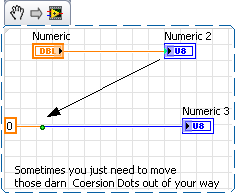


For Style though- "A meaningful Icon should be created for all subvi's" the real estate on the BD is useful for aiding the user and the developer trying to debug. Be careful with WHEN you chose to reduce your ICON size lest you obfuscate the code (Hmmm LV Proverb?)
"Keep Thine Icon size maxim unless less is more"
"Should be" isn't "Is" -Jay

 RavensFan
02-12-2010 02:50 PM - edited 02-12-2010 02:52 PM
- Mark as New
- Bookmark
- Subscribe
- Mute
- Subscribe to RSS Feed
- Permalink
- Report to a Moderator
This was a good topic to mention. It is one of those things that people might not think of.
One tip (and I think you basically said this, but not so clearly) is to make sure the X of the connectors you want to use are within the boundary of the icon you are creating. In your case where you use one of the top connectors, the X is slightly below your rectangle, thus you see a bit of the wire passing through your icon and hitting the X that is now below your visible icon. To correct this, you may want to pick a different connector pattern such as the 4-1-0-4 rotated 90 degrees.

It has 4 connectors across the top that have small enough squares so that all their X connection points would fall within your icon.

02-12-2010 03:14 PM
- Mark as New
- Bookmark
- Subscribe
- Mute
- Subscribe to RSS Feed
- Permalink
- Report to a Moderator
Ravens Fan wrote:This was a good topic to mention. It is one of those things that people might not think of.
One tip (and I think you basically said this, but not so clearly) is to make sure the X of the connectors you want to use are within the boundary of the icon you are creating. In your case where you use one of the top connectors, the X is slightly below your rectangle, thus you see a bit of the wire passing through your icon and hitting the X that is now below your visible icon. To correct this, you may want to pick a different connector pattern such as the 4-1-0-4 rotated 90 degrees.
It has 4 connectors across the top that have small enough squares so that all their X connection points would fall within your icon.
Message Edited by Ravens Fan on 02-12-2010 03:52 PM
Agreed. I should have mentioned this as random whitespace can look a little funny  . Also, to comment on your first sentence. That is why I posted it, because often there are things that might seem common, but people don't know about/ think to look into further. LabVIEW is a big package and finding all the little things that may help can often be overwhelming. That kind of goes along with the post from Dennis. Yes, there is something about it in the LabVIEW help. But as we have seen on these forums, often people don't bother to look 🙂 (as I didn't bother to for a while). Therefore, I hope this post can just make people aware that this is an option thats available. Maybe next time they will think, hey I could use that idea I saw on NI's forums.

 Yuri33
02-19-2010 04:20 AM
- Mark as New
- Bookmark
- Subscribe
- Mute
- Subscribe to RSS Feed
- Permalink
- Report to a Moderator
Ben wrote:Nice!
But....
You stoped one step short or nirvana.
*Create a warpper for each of the two actions (include the enum in the wrapper) and edit those icons similarly. Using a warpper for each action gives you
1)the ability to mark the input terminal on the "write" wrapper as required while also
2) loosing the enum on top. This also,
3) minimizes you (well maybe not you but me anyway) forgetting to set the right action.
Ben
* Idea of wrapper for each action was given to me by Jim Kring. It is a gift I use regularly.
I've been doing this for years, and there's even one more step to nirvana:
Create a polymorphic of all the wrappers. That way you simply lay down the poly and it will automatically adapt to get/set functionality based on how you wire it.
For more complex AEs (with multiple actions), I still like to create a polymorphic of the wrappers, but I additionally choose to show the polymorphic instance label. Now you have a single, easily usable interface to your AE. All I do is plop down the poly, and select the instance I want on the block diagram. With the label, anyone reading the code can easily understand what's going on.

 craigc
06-22-2010 06:16 PM
- Mark as New
- Bookmark
- Subscribe
- Mute
- Subscribe to RSS Feed
- Permalink
- Report to a Moderator
The small Icon idea also works wonderfully for large Cluster constants. Simply put the cluster constant on the BD and add an indicator. Create a small icon and now you have a Small but usefull cluster constant when Bundling data together 🙂
Craig

 Hooovahh
07-17-2012 02:49 PM
- Mark as New
- Bookmark
- Subscribe
- Mute
- Subscribe to RSS Feed
- Permalink
- Report to a Moderator
@Jeff Bohrer wrote:
Within the last week I've actually posted TWO examples where I use small icons for sub-vis
and Magicically dragable Coersion Dot
For Style though- "A meaningful Icon should be created for all subvi's" the real estate on the BD is useful for aiding the user and the developer trying to debug. Be careful with WHEN you chose to reduce your ICON size lest you obfuscate the code (Hmmm LV Proverb?)
"Keep Thine Icon size maxim unless less is more"
Oh that reminds me of some odd code. I once saw a sub VI that had one input one output, and the icon looked like an array of string wire. So when you wired it up to an array of string in, and array of string out, it looked like there was no sub VI at all. The code was not written by me, or anyone I know, but secretly manipulating data makes debugging software very difficult. In your case I'm okay with it because you can see data changing, but my example is just another reason why code review is not a valid method of unit testing.
Unofficial Forum Rules and Guidelines
Get going with G! - LabVIEW Wiki.
17 Part Blog on Automotive CAN bus. - Hooovahh - LabVIEW Overlord
07-17-2012 04:25 PM - edited 07-17-2012 04:26 PM
- Mark as New
- Bookmark
- Subscribe
- Mute
- Subscribe to RSS Feed
- Permalink
- Report to a Moderator
Hooovahh wrote:Oh that reminds me of some odd code. I once saw a sub VI that had one input one output, and the icon looked like an array of string wire. So when you wired it up to an array of string in, and array of string out, it looked like there was no sub VI at all. The code was not written by me, or anyone I know, but secretly manipulating data makes debugging software very difficult. In your case I'm okay with it because you can see data changing, but my example is just another reason why code review is not a valid method of unit testing.
People will always find a way to abuse the system . As with all things, common sense should be applied. In my opinion, that developer used none. I am actually in favor of only using the standard sized icons for the most part. However, if I have some sort of error handler that only takes an error input to publish or something, I will make a small rectangle icon with only error in and error out so my queue ref wires don't have to navigate it etc. The more you develop, the more you learn to organize your VIs on the block diagram in a way that you can avoid bent wires even when using the standard icon size. But for certain cases, it is certainly nice to be able to reduce the size.
