|
|||||||||||||
Hi,
When I use array constants on the block diagram I often expand them to show how many elements they contain - I even expand them one element further than their contents to leave no doubt that no elements are hiding below the lowest visible element:
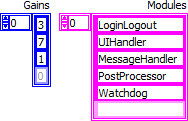
Often it's not so important to know how many elements are in the arrays, nor even their values (one can always scroll through the array if one needs to know). But it can be very important to not get a false impression of a fewer number of elements than is actually present, for instance when auto-indexing a For-loop:
To be able to shrink array constants to a minimum size while still signalling that they contain more elements than currently visible, it would be nice with an indicator on the array constant when it's shrunk to hide elements (here shown with a tooltip that would appear if you hover on the "more elements" dots):
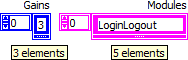
The information in the tooltip would be better placed in context help, but the important aspect of this idea is the "more elements" indicator itself.
Cheers,
Steen
Very nice. A hover-over tooltip or putting it in the context help would be very nice. Just something simple like "15 elements" or "12 x 3 elements" would be quite nice. Kudos!
Nice. Common good coding practice of pulling down an array to display the last empty element is not so common. The visual indicator would work for me. Would save a ton of real estate, too.
Good Idea. Kudos..
Good suggestion. I currently have to expand the array to show more than one element then set the index to soemthing that shows the end of the array like so:
I could still mistake that array for having only one element in it though, since it's easy to miss that it's offset.
/Steen
I am usually quite happy with the scrollbar myself. Granted it will make the constant a little bit higher than this idea, but I do not lose much sleep over a few pixels here and there. At least it gives you functionality for the space it takes up.
Making the scrollbar visible is an ok indicator only if you adapt the style that the scrollbar may only be visible if the array contains more than the visible elements, else the scrollbar must be invisible. The latter is because it's hard to impossible to tell the difference on the scrollbar if there is a single, a few, or many elements in the array. With my suggested indicator there's never any doubt:
/Steen
The most useful visual cue in that last picture is the label. If I care if it is 2 or 5 I will add a comment or use the label. If I care if it is 5 or 500 then the scrollbar is fine with me and it is actually functional. Every little visual cue gets added under the guise of increasing readability, but eventually we have so many of them that it is just noise and more and more details become obfuscated.
You must be a registered user to add a comment here. If you've already registered, please log in. If you haven't registered yet, please register and log in.
Post New Idea to submit a product idea to the LabVIEW Idea Exchange. Be sure to submit a separate post for each idea.
My Profile | Privacy |
Legal |
Contact NI
© 2011 National Instruments Corporation. All rights reserved. | E-Mail this Page
|
||

E-Mail this Page