NI Home
Cart Cart | Help
Hello Events Academic NI Developer Zone Support Solutions Products & Services Contact NI MyNI
You are here: 
NI Home > NI Developer Zone > NI Discussion Forums


Announcements
The NI Idea Exchange is a product feedback forum where NI R&D and users work together to submit ideas, collaborate on their development, and vote for the ones they like best. View all of the NI Idea Exchanges to post an idea or add your opinion on an existing one today!
andrewsi

Enabling use Labview FPGA front panel in interactive mode without recompilation-

Status: New
by Member andrewsi on ‎05-31-2012 05:24 PM

Technically, I suppose you could consider this a bug.


The situation is this:

  • You develop an FPGA module for an sbRIO, cRIO, or what have you.
  • You share the compiled code and .lvbitx with a team member, who needs to run that front panel in interactive mode, however, his sbRIO lives at a different IP address.
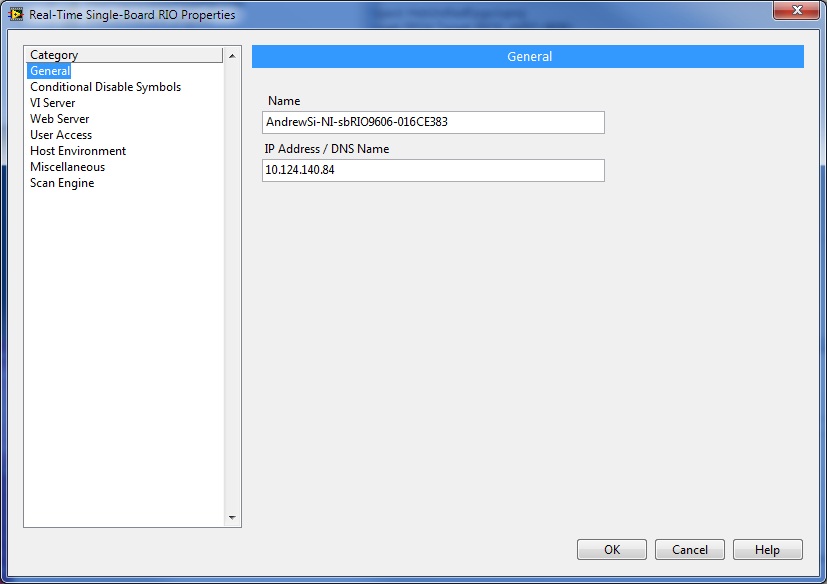
  • The only change he makes to the product is to right click on the target in Project Explorer, so as to be able to change the expected IP address.  However, the target hardware is otherwise completely identical.

Net result:

  •  The co-worker has to wait for a complete recompilation of the bitfile, which can be an hour or more in the case of a complex design.  There's no reason why the user shouldn't be able to completely re-use the existing bitfile just to send it to a different IP address.

Perhaps there's some technique I'm missing, but this is causing our team a pretty significant loss in productivity.  (Note that we have no issue with re-using the .lvbitx from RT host code, that works just fine - it's using an existing front panel in interactive mode that you can't do without recompiling it locally.)


Project Explorer:


pe.jpg


Change the target IP address:

Change the IP address


Now you have to recompile...

Comments
by Member MattN on ‎06-01-2012 09:21 AM

This _should_ work, though it's always possible you've found a bug.


Just to confirm, when you say "You share the compiled code and .lvbitx with a team member",  you're sharing the whole project, the FPGA, all of its subVIs, etc.?  And when your coworker opens up that FPGA VI, that VI and all of its dependencies don't need to be re-saved?


It's not intended that the IP address is included in the "signature" of the bitfile (the signature is what tracks when a FPGA VI needs to recompile).  As a test, have you tried pointing your project (that works) to the IP address of your coworker, and seeing if it runs or requires a recompile?


The other thing you may be running into is the naming scheme for default bitfile name in the build spec.  To support some use cases, it actually consumes the whole path of the project in the algorithm it uses. Have your coworker open up the properties of the build spec under the FPGA, and check the bitfile name that is there.  If it is different from the name of the .lvbitx file you sent him, have him try changing it to match that existing bitfile.  Or you and he/she could agree on a non-default bitfile name that you both could use (this has the advantage of being less "alphabet soup" than the default naming scheme).

by Member andrewsi on ‎06-01-2012 11:43 AM

I'm sharing the whole project - the whole thing is checked into source control, so the team member has the full source and the compiled bitfile, and opens the .lvproj via project explorer.  By convention, everyone should be opening it from an identical path on the local machine so that Labview doesn't get confused by potentially different root tree structure above the top of the source-controlled tree.


I'll investigate a little further, but the claim from the co-worker is that just opening the project locally and attempting to run the top level VI interactively forces a local recompile if any changes were made on the server and the project was resynced (including the bitfile).

Latest LabVIEW Idea Exchange Blog Posts
About LabVIEW Idea Exchange

Have a LabVIEW Idea?

  1. Browse by label or search in the LabVIEW Idea Exchange to see if your idea has previously been submitted. If your idea exists be sure to vote for the idea by giving it kudos to indicate your approval!
  2. If your idea has not been submitted click Post New Idea to submit a product idea to the LabVIEW Idea Exchange. Be sure to submit a separate post for each idea.
  3. Watch as the community gives your idea kudos and adds their input.
  4. As NI R&D considers the idea, they will change the idea status.
  5. Give kudos to other ideas that you would like to see in a future version of LabVIEW!
Idea Statuses
Top Kudoed Authors
User Kudos Count
134
86
73
65
61
By using this web site, you accept the Terms of Use for this web site. Please read these Terms of Use carefully before using any part of this site. Please go here for information on ni.com's copyright infringement policy.
My Profile | Privacy | Legal | Contact NI © 2011 National Instruments Corporation. All rights reserved.    |    E-Mail this Page E-Mail this Page