- Document History
- Subscribe to RSS Feed
- Mark as New
- Mark as Read
- Bookmark
- Subscribe
- Printer Friendly Page
- Report to a Moderator
- Subscribe to RSS Feed
- Mark as New
- Mark as Read
- Bookmark
- Subscribe
- Printer Friendly Page
- Report to a Moderator
Using Microsoft Kinect with myRIO (update)
This guide will describe how to use Kinect on myRIO through the USB port. This involves setting up libfreenect libraries on the myRIO, and testing it with an example project. This library only contains basic APIs to read raw RGB image and depth image from Kinect. Other functions such as audio, 3D skeleton abstraction are not included.
Instructions:
A. Download the attached 2 zip files.
The "KinectLib.zip" contains libfreenect library files and the "Kinect Project.zip" contains the example Kinect VIs to use the library to read data from Kinect.
B. Setting up libfreenect Library.
Requirements:
In order to complete this part of the tutorial you will need software to SSH into your myRIO. This example uses PuTTY. You will also need to use SFTP to transfer files to the myRIO. This example uses FileZilla.
Steps:
1. Connect myRIO through its device USB port to your PC.
2. Enable SSH. Go into NI MAX and find your myRIO under Remote Systems item in the left pane. Browse to your myRIO. In the System Settings tab of the device, under Startup Settings, there should be several checkboxes. Enable the box to the right of “Enable Secure Shell Server(sshd)” if it is not already. Hit Save.
3. Connect to the myRIO with SFTP. Username is 'admin' and Password is left blank.
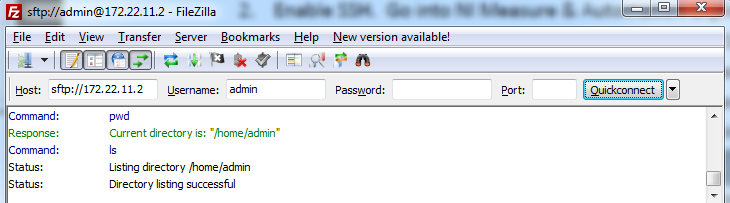
4. Copy over libfreenect.so.0.1.2, libfreenect_sync.so.0.1.2 and libkinect_wrapper.so in /user/lib folder on your myRIO. And copy liblibusb.so.1.0.8 to /usr/local/lib
5. Open an SSH connection with the myRIO. User is admin and password is left blank.
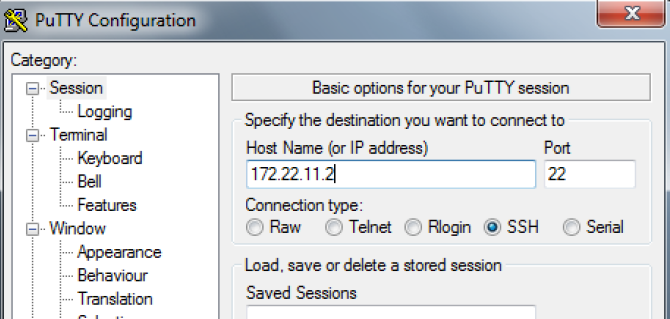
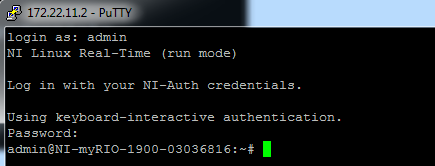
6. Create symbol link to these files through the following commands in your PuTTY.
=============================================================
#ln -s /usr/lib/libfreenect.so.0.1.2 /usr/lib/libfreenect.so.0.1
#ln -s /usr/lib/libfreenect_sync.so.0.1.2 /usr/lib/libfreenect_sync.so.0.1
#ln -s /usr/local/lib/liblibusb.so.1.0.8 /lib/libusb-1.0.so.0
=============================================================
7. Reboot your myRIO and your libfreenct library should be ready to go.
C. Run Example
Software Requirements:
- LabVIEW 2013
- LabVIEW Real-Time 13.0.0 - NI myRIO 13.0
- Kinect Example VIs (attached)
Hardware Setup:
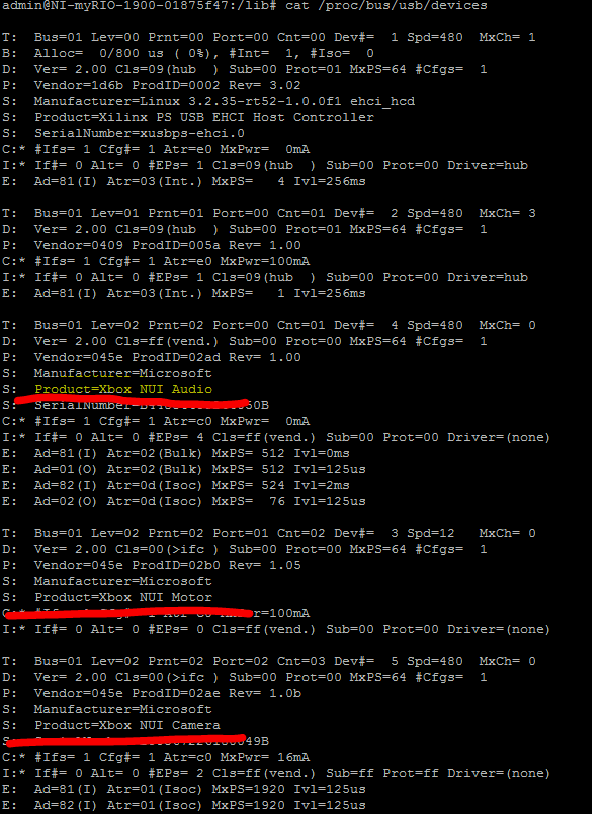
Connect your Kinect to the myRIO USB port and powered it by the wall adapter. Also, you can power Kinect with a external 12V DC. To make sure your Kinect is working properly, again SSH to your myRIO and type the following commands to check whether all Kinect USB devices are correctly mounted. And you should be able to see three USB devices in the list: "Xbox NUI Audio", "Xbox NUI Motor", "Xbox NUI Camera". If you cannot see them, make sure your Kinect is correctly connected.
====================================================
#cat /proc/bus/usb/devices
====================================================
Software Overview:
In the included project, there are two top level VIs which can be run after the Kinect is connected, and the libraries are installed on the myRIO.
Kinect Depth Controller has controls for the Depth Resolution and Depth Format, as well as the LED option and Tilt Degree. All depth formats and resolutions should work (NOTE: resolution and format have to be set before the program is run, and don’t have effect while the program is running). Tilt degree controls the motor inside of the Kinect that rotates it. LED option controls the LED on the front of the Kinect.
Depth resolutions: Tiny (160x120), Low(320x240), and Medium(640x480)
After Init Kinect Systems has run, any of the Vis that read depth or video data from the Kinect should work (exceptions for video resolutions noted below). It is important that Close Kinect Systems is called (use stop button, don’t abort); if it’s not executed, on next execution of the VI the myRIO will lose connection immediately. However, running it again after the disconnection will work.
Kinect Video Controller has the same controls as Kinect Depth Controller, but this time the Video Resolution and Video Format controls will take effect (again, these must be set before executing the VI). NOTE: as of right now, none of the video formats work in Low(320x240) resolution, all of the formats work in Medium(640x480) resolution, and only RGB and Bayer formats work in High(1280x1024) resolution.
If you will be doing image processing, or converting the depth to physical units, the projects on Obstacle Avoidance and Color Following with the Kinect have examples of this. Basically, you will want to modify the Read Video or some Read Depth VI so that you get the 2D array of points instead of the picture. From there you can convert it to an IMAQ image and process it with IMAQ functions.
The lower resolutions for both Video and Depth are much faster than higher resolutions. In the other projects, we’ve been getting about 15fps on tiny depth resolution, and ~3fps on medium resolution video.
Kinect VIs & Wrapper library
Credit for the Kinect VIs and wrapper code goes to Vicentiu Neagoe, Mihai Serban, and Adrian Papp.
This is a updated version of the original documentation written by erik.j.o
The attached "Async_wrapper.h" is the c header file of this library.


- Mark as Read
- Mark as New
- Bookmark
- Permalink
- Report to a Moderator
Hi I'm new here, I'm using XBOX 360 Kinect (Model 1414), NI myRIO 1900 (18.0), Labview 2018.
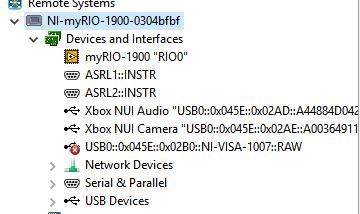
in my NI MAX, myRIO did detect the device as Xbox NUI but in USB instead of "camera".
I did the steps as shown in this forum, but mine looks nothing like the one that almost everyone here get...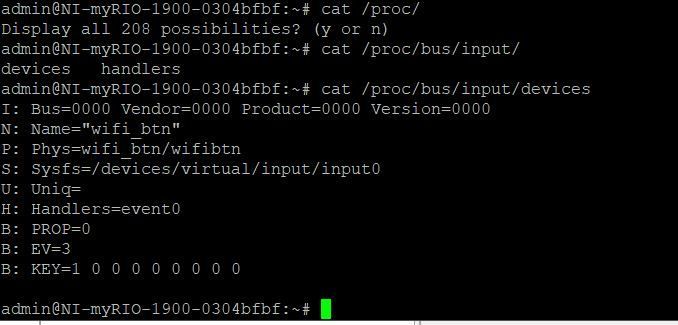
I don't have the " /proc/bus/usb/devices " directory but I do have this directory "/proc/bus/input/devices" .
I have connected XBOX 360 Kinect to myRIO using USB and also supplied the Kinect with the wall plug, Power up the myRIO with wall plug as well.
The XBOX 360 Kinect has yellow light blinking as well
Can anyone help me with this? ...

