ni.com is currently undergoing scheduled maintenance.
Some services may be unavailable at this time. Please contact us for help or try again later.
- Subscribe to RSS Feed
- Mark Topic as New
- Mark Topic as Read
- Float this Topic for Current User
- Bookmark
- Subscribe
- Mute
- Printer Friendly Page
Read Custom Command Line Arguments When Running Sequence
Solved!
 jkerrigan12
12-04-2018 12:43 PM
- Mark as New
- Bookmark
- Subscribe
- Mute
- Subscribe to RSS Feed
- Permalink
- Report to a Moderator
Hi,
I would like to be able to run a sequence file and have it accept a custom command line argument. For example I would like to run "TestSequence.seq" with the string "2710" as an argument to the sequence file (when I run via command line), which will be saved in a sequence local and used as an input to one of my VIs in the sequence file. Can anybody help me with this?
I have tried to capture the command line argument with the ActiveX module using RunState.Engine.GetInternalOption(InternalOption_ApplicationManager) & property CommandLineArguments
but I get an error popup saying the argument is not recognized.
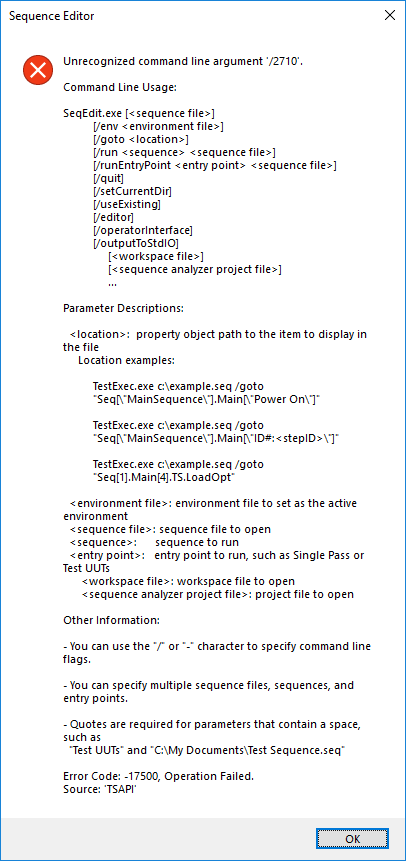
Any help is appreciated.
Thanks
Solved! Go to Solution.

 ~jiggawax~

12-04-2018 07:03 PM
- Mark as New
- Bookmark
- Subscribe
- Mute
- Subscribe to RSS Feed
- Permalink
- Report to a Moderator
I think you can only do this inside of a UI that you have the source code for. See this: https://zone.ni.com/reference/en-XX/help/370052W-01/tsuiref/reftopics/applicationmgr_processusercomm...
Since you don't have the source code for the sequence editor you cannot trigger that event and therefore cannot suppress the error.

12-06-2018 03:05 AM
- Mark as New
- Bookmark
- Subscribe
- Mute
- Subscribe to RSS Feed
- Permalink
- Report to a Moderator
Jigg is right. Here are some examples that should help with the UI creation:
Passing Custom Command Line Arguments to a TestStand Operator Interface (LabVIEW)
Passing Custom Command Line Arguments to a TestStand Operator Interface (.NET)
Passing Custom Command Line Arguments to a TestStand Operator Interface (CVI)
12-06-2018 10:33 AM
- Mark as New
- Bookmark
- Subscribe
- Mute
- Subscribe to RSS Feed
- Permalink
- Report to a Moderator
Ok, I will incorporate this into my own teststand GUI.
Although it would be nice to have this option from the shipping version of teststand!
Thanks

 BAP_TM
12-18-2024 04:38 AM
- Mark as New
- Bookmark
- Subscribe
- Mute
- Subscribe to RSS Feed
- Permalink
- Report to a Moderator
There is a simple workaround to use custom command line arguments even for TestStand sequence editor. Just use /enableFeatures argument and specify your own "features to enable" separated by a semicolon.
e.g.
"%TestStand64%\Bin\SeqEdit.exe" /runEntryPoint "Single Pass" "<sequence_path>\test.seq" /enableFeatures param1_name;"param1 value";"param2 name";param_value
TestStand ignores unrecognized features and doesn't show error popup.
