- Community
- :
- User Groups
- :
- Special Interest Groups
- :
- NI Linux Real-Time
- :
- NI Linux Real-Time Discussions
- :
- Re: Installing and using x11vnc on a 2016 x64 target (remote UI access to a cRIO)
Options
- Subscribe to RSS Feed
- Mark Topic as New
- Mark Topic as Read
- Float this Topic for Current User
- Bookmark
- Subscribe
- Printer Friendly Page
Turn on suggestions

Auto-suggest helps you quickly narrow down your search results by suggesting possible matches as you type.
Showing results for
Installing and using x11vnc on a 2016 x64 target (remote UI access to a cRIO)


- Mark as New
- Bookmark
- Subscribe
- Subscribe to RSS Feed
- Permalink
- Report Inappropriate Content
08-15-2016
05:48 PM
08-15-2016
05:48 PM
Installing and using x11vnc on a 2016 x64 target (remote UI access to a cRIO)


One of the packages that made its way into the 2016 opkg feeds is x11vnc. This is a package that allows you to serve the current UI over a VNC connection to the target (meaning that you can remotely check the status of an embedded UI of a running LabVIEW app from the comfort of your desk).
- Make sure that your x64-based controller is connected to the internet (this is not strictly required, but prevents you from needing to download all of the separate .ipk files that are needed to a USB drive to install from)
- Log into the controller (serial or ssh)
- Run the following commands
- opkg update
- opkg install x11vnc
- Enable the UI if it has not already been enabled
- Test it out first
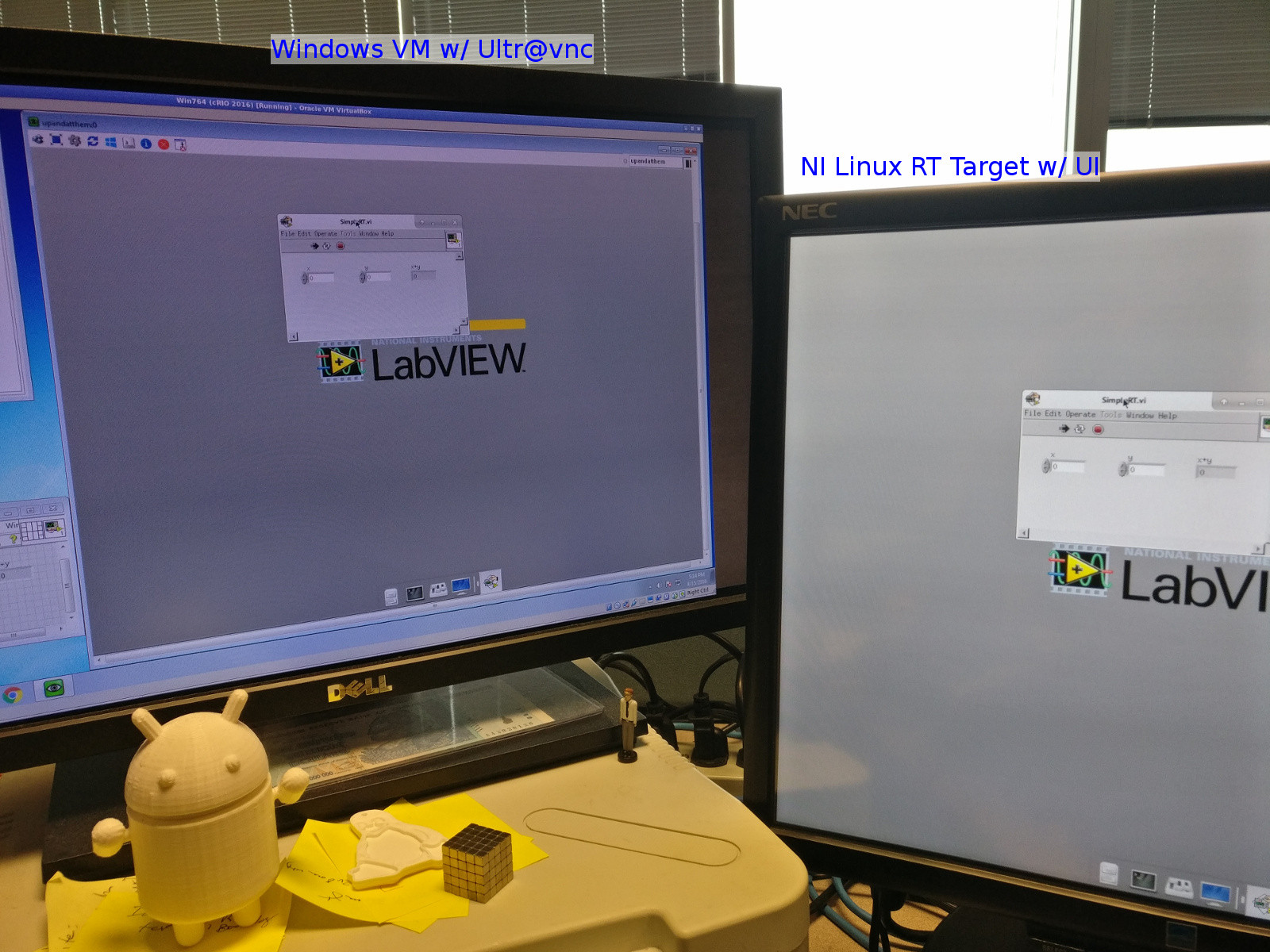
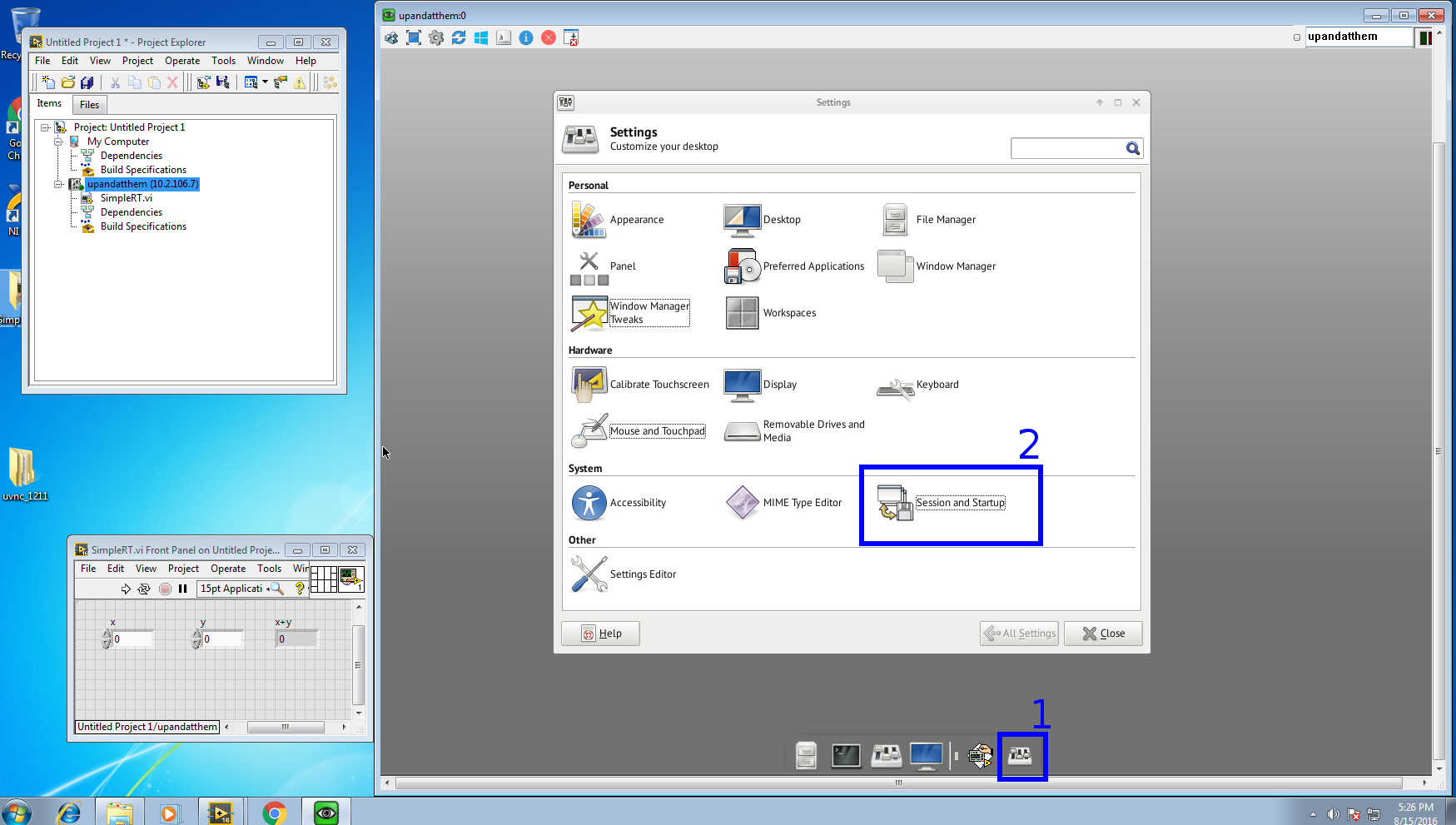
- To set the x11vnc server to run on startup, goto Settings Manager[1], Session and Startup[2], and under the Application Autostart tab, add an entry for x11vnc

IMPORTANT! READ THIS!
Right now, the connection is passwordless and gives complete control to the UI as if you were standing at the controller. You should read up on all of the options to see what makes sense for you, but I would recommend looking at -storepasswd and -usepw for some basic access control, you may wish to look into tunneling over ssh etc. etc.
Right now, as configured, the x11vnc server will exit after the first connection is closed, you would want to use -forever or -loop to keep the interface up. Additionally, it currently only accepts a single connection at a time, to share between users, look into the aptly-named -shared option. These would be added to the Command field when adding the startup application.
7 REPLIES 7


- Mark as New
- Bookmark
- Subscribe
- Subscribe to RSS Feed
- Permalink
- Report Inappropriate Content
01-16-2020
07:50 AM
01-16-2020
07:50 AM
Re: Installing and using x11vnc on a 2016 x64 target (remote UI access to a cRIO)
Hi,
Can someone kindly advise on how to keep the x11vnc running with -forever or -loop. I have just started to know about Linux. Thank you.

- Mark as New
- Bookmark
- Subscribe
- Subscribe to RSS Feed
- Permalink
- Report Inappropriate Content
02-17-2021
04:40 AM
02-17-2021
04:40 AM
Re: Installing and using x11vnc on a 2016 x64 target (remote UI access to a cRIO)
add the -forever to the command in add application window.
name: x11vnc
Description: X11 VNC server
Command x11vnc -forever
Tested on crio 9030 with LV2020

- Mark as New
- Bookmark
- Subscribe
- Subscribe to RSS Feed
- Permalink
- Report Inappropriate Content
03-31-2021
11:58 AM
03-31-2021
11:58 AM
Re: Installing and using x11vnc on a 2016 x64 target (remote UI access to a cRIO)
I'm trying to use x11vnc on a cRio 9041. It's close to working but...
1. I found that I first have to set the display size in the cRio or else the vncviewer will only see a very small portion of the screen. I do this by sshing into the device and running:
> export DISPLAY=:0
>xrandr -fb 1920x1080
then I can start the server with:
> x11vnc -display :0 -forever -geometry 1920x1080
Now opening it with a view shows the whole screen.
Is there a way to do this automatically at startup so I don't have ssh in first to set the display properties?
Also, the fonts are wrong in the application when it's running, but maybe that's worth another post.

- Mark as New
- Bookmark
- Subscribe
- Subscribe to RSS Feed
- Permalink
- Report Inappropriate Content
06-14-2021
05:57 AM
06-14-2021
05:57 AM
Re: Installing and using x11vnc on a 2016 x64 target (remote UI access to a cRIO)
I arrived at the same stage. Did you manage to find a solution for automatically setting the screen resolution? Would be great to update this thread so everybody can benefit
- Mark as New
- Bookmark
- Subscribe
- Subscribe to RSS Feed
- Permalink
- Report Inappropriate Content
06-14-2021
07:31 AM
06-14-2021
07:31 AM
Re: Installing and using x11vnc on a 2016 x64 target (remote UI access to a cRIO)
Yes, I did find a workable solution. I had to start another thread to get it though. Try chipmonk77's solution at...
https://forums.ni.com/t5/NI-Linux-Real-Time-Discussions/howto-make-x11vnc-start-on-boot/m-p/4152766

- Mark as New
- Bookmark
- Subscribe
- Subscribe to RSS Feed
- Permalink
- Report Inappropriate Content
07-15-2021
12:47 PM
07-15-2021
12:47 PM
Re: Installing and using x11vnc on a 2016 x64 target (remote UI access to a cRIO)
Can the same be used to replicate virtual console display on a Windows host PC? What additional steps do we need to view the VCS data continuously on the host PC?
- Mark as New
- Bookmark
- Subscribe
- Subscribe to RSS Feed
- Permalink
- Report Inappropriate Content
07-19-2021
05:19 AM
07-19-2021
05:19 AM
Re: Installing and using x11vnc on a 2016 x64 target (remote UI access to a cRIO)
Propably just installing a VNC server is the easiest way.
This guide is for the linux based RT system.
For windows you can use realvnc
