- Subscribe to RSS Feed
- Mark Topic as New
- Mark Topic as Read
- Float this Topic for Current User
- Bookmark
- Subscribe
- Mute
- Printer Friendly Page
DAQ program
Solved!
 Snow_In_Tehran
05-08-2015 09:30 AM
- Mark as New
- Bookmark
- Subscribe
- Mute
- Subscribe to RSS Feed
- Permalink
- Report to a Moderator
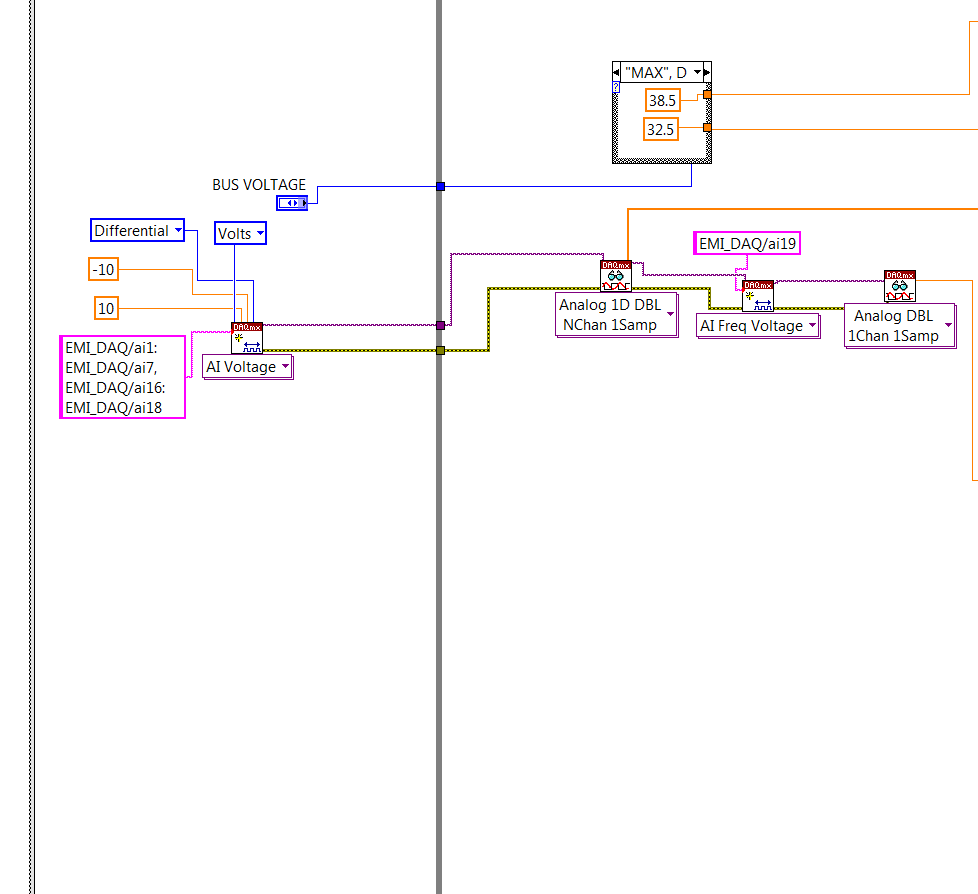
I'm trying to write a program that runs in a loop and samples 11 different channels on a NI USB DAQ 6343 device continuously. The first 10 channels are simple DC measurements, the remaining channel is an AC voltage signal, whose frequency I want to record. All of this data I will be writing to a .csv file at the end. I have attached my code and I'm working with the DAQ.mx drivers.
The question I have is, how do I measure and AC signal with the USB DAQ? I tried to configure analog input channel # 19 for "frequency, voltage" and then do a "read", howeever, it is telling me that the channel does not support that type of measurement. This AC signal is going through a BNC cable, and then to two banana adapters.
Attached is my code, written in LabVIEW 2013. Here is a screen shot .
Solved! Go to Solution.

 Dennis_Knutson
05-08-2015 09:37 AM
- Mark as New
- Bookmark
- Subscribe
- Mute
- Subscribe to RSS Feed
- Permalink
- Report to a Moderator
05-08-2015 09:43 AM
- Mark as New
- Bookmark
- Subscribe
- Mute
- Subscribe to RSS Feed
- Permalink
- Report to a Moderator
Thanks for your reply. I see what you're saying in terms of including the channel in the original list, since its the same task. However, how do I record the freqnecy. Don't I need to designate that channel alone (using virtual channel) as a voltage-frequency measurement?
If I just do "N channel, N sample read" for all 11 channels, I will get the voltage levels for those channels, but how will I know the frequency of that last channel (the AC signal)?
Should I use some other vi's to look at that channel after its been read to calculate the freqnecy of that input?

 crossrulz

05-08-2015 09:58 AM
- Mark as New
- Bookmark
- Subscribe
- Mute
- Subscribe to RSS Feed
- Permalink
- Report to a Moderator
Look for the Signal Processing->Waveform Measure->Extract Single Tone Information.vi. It performs an FFT and gives you the main frequency of the waveform.
There are only two ways to tell somebody thanks: Kudos and Marked Solutions
Unofficial Forum Rules and Guidelines
"Not that we are sufficient in ourselves to claim anything as coming from us, but our sufficiency is from God" - 2 Corinthians 3:5
05-08-2015 11:03 AM
- Mark as New
- Bookmark
- Subscribe
- Mute
- Subscribe to RSS Feed
- Permalink
- Report to a Moderator
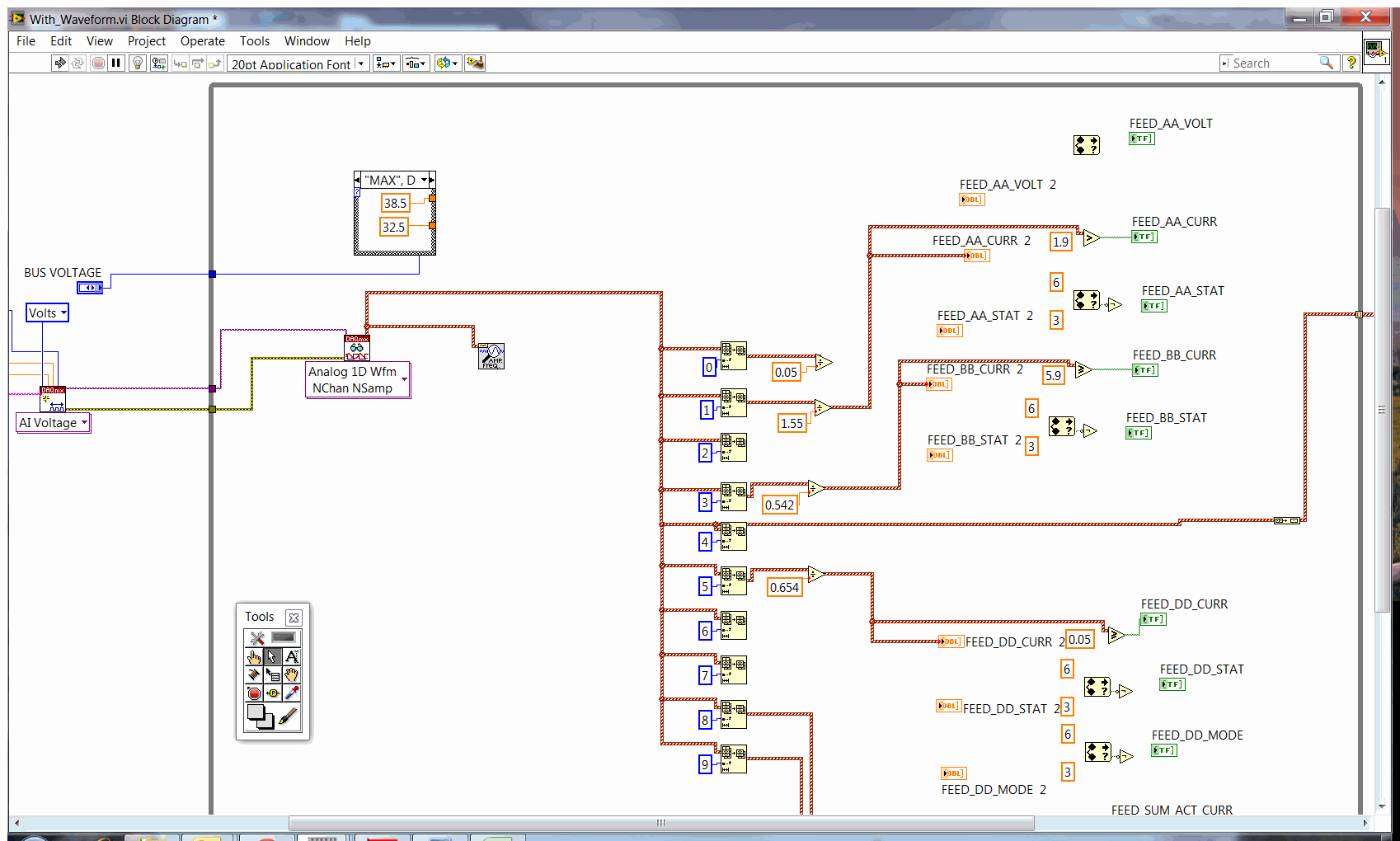
Ok thanks, this is a real help for getting the frequency data. However, the only problem is that by going from 1 sample read to N samples, the output data out of the 'read' vi is in waveform mode. This creates problems for my other processes becuase I wanted to scale the DC voltages by constants and then write the modified values to a .csv file. I can't do those operations when my data is in waveform form.
i tried to undundle the waveform data thinking that it is a cluster, but that doesn' work. Any suggestions?

 John_P1
05-08-2015
11:12 AM
- last edited on
11-07-2024
10:51 AM
by
 Content Cleaner
- Mark as New
- Bookmark
- Subscribe
- Mute
- Subscribe to RSS Feed
- Permalink
- Report to a Moderator
@Snow_In_Tehran wrote:
i tried to undundle the waveform data thinking that it is a cluster, but that doesn' work. Any suggestions?
The function you're looking for is called Get Waveform Components.
Best Regards,
Dennis_Knutson
05-08-2015 12:23 PM
- Mark as New
- Bookmark
- Subscribe
- Mute
- Subscribe to RSS Feed
- Permalink
- Report to a Moderator
05-08-2015 12:44 PM
- Mark as New
- Bookmark
- Subscribe
- Mute
- Subscribe to RSS Feed
- Permalink
- Report to a Moderator
Thanks, these were all great answers and have helped me to solve the problem.
05-08-2015 03:04 PM
- Mark as New
- Bookmark
- Subscribe
- Mute
- Subscribe to RSS Feed
- Permalink
- Report to a Moderator
Ok this has worked great. My only problem is, as you mentioned, now I have many more samples and I end up with a csv file with a huge number of rows and columns.
originally it was just 11 columns corresponding to my 11 channels. What kind of averaging operation can I employ to make the output more readable like it was before?
Thanks
John_P1
05-08-2015
03:06 PM
- last edited on
11-07-2024
10:52 AM
by
Content Cleaner
- Mark as New
- Bookmark
- Subscribe
- Mute
- Subscribe to RSS Feed
- Permalink
- Report to a Moderator
@Dennis_Knutson wrote:
Since your dc channels would consist of multiple readings now, you could do something like take the mean of those.
There is a Mean function that does exactly what Dennis suggested.
Best Regards,
