ni.com is currently undergoing scheduled maintenance.
Some services may be unavailable at this time. Please contact us for help or try again later.
- Subscribe to RSS Feed
- Mark Topic as New
- Mark Topic as Read
- Float this Topic for Current User
- Bookmark
- Subscribe
- Mute
- Printer Friendly Page
Programmatically change AI Channels properties?

 busarider29
10-22-2015 02:47 PM
- Mark as New
- Bookmark
- Subscribe
- Mute
- Subscribe to RSS Feed
- Permalink
- Report to a Moderator
I'm creating a custom data logger application for my company using a cDaq-9184 chassis with a 9205 AI module in it. Each channel will have its own waveform graph on the UI. I'm to the point now where I can apply an anolog voltage (-10 to 10 VDC) to each of the physical channels and see it streaming continous on each WFG on the UI. I have a functionality where I want to be able to not only change the scaling from the UI, but also the scale type (linear, Ranged Map, Table). So this is where I am stuck. How do I do this? The documentation has me hazy and I could use some more guidance.
Below is a snapshot of the UI for this. When a user clicks the "download" button, I want to change the scale type and scaling parameters of whichever channel the combobox is on, in this case channel 9 (ai10). Do I need to create a new task every time I do this? When is OnTaskCreated called in the DaqTask1.User.vb? I tried the following code in the download button click event :
 Dim MyTask As New NationalInstruments.DAQmx.Task
        MyTask = New DaqTask1
This did not fire OnTaskCreated in the User.vb file.
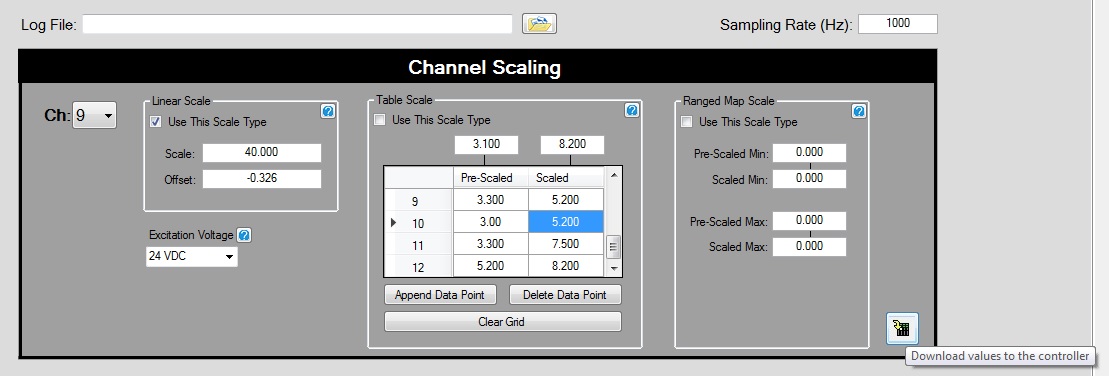

 DJColeslaw
10-23-2015 04:51 PM
- Mark as New
- Bookmark
- Subscribe
- Mute
- Subscribe to RSS Feed
- Permalink
- Report to a Moderator
To change the scaling type for a plot, you invoke the scaling on the plot object. So, if you have a graph called "graph" with a plot called "waveformPlot", you could change the scaling on the x-axis of that plot to Logarithmic with the following line:
waveformPlot.XAxis.ScaleType = ScaleType.Logarithmic
So for the functionality you're looking for, I would have a selector that selects the scale type you want and then in the callback for the "download values to controller" button, process that value and set the appropriate scale type.
