- Community
- :
- Discussion Forums
- :
- Most Active Hardware Boards
- :
- Machine Vision
- :
- Re: Understanding distortion model calibration
Options
- Subscribe to RSS Feed
- Mark Topic as New
- Mark Topic as Read
- Float this Topic for Current User
- Bookmark
- Subscribe
- Printer Friendly Page
Turn on suggestions

Auto-suggest helps you quickly narrow down your search results by suggesting possible matches as you type.
Showing results for
Understanding distortion model calibration


- Mark as New
- Bookmark
- Subscribe
- Subscribe to RSS Feed
- Permalink
- Report Inappropriate Content
05-02-2017
05:20 PM
05-02-2017
05:20 PM
Understanding distortion model calibration


Hi,
I am following off of a distortion model calibration as shown in this video
https://www.youtube.com/watch?v=RxmUgSKT0pg
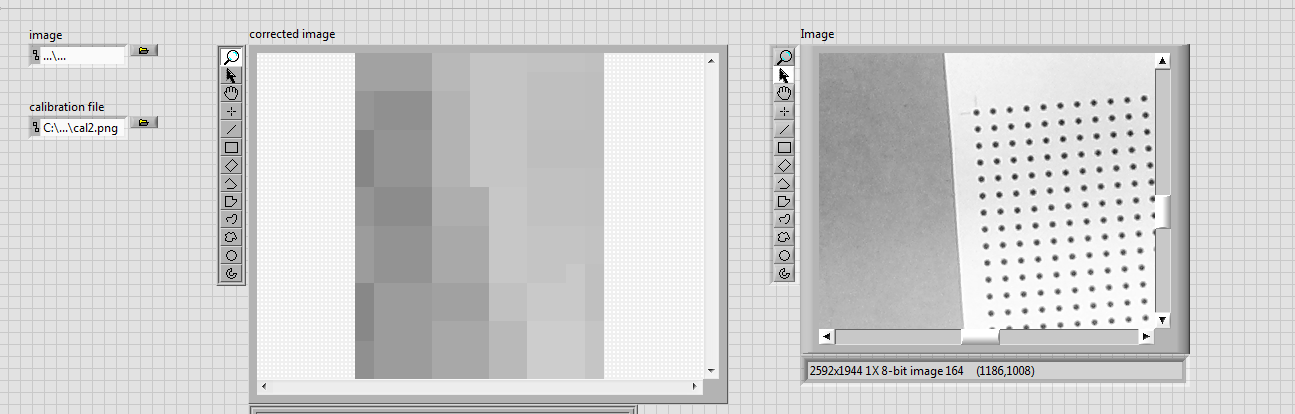
However when I replicate the steps I am not getting valid images on my front panel. The corrected image is all blurry. What is the reason and is there a way to rectify this?
Another question : Is it necessary that during calibration the grid covers the entire field of view?
cal2 is my calibrated image
rawimage4 is my snapped image

7 REPLIES 7

- Mark as New
- Bookmark
- Subscribe
- Subscribe to RSS Feed
- Permalink
- Report Inappropriate Content
05-03-2017
06:58 PM
05-03-2017
06:58 PM
Re: Understanding distortion model calibration
Hi Vishwarath,
Try the following tutorial:
https://www.youtube.com/watch?v=eWqq65ZZ0NQ
My understanding is that yes, the grid has to cover the entire field of view.
Thanks,
Peter George
Applications Engineer
National Instruments

- Mark as New
- Bookmark
- Subscribe
- Subscribe to RSS Feed
- Permalink
- Report Inappropriate Content
05-06-2017
06:55 AM
05-06-2017
06:55 AM
Re: Understanding distortion model calibration
first your image size should be same with your calibration image size
second your dots should be cover all port of camera view to solve all possible distortion in camera lens site
second your dots should be cover all port of camera view to solve all possible distortion in camera lens site
Highlighted
- Mark as New
- Bookmark
- Subscribe
- Subscribe to RSS Feed
- Permalink
- Report Inappropriate Content
05-08-2017
09:02 PM
05-08-2017
09:02 PM
Re: Understanding distortion model calibration
Hi George,
My FOV is quite large. Do I zoom the image and crop it so that only the grid remains in view? In the video you suggested did the camera already focus on the grid leaving everything aside
- Mark as New
- Bookmark
- Subscribe
- Subscribe to RSS Feed
- Permalink
- Report Inappropriate Content
05-08-2017
09:03 PM
05-08-2017
09:03 PM
Re: Understanding distortion model calibration
Hi Hatef,
What is the camera is grabbing some more regions than only the grid?
- Mark as New
- Bookmark
- Subscribe
- Subscribe to RSS Feed
- Permalink
- Report Inappropriate Content
05-11-2017
05:27 PM
05-11-2017
05:27 PM
Re: Understanding distortion model calibration
Can anyone answer pls


- Mark as New
- Bookmark
- Subscribe
- Subscribe to RSS Feed
- Permalink
- Report Inappropriate Content
05-11-2017
05:33 PM
05-11-2017
05:33 PM
Re: Understanding distortion model calibration
I think that if you crop the image it should be OK.
You have the make sure that the second image you calibrating is exactly the same size in the same location.
Amit Shachaf
- Mark as New
- Bookmark
- Subscribe
- Subscribe to RSS Feed
- Permalink
- Report Inappropriate Content
05-11-2017
06:37 PM
05-11-2017
06:37 PM
Re: Understanding distortion model calibration
So I have the following workspace which I need to calibrate. I placed the grids adjoining one another. How should I go about doing this?

