- Subscribe to RSS Feed
- Mark Topic as New
- Mark Topic as Read
- Float this Topic for Current User
- Bookmark
- Subscribe
- Mute
- Printer Friendly Page
Pattern Projection - Controlling Projector
Solved!
 sevincom
05-19-2017 10:36 AM
- Mark as New
- Bookmark
- Subscribe
- Mute
- Subscribe to RSS Feed
- Permalink
- Report to a Moderator
Hello,
I would like to create patterns with projectors. It is like how 3D scanning devices use for pattern projection, here is an example link.
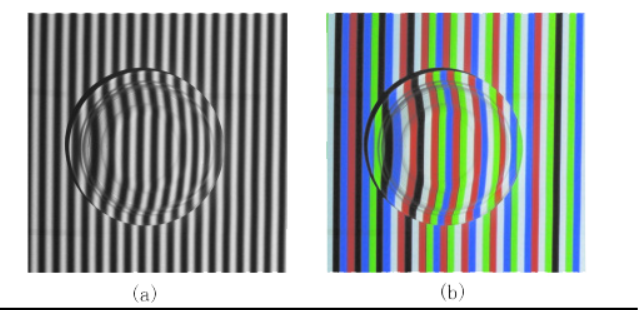
I want to create any geometries, not only lines. I am hoping for a pixel based method like creating an image/picture with coordinates and color values. I have searched some projector brands to see if they have any API for that but could not find anything.
I would appreciate if there is anyone who has experience or idea for me to deal with this topic.
Solved! Go to Solution.

 BruceAmmons
05-19-2017 01:13 PM
- Mark as New
- Bookmark
- Subscribe
- Mute
- Subscribe to RSS Feed
- Permalink
- Report to a Moderator
Do you need to change the pattern rapidly, or just keep the same pattern? You should be able to set up a projector as a second screen, then display the image you want on the projector. Changing it rapidly is a little more challenging, but you could probably generate several images and flip through them fairly quickly. Changing the image every frame would be the most difficult. That might require creating a video and playing at the desired frame rate.
Bruce
Ammons Engineering
05-19-2017 01:17 PM
- Mark as New
- Bookmark
- Subscribe
- Mute
- Subscribe to RSS Feed
- Permalink
- Report to a Moderator
Bruce, changing the images qucikly like in the structured light 3D scanners can be another workaround for me but for now I just want to keep one pattern. But I am not sure how I can display the image with the projector on LabVIEW.
Do you have any suggestion where I can start?
BruceAmmons
05-19-2017 02:08 PM
- Mark as New
- Bookmark
- Subscribe
- Mute
- Subscribe to RSS Feed
- Permalink
- Report to a Moderator
1. Create the image. Either use the drawing tools in LabVIEW, or use a drawing program to create an image and load it into LabVIEW. The image should be the same resolution that the projector can display.
2. Connect the projector to the computer. Use Windows to set it up as a second display.
3. Create a VI with a large Image indicator, large enough to display image from step 1. Make the VI load and display the image. Move the VI so it shows up on the projector. You might be able to use VI properties to display it full size on the second screen.
Bruce
Ammons Engineering
05-19-2017 02:35 PM
- Mark as New
- Bookmark
- Subscribe
- Mute
- Subscribe to RSS Feed
- Permalink
- Report to a Moderator
Thank you for the suggestion Bruce. I will try it when I am near the device.
 Hatef.fouladi
05-24-2017 04:54 PM
- Mark as New
- Bookmark
- Subscribe
- Mute
- Subscribe to RSS Feed
- Permalink
- Report to a Moderator
I was do this project before for this one I write a vi just show the pattern image but record camera and process the pattern behind also maybe using two monitor method and sharing desktop work between to monitor (one for projector )
05-28-2017 12:03 PM
- Mark as New
- Bookmark
- Subscribe
- Mute
- Subscribe to RSS Feed
- Permalink
- Report to a Moderator
I have tried this with creating pictures and it works pretty well as expected.
However, beside the pattern, we are also projecting the whole VI which creates an amateur look. How can I can get rid of it and only show the pattern I want in the picture?
BruceAmmons
05-28-2017 02:02 PM
- Mark as New
- Bookmark
- Subscribe
- Mute
- Subscribe to RSS Feed
- Permalink
- Report to a Moderator
You can change the display options for your VI to no border, size to screen, display on second screen, etc. Size your image display to fill the VI window, then when you run it, it will resize to fill the screen.
If you can't get that to work, the old window display is still available (Vision Utilities -> External Display). It creates a separate window just for displaying your image. I would think it would be more work than setting the VI properties, though.
Bruce
Ammons Engineering

 Xueping
11-13-2018 09:21 AM
- Mark as New
- Bookmark
- Subscribe
- Mute
- Subscribe to RSS Feed
- Permalink
- Report to a Moderator
Hi, I'm a new Labview user. I want to use labview to generate pattern projection. And connect to the projector. Can you give me some examples to learn? And how can I control the projector?
Thank you
Xueping

11-14-2018 10:12 AM
- Mark as New
- Bookmark
- Subscribe
- Mute
- Subscribe to RSS Feed
- Permalink
- Report to a Moderator
Hi Xueping,
Few questions to get a better idea of your system:
What hardware are you using?
How is it connected? (serial?)
Thanks!
Joseph
