ni.com is currently undergoing scheduled maintenance.
Some services may be unavailable at this time. Please contact us for help or try again later.
- Subscribe to RSS Feed
- Mark Topic as New
- Mark Topic as Read
- Float this Topic for Current User
- Bookmark
- Subscribe
- Mute
- Printer Friendly Page
NI VISION error code 0x80040217
Solved!
 丁一
丁一
10-30-2020 03:44 AM
- Mark as New
- Bookmark
- Subscribe
- Mute
- Subscribe to RSS Feed
- Permalink
- Report to a Moderator
NI VAS 2017,NI VDM2017,NI VBAI 2015 and NI MAX were installed on my computer,
I tried to use the camera on my computer.but when I do tests through Max explorer I get this error message
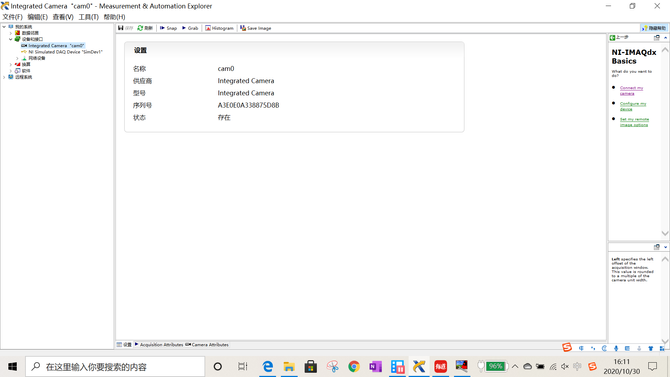
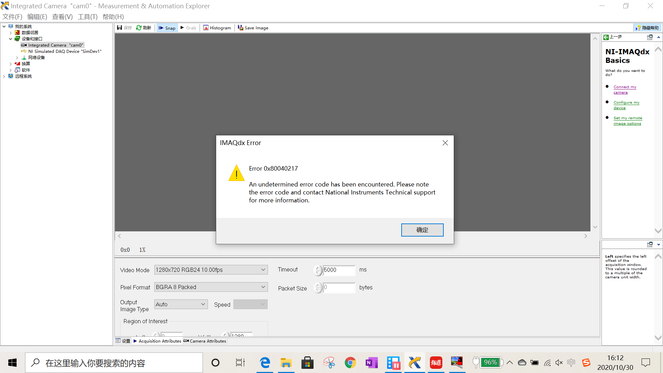
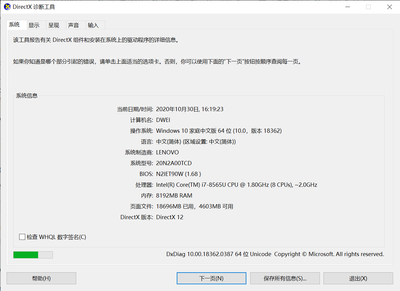
My computer is 64-bit,Update the camera driver to the latest version.
-
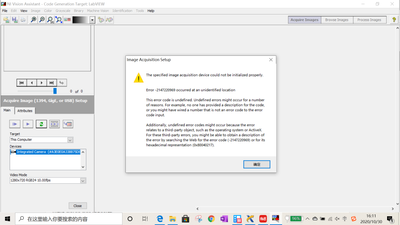
The acquisition of images in NI VAS also encountered one problem
ding
Solved! Go to Solution.

 another_novice
10-30-2020 08:26 AM
- Mark as New
- Bookmark
- Subscribe
- Mute
- Subscribe to RSS Feed
- Permalink
- Report to a Moderator
A couple of suggestions:
1. Can you change the video mode? My integrated cam works with 1280x720 MJPG 30.00fps.
2. Have you reviewed previous posts on this topic? This one in particular may be helpful: https://forums.ni.com/t5/Machine-Vision/Error-0x80040217-The-error-code-passed-into-imgShowError-is/...
11-03-2020 07:25 PM
- Mark as New
- Bookmark
- Subscribe
- Mute
- Subscribe to RSS Feed
- Permalink
- Report to a Moderator
Hi,
Thank you very much for your reply.The advice you gave was extremely useful.My Integrated CAM worked when I changed the camera mode to 1280x720 MJPG 30.00 FPS
I saw the topic you mentioned before and didn't understand what it said, but now I seem to understand a little bit.
Thanks again.
