ni.com is currently undergoing scheduled maintenance.
Some services may be unavailable at this time. Please contact us for help or try again later.
- Subscribe to RSS Feed
- Mark Topic as New
- Mark Topic as Read
- Float this Topic for Current User
- Bookmark
- Subscribe
- Mute
- Printer Friendly Page
Machine Vision 'Vision Acquisition' connect error
Solved!
 casper7899
02-12-2017 08:49 AM
- Mark as New
- Bookmark
- Subscribe
- Mute
- Subscribe to RSS Feed
- Permalink
- Report to a Moderator
when I open "Vision Acquisition" ,this error comes out
and I could't connect my webcam
Thanks
Solved! Go to Solution.

 udka
udka
02-12-2017 11:38 PM
- Mark as New
- Bookmark
- Subscribe
- Mute
- Subscribe to RSS Feed
- Permalink
- Report to a Moderator
uday
02-20-2017 09:22 AM
- Mark as New
- Bookmark
- Subscribe
- Mute
- Subscribe to RSS Feed
- Permalink
- Report to a Moderator
How to open with NI MAX ?
Can you snap a picture please~ Thank you
udka
02-20-2017 10:17 AM - edited 02-20-2017 10:18 AM
- Mark as New
- Bookmark
- Subscribe
- Mute
- Subscribe to RSS Feed
- Permalink
- Report to a Moderator
-What is MAX:http://digital.ni.com/public.nsf/allkb/71544521BDE34FFB86256FCF005F4FB6
-It should be automatically installed in your PC, try searching for NI MAX in after clicking Windows button.
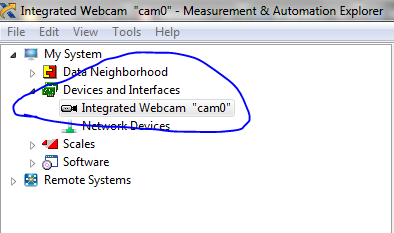

-Under Devices and Interfaces your camera should be listed and click on that.
-Then use Grab/snap functions and check if you receive same error.
-Check the Acquisition attributes tab, especially Output image Type and Pixel format parameters try changing to defaults and see if you still receive an error: Post Screenshot of NI MAX settings.
uday
03-03-2017 10:36 AM
- Mark as New
- Bookmark
- Subscribe
- Mute
- Subscribe to RSS Feed
- Permalink
- Report to a Moderator
It can active right now .
thanks a lot~
