Machine Vision
- Suscribirse a un feed RSS
- Marcar tema como nuevo
- Marcar tema como leído
- Colocar este tema arriba del foro
- Favorito
- Suscribir
- Silenciar
- Página de impresión sencilla
How can I import a .png image with transparent background into Vision Assistant?
¡Resuelto!
 Norick_17
el 10-10-2009 09:43 AM
- Marcar como nuevo
- Favorito
- Suscribir
- Silenciar
- Suscribirse a un feed RSS
- Resaltar
- Imprimir
- Informe de contenido inapropiado
Hi
I am using the NI Vision Assistant. Here I wanna overlay an existing image with another one. Therefore I use the overlay setup where I can import a .png image. If I do so I do not get
the transparent background of the image back, even I has been saved with transparency background. The image is shown with an orange background.
If I import the same picture to any frontpanel for example, I see the picture in the right way with a transparent background. What I do wrong? I attached the image which I would like to use.
thanks
¡Resuelto! Ir a solución.
 Andrey_Dmitriev
el 10-11-2009 07:14 AM
- Marcar como nuevo
- Favorito
- Suscribir
- Silenciar
- Suscribirse a un feed RSS
- Resaltar
- Imprimir
- Informe de contenido inapropiado
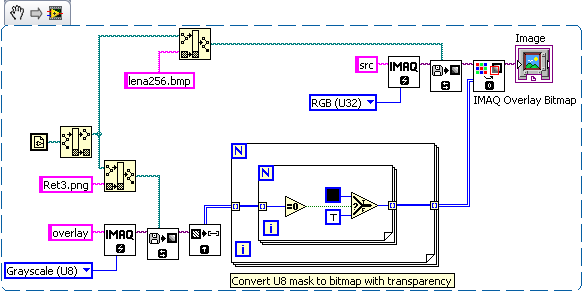
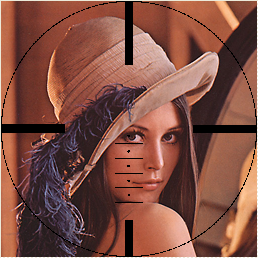
Hi! Not sure how to do this in Vision Assistant. Try to use overlay (bitmap) or convert your image to mask. Transparency effect not supported in Vision. What you can do in LabVIEW is something like that:

- Etiquetas:
- png_vision
el 10-11-2009 07:53 AM
- Marcar como nuevo
- Favorito
- Suscribir
- Silenciar
- Suscribirse a un feed RSS
- Resaltar
- Imprimir
- Informe de contenido inapropiado
Hi Andrey... this was exactly what I was looking for, even it is not working for the vision assistant I think I can use it.
thanks..!

el 10-12-2009 03:56 AM
- Marcar como nuevo
- Favorito
- Suscribir
- Silenciar
- Suscribirse a un feed RSS
- Resaltar
- Imprimir
- Informe de contenido inapropiado
Hello,
this is maybe due to the image type you are using. Under the following link you will find additional information about NI-IMAQ Supported File Formats.
http://digital.ni.com/public.nsf/allkb/4EEF7CB578DCDC5E86256D05000D3AE5?OpenDocument
Best regards, Stéphane
el 10-12-2009 09:40 AM
- Marcar como nuevo
- Favorito
- Suscribir
- Silenciar
- Suscribirse a un feed RSS
- Resaltar
- Imprimir
- Informe de contenido inapropiado
Stephane,
I tried to save the image in different formats, even with an alpha channel - without success. Do you have an example image which I could try to import in the Vision Assistant?
regards

 muks
muks
el 10-13-2009 01:49 AM
- Marcar como nuevo
- Favorito
- Suscribir
- Silenciar
- Suscribirse a un feed RSS
- Resaltar
- Imprimir
- Informe de contenido inapropiado
Norick,
Can you mark andrey's reply as the solution?

 MOI_maker
el 12-20-2011 05:58 PM
- Marcar como nuevo
- Favorito
- Suscribir
- Silenciar
- Suscribirse a un feed RSS
- Resaltar
- Imprimir
- Informe de contenido inapropiado
Hi,
I'm trying to do something very similar, but I want to overlay I colour image with transparency. This solution only seems to work for greyscale...
Any ideas?
Thanks,
Steve
 Zahkay
03-01-2014 01:59 PM - editado 03-01-2014 02:03 PM
- Marcar como nuevo
- Favorito
- Suscribir
- Silenciar
- Suscribirse a un feed RSS
- Resaltar
- Imprimir
- Informe de contenido inapropiado
Hello
I am having problem with my QR code scanning using a webcam
This is the actual image that is seen
I used vision assitant to make the image processing. But still it is not detected.
I took an image and process it in the vision assistant. still the output is not yielded.
Anybody can help


