- Subscribe to RSS Feed
- Mark Topic as New
- Mark Topic as Read
- Float this Topic for Current User
- Bookmark
- Subscribe
- Mute
- Printer Friendly Page
Configure a camera
Solved!
 danielll99
11-01-2021 01:27 PM
- Mark as New
- Bookmark
- Subscribe
- Mute
- Subscribe to RSS Feed
- Permalink
- Report to a Moderator
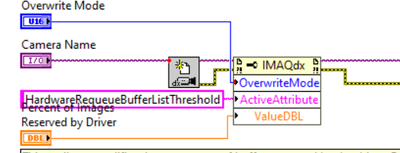
Can anybody explain me how works configuration of the camera? It seems like the ActiveAtribute tell what we want to change, in this case it's a HardwareRequeueBufferListThreshold, and next we give the parameters which we want to change in the atribute given before? Am I understand it right?
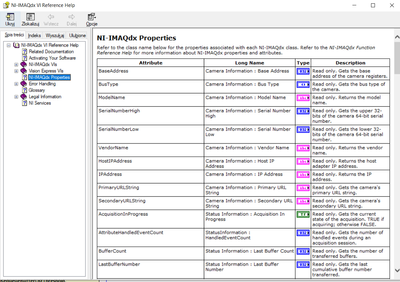
Where can I find the full list of the Attributes and values I can change in them? I've only find in the documentation the list below but there's nothing about the HardwareRequeueBufferListThreshold for example.
I've also read that there is posibility to print the list of parameters for my camera using block enumerateAttributes but I really don't know how to do this
Solved! Go to Solution.

 1100fps
11-03-2021 09:42 AM
- Mark as New
- Bookmark
- Subscribe
- Mute
- Subscribe to RSS Feed
- Permalink
- Report to a Moderator
Here is some code that will list the camera attributes. You will need to go into the VI to change the camera name to match yours.
In my experience some camera vendors will show attributes that don't actually work. It's an expensive lesson, and I tend to stick with vendors that have a working attribute list..
This should get you the list, in any event.
Good luck.
11-04-2021 09:27 AM
- Mark as New
- Bookmark
- Subscribe
- Mute
- Subscribe to RSS Feed
- Permalink
- Report to a Moderator
Thanks, it's very helpful.
Could you also tell me where can I find name of parameters which are defined as enum?
1100fps
11-05-2021 06:23 PM
- Mark as New
- Bookmark
- Subscribe
- Mute
- Subscribe to RSS Feed
- Permalink
- Report to a Moderator
Yah, that bit is annoying, figuring out the proper input.. I don't recall how I used to do it, but modified the code to give you the enum values, they can be either numerical or text.. A sometimes when you hook up a control it will automatically populate the control with a ring that give you the choices.
I'm too lazy to generate a program that extracts all the enums, but you can run the program, copy and paste an attribute, and turn the program again, and it will display the enum values.
Hope it helps..
Cheers
Robert
