ni.com is currently undergoing scheduled maintenance.
Some services may be unavailable at this time. Please contact us for help or try again later.
- Subscribe to RSS Feed
- Mark Topic as New
- Mark Topic as Read
- Float this Topic for Current User
- Bookmark
- Subscribe
- Mute
- Printer Friendly Page
urgent: could anybody please explain that replace array subset error

 sthu
sthu
01-03-2008 10:56 AM
- Mark as New
- Bookmark
- Subscribe
- Mute
- Subscribe to RSS Feed
- Permalink
- Report to a Moderator
When I opened my VI, that was compiling without errors on the old PC, labview displayed an error at a replace array subset function. I couldn't get it running so far.
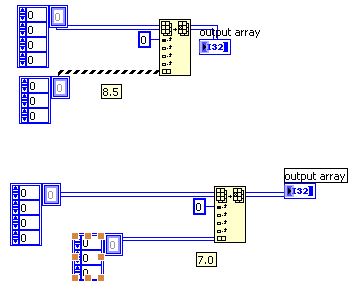
I attached a simple VI that shows my problem: I have a 4D array and want to replace a 3D subset. I always end up with an a error as shown in the pic. Maybe I'm getting something wrong at the moment, but it doesn't make any sense to me & the VI has been working flawlessly on the old system. what's wrong here?
01-03-2008 01:20 PM
- Mark as New
- Bookmark
- Subscribe
- Mute
- Subscribe to RSS Feed
- Permalink
- Report to a Moderator

 TCPlomp
01-03-2008 01:37 PM - edited 01-03-2008 01:38 PM
- Mark as New
- Bookmark
- Subscribe
- Mute
- Subscribe to RSS Feed
- Permalink
- Report to a Moderator
It works in LV 7.0.
And in 8.5 AFTER you resize the replacement part to be 4D and then hit <CTRL-Z> ( or undo)
The shot below shows it before the workaround.
Ton
Message Edited by TonP on 01-03-2008 08:38 PM
Nederlandse
 LabVIEW user groep www.lvug.nl
My LabVIEW Ideas
LabVIEW, programming like it should be!
01-03-2008 01:43 PM
- Mark as New
- Bookmark
- Subscribe
- Mute
- Subscribe to RSS Feed
- Permalink
- Report to a Moderator
do you suggest to add a dimension and then undo it? I am not sure if I get you right.
If so, try hitting the run button - you end up with a broken wire. I already noticed that, but it obviously was no use. 😞

 altenbach

01-03-2008 02:00 PM
- Mark as New
- Bookmark
- Subscribe
- Mute
- Subscribe to RSS Feed
- Permalink
- Report to a Moderator
TonP wrote:
And in 8.5 AFTER you resize the replacement part to be 4D and then hit( or undo)


 TCPlomp
01-03-2008 02:00 PM - edited 01-03-2008 02:01 PM
- Mark as New
- Bookmark
- Subscribe
- Mute
- Subscribe to RSS Feed
- Permalink
- Report to a Moderator

This is definitly a bug (I already posted it to the bug thread), you should contact your local NI rep, and submit the bug and get a CAR number.
Ton
Message Edited by TonP on 01-03-2008 09:01 PM
Nederlandse
LabVIEW user groep www.lvug.nlMy LabVIEW Ideas
LabVIEW, programming like it should be!
TCPlomp
01-03-2008 02:03 PM
- Mark as New
- Bookmark
- Subscribe
- Mute
- Subscribe to RSS Feed
- Permalink
- Report to a Moderator
Not on my system (Win XP, LV 8.5)
@altenbach wrote:
@TonP wrote:
And in 8.5 AFTER you resize the replacement part to be 4D and then hit( or undo)
Just hold downand press the run button. It'll fix itself. 🙂 (Ctrl+Run recompiles the VI)
Ton
Nederlandse
LabVIEW user groep www.lvug.nlMy LabVIEW Ideas
LabVIEW, programming like it should be!

 Darren
01-03-2008 05:00 PM - edited 01-03-2008 05:01 PM
- Mark as New
- Bookmark
- Subscribe
- Mute
- Subscribe to RSS Feed
- Permalink
- Report to a Moderator
This bug is currently listed on the LabVIEW 8.5 Known Issues webpage. The CAR number is 4CFADPDX.
-D
Message Edited by Darren on 01-03-2008 05:01 PM
