- Subscribe to RSS Feed
- Mark Topic as New
- Mark Topic as Read
- Float this Topic for Current User
- Bookmark
- Subscribe
- Mute
- Printer Friendly Page
uninstall application builder

 StefanoPantaleo
05-26-2010 08:20 AM
- Mark as New
- Bookmark
- Subscribe
- Mute
- Subscribe to RSS Feed
- Permalink
- Report to a Moderator
Hello, I have made an installation of LabView2009. Mine is a Full Dev System.
But the program installed also the Application Builder. I want to uninstall it as it isn't licensed.
How can I do it?
Thank you
Stefano

 muks
muks
05-26-2010 09:12 AM
- Mark as New
- Bookmark
- Subscribe
- Mute
- Subscribe to RSS Feed
- Permalink
- Report to a Moderator

 JÞB
JÞB
05-26-2010 09:28 AM
- Mark as New
- Bookmark
- Subscribe
- Mute
- Subscribe to RSS Feed
- Permalink
- Report to a Moderator
You can de-activate the app builder from the NI Liscense Manager
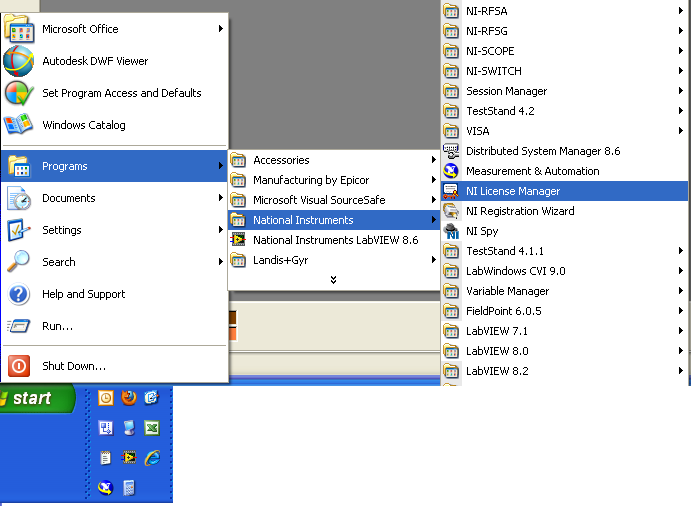
When the LM appears you can expand the LabVIEW 2009 Modules select the app builder and right-click

Click the De-activate.
If the App builder shows as any color other than the solid green you have no problem. NI likes to grant 30 trials-to encourage you to use the feature (and purchase it later as an up-grade.) It kind of sounds like you are in the 30 day use window. explore the feature
"Should be" isn't "Is" -Jay
05-26-2010 10:12 AM
- Mark as New
- Bookmark
- Subscribe
- Mute
- Subscribe to RSS Feed
- Permalink
- Report to a Moderator
Hi, thanks for the response.
My problem is that the Application Builder is not licensed so I can just select activate on the license manager, not deactivate.
And if I run the uninstaller I cannot see the components Application Builder in the Software National instruments menu on the control panel
 smjanows
12-29-2010 04:49 PM
- Mark as New
- Bookmark
- Subscribe
- Mute
- Subscribe to RSS Feed
- Permalink
- Report to a Moderator
I have the same problem. Application builder is showing in the licensing manager as in evauation mode. I do not have a license for it nor do I want to. I just want to remove / uninstall it. However in the NI Software control panel there is no sign of it. Is it listed by a differnt name or description?
Win 7 Pro, LabView 2010 Full Development System
JÞB
12-30-2010 09:11 AM
- Mark as New
- Bookmark
- Subscribe
- Mute
- Subscribe to RSS Feed
- Permalink
- Report to a Moderator
@smjanows wrote:
I have the same problem. Application builder is showing in the licensing manager as in evauation mode. I do not have a license for it nor do I want to. I just want to remove / uninstall it. However in the NI Software control panel there is no sign of it. Is it listed by a differnt name or description?
Win 7 Pro, LabView 2010 Full Development System
No problem- Its a "bonus" you have been granted a 30 evaluation of the application builder - standard with any LabVIEW FDS license. If you want to evaluate it GREAT, if not don't use it.
"Should be" isn't "Is" -Jay
smjanows
01-03-2011 09:06 AM
- Mark as New
- Bookmark
- Subscribe
- Mute
- Subscribe to RSS Feed
- Permalink
- Report to a Moderator
What part of "I just want to remove / uninstall it" do you not understand? When I launch Labview I get the licensing prompt come up (yes I know I can disable that, but in case other software gets installed I want to see it) which is annoying, and I will never use application builder with this installation. I do not want any references to it.
I didn't ask to install it, therefore as far as I am concerned it is malware / spyware since it installed itself without my permission. NI is to provide uninstall instructions to remove unwanted software.

 altenbach

01-03-2011 03:16 PM
- Mark as New
- Bookmark
- Subscribe
- Mute
- Subscribe to RSS Feed
- Permalink
- Report to a Moderator
A great benefit of the current behavior is the fact that it is easy to maintain by NI. One unified installer, unlimited install scenarios. There are many shared components, so surgically removing one module might not provide much benefit and could hamper stability.
If you feel strongly (and it looks like you do :o), please post an idea in the ideas exchange. If it get enough votes, NI might consider changing the current behavior in the future.
smjanows wrote:I didn't ask to install it, therefore as far as I am concerned it is malware / spyware since it installed itself without my permission. NI is to provide uninstall instructions to remove unwanted software.
You might want to look up the definition of malware/spyware before making such a statement. If you don't trust NI, don't install anything from NI. Simple as that. 😉 Is Windows malware because it also installed "notepad", even though you did not specifically ask for it?
What is the deeper reason here? Are you running out of disk space?
 smjanows
01-03-2011 05:07 PM
- Mark as New
- Bookmark
- Subscribe
- Mute
- Subscribe to RSS Feed
- Permalink
- Report to a Moderator
No disk space is not an issue. The issue is that we have various students who will be programming code on this machine and the only way to prevent them from using an application that will not be used or licensed is to not install it in the first place. Every other software we use gives us the option to install or not trial or unlicensed components.
Trust me with students in the mix, you can easily take 5 steps backwards because of something as poorly thought through as this. Of course that's probably the idea, so then you have to buy a license instead of redoing a month's worth of work. Then if you have it on one machine, you'll have to have it on all of them.
JÞB
01-04-2011 09:38 AM
- Mark as New
- Bookmark
- Subscribe
- Mute
- Subscribe to RSS Feed
- Permalink
- Report to a Moderator
@smjanows wrote:
No disk space is not an issue. The issue is that we have various students who will be programming code on this machine and the only way to prevent them from using an application that will not be used or licensed is to not install it in the first place. Every other software we use gives us the option to install or not trial or unlicensed components.
If this is a "Machine" license any user (but only one user at a time) can use LabVIEW including evaluating features during evaluation period. Any apps built would be "legal" and would not have Licensing issues.
You could uninstall LabVIEW: Reset the system clock to 31 days ago: reinstall LabVIEW: Launch LabVIEW: shut down-Reeboot: and reset the system clock. Eval period will be expired
"Should be" isn't "Is" -Jay
