- Subscribe to RSS Feed
- Mark Topic as New
- Mark Topic as Read
- Float this Topic for Current User
- Bookmark
- Subscribe
- Mute
- Printer Friendly Page
tpc-2012
Solved!
 chrisosw
09-15-2014 04:41 AM
- Mark as New
- Bookmark
- Subscribe
- Mute
- Subscribe to RSS Feed
- Permalink
- Report to a Moderator
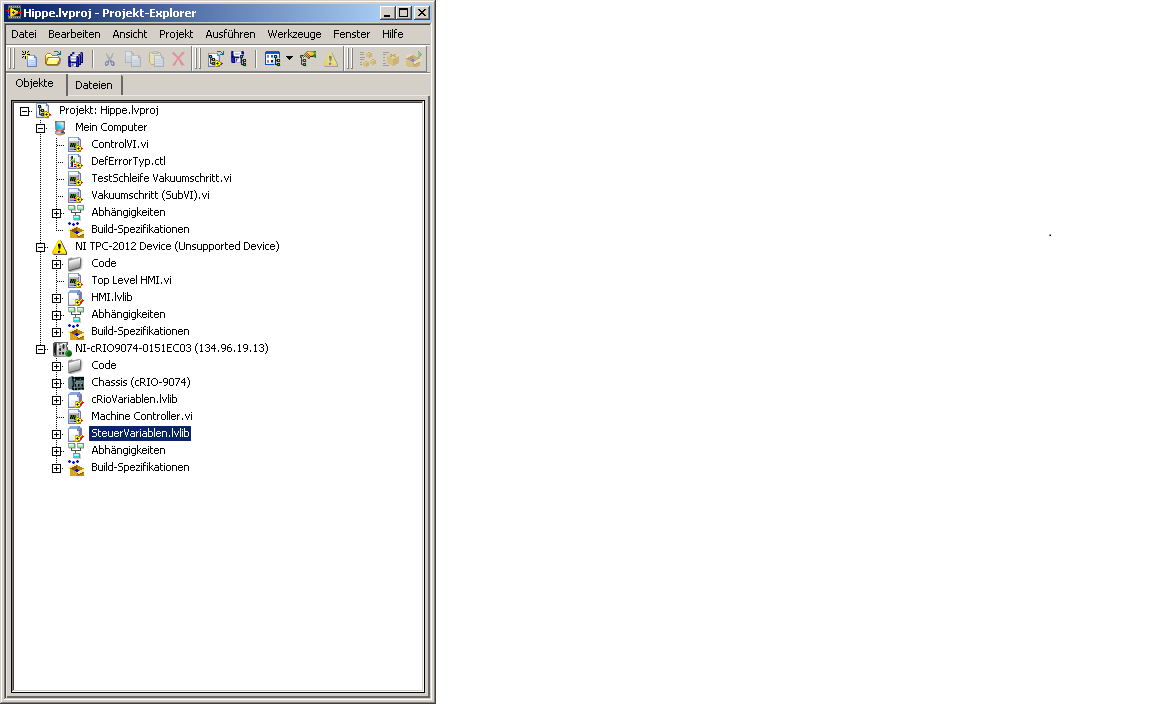
After updating to LV 2013 the tpc-2012 in my labview-Project is marked "unsupportede device". How can I change this? Must I updated the software? Where can I find actual software?
Thanks,
Christian
Solved! Go to Solution.
 nyc_(is_out_of_
09-15-2014 08:05 AM
- Mark as New
- Bookmark
- Subscribe
- Mute
- Subscribe to RSS Feed
- Permalink
- Report to a Moderator
What's a TPC 2012?
09-15-2014 08:10 AM
- Mark as New
- Bookmark
- Subscribe
- Mute
- Subscribe to RSS Feed
- Permalink
- Report to a Moderator
a touch-panel computer working with windows ce. In LV 2009 I have integrated it in my project and after the update to LV 2013 it don't work anymore.
Christian
nyc_(is_out_of_09-15-2014 08:35 AM
- Mark as New
- Bookmark
- Subscribe
- Mute
- Subscribe to RSS Feed
- Permalink
- Report to a Moderator
@chrisosw wrote:
a touch-panel computer working with windows ce. In LV 2009 I have integrated it in my project and after the update to LV 2013 it don't work anymore.
Christian
How exactly is it "integrated"?
09-15-2014 08:39 AM
- Mark as New
- Bookmark
- Subscribe
- Mute
- Subscribe to RSS Feed
- Permalink
- Report to a Moderator
it appears in the project file as for example the crio device. I can deploy files to it work with it as with any other device in the project tree.
09-15-2014 08:57 AM
- Mark as New
- Bookmark
- Subscribe
- Mute
- Subscribe to RSS Feed
- Permalink
- Report to a Moderator
look here
 nyc_(is_out_of_
09-15-2014
09:24 AM
- last edited on
03-28-2025
09:37 AM
by
 Content Cleaner
- Mark as New
- Bookmark
- Subscribe
- Mute
- Subscribe to RSS Feed
- Permalink
- Report to a Moderator
You will have to contact NI if you want to use the TPC-2012 with LabVIEW 2013 http://sine.ni.com/nips/cds/view/p/lang/en/nid/209858
Starting with LabVIEW 2014, it looks like the TPC-2012 will no longer be supported. http://www.ni.com/white-paper/5868/en/
09-15-2014 09:26 AM
- Mark as New
- Bookmark
- Subscribe
- Mute
- Subscribe to RSS Feed
- Permalink
- Report to a Moderator
that means no update for Labview anymore.
nyc_(is_out_of_09-15-2014 09:30 AM
- Mark as New
- Bookmark
- Subscribe
- Mute
- Subscribe to RSS Feed
- Permalink
- Report to a Moderator
@chrisosw wrote:
that means no update for Labview anymore.
That is what it looks like. They want you to upgrade to TPC-22xx for future versions of LabVIEW starting with LabVIEW 2014.
