text file + combobox
已解决!
 lord_nox
Hi guys,
I'm about to give up on this, I've searched all day about this and no one have the same thing that I want...
I have a txt file that is like this
Red red.png
Yellow yellow.png
Blue blue.png
...
N-Color ncolor.png
Using this file I want to create a combobox that its items and values have:
Items | Value
Red | red.png
Yellow | yellow.png
...etc
Right now I'm using Read text from File and Spreadsheet String to array but I can't figure out how to achieve this.
已解决! 转到解答。

here it is, is not very useful really...

 crossrulz

You want to write to the Strings And Values property. I also recommend using the Read Lines option on the Read Text File and then a FOR loop to parse each line (Match Pattern with a tab as the desired pattern).

There are only two ways to tell somebody thanks: Kudos and Marked Solutions
Unofficial Forum Rules and Guidelines
"Not that we are sufficient in ourselves to claim anything as coming from us, but our sufficiency is from God" - 2 Corinthians 3:5
Hi Crossrulz, I'm making the VI that you send me and I have a little issue (I think)
Is with the array that goes to the bundle, here is the picture...
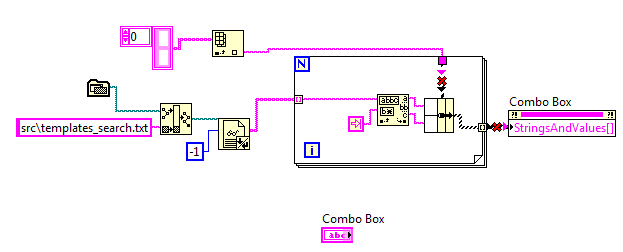
I create an Array Constant to the Index Array Input, can you please tell me what's wrong? thanks!
 GerdW
GerdW
Hi nox,
create this array constant directly from your combobox "strings&values" property node!
(This way it will be a typedefinition as shown in Crossrulz' snippet! Btw. you need an array of cluster as is written in the context help of this property node…)
GerdW
using LV2016/2019/2021 on Win10/11+cRIO, TestStand2016/2019

 Hooovahh


By the way there is no need to recreate the VI. The image CrossRulz has the VI embedded in it as a snippet.
https://knowledge.ni.com/KnowledgeArticleDetails?id=kA03q000000x2PkCAI&l=en-US
Unofficial Forum Rules and Guidelines
Get going with G! - LabVIEW Wiki.
17 Part Blog on Automotive CAN bus. - Hooovahh - LabVIEW Overlord
crossrulz
@lord_nox wrote:
I create an Array Constant to the Index Array Input, can you please tell me what's wrong? thanks!
Right-click on the StringsAndValues[] input and select Create->Constant. That will be the array of clusters you should be using.
As an aside, I always find Type Def of an array to be painful for a user. The contents of the array should be the Type Def (in this case, the String/Value pair cluster), making things a lot more modular and easier to use.
There are only two ways to tell somebody thanks: Kudos and Marked Solutions
Unofficial Forum Rules and Guidelines
"Not that we are sufficient in ourselves to claim anything as coming from us, but our sufficiency is from God" - 2 Corinthians 3:5
