- Subscribe to RSS Feed
- Mark Topic as New
- Mark Topic as Read
- Float this Topic for Current User
- Bookmark
- Subscribe
- Mute
- Printer Friendly Page
string control reset button (mac like)

 Sapiophile
09-13-2015 05:45 AM
- Mark as New
- Bookmark
- Subscribe
- Mute
- Subscribe to RSS Feed
- Permalink
- Report to a Moderator
Hi all,
Has anybody ever created a string input control that has an 'X' at the right corner to reset the values in the control. If yes, how to do? I do have plenty of filters for my data in my application and it would be sweet to have similar input reset button as with the most aple applications.
Thank u 🙂

 Bob_Schor

09-13-2015 09:19 AM
- Mark as New
- Bookmark
- Subscribe
- Mute
- Subscribe to RSS Feed
- Permalink
- Report to a Moderator
Hmm, an interesting idea. Why couldn't you create a Cluster with two elements, String (a String, naturally) and Reset (a Latching Boolean). I haven't tried making the appropriate Custom Control, but I can envision it ... . I'm sure someone will give it a shot ... (maybe even I).
Bob Schor
Bob_Schor
09-13-2015 09:34 AM
- Mark as New
- Bookmark
- Subscribe
- Mute
- Subscribe to RSS Feed
- Permalink
- Report to a Moderator
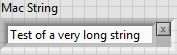
Hey, it works! It was even easier than I thought it would be -- it's just a cluster, with some appropriate sizing and arranging the elements (Auto-sizing) horizontally. I'm attaching the control -- feel free to play with it.
Bob Schor
09-13-2015 11:55 AM
- Mark as New
- Bookmark
- Subscribe
- Mute
- Subscribe to RSS Feed
- Permalink
- Report to a Moderator
Cool! Thank you! 🙂
 mikeporter
09-13-2015 01:38 PM
- Mark as New
- Bookmark
- Subscribe
- Mute
- Subscribe to RSS Feed
- Permalink
- Report to a Moderator
Mike...
Certified Professional Instructor
Certified LabVIEW Architect
LabVIEW Champion
"... after all, He's not a tame lion..."
For help with grief and grieving.
09-14-2015 12:57 AM
- Mark as New
- Bookmark
- Subscribe
- Mute
- Subscribe to RSS Feed
- Permalink
- Report to a Moderator

09-14-2015
03:23 AM
- last edited on
10-10-2025
06:18 PM
by
 Content Cleaner
- Mark as New
- Bookmark
- Subscribe
- Mute
- Subscribe to RSS Feed
- Permalink
- Report to a Moderator
Have a look at this tutorial for XControls:
Creating New Front Panel Objects with LabVIEW XControls - National Instruments
https://knowledge.ni.com/KnowledgeArticleDetails?id=kA03q000000x2jVCAQ&l=en-US
It explains it pretty nicely. There is also a LabVIEW Example that you can use as a starting point.
Refer to the Simple Dual Mode Thermometer XControl project in the labview\examples\Controls and Indicators\XControls\Dual Mode Thermometer directory.
Application Engineer
National Instruments
09-21-2015 07:26 AM
- Mark as New
- Bookmark
- Subscribe
- Mute
- Subscribe to RSS Feed
- Permalink
- Report to a Moderator
Hi all,
Thanks for your input. At the same time you recommended to so solve this task with xcontrols, I attended the lv adavnced architecture training and xcontrols are part of it. here's the solution:
Thank you all!
02-23-2017 04:17 AM
- Mark as New
- Bookmark
- Subscribe
- Mute
- Subscribe to RSS Feed
- Permalink
- Report to a Moderator
hi again,
the xcontrol I posted some time ago works like a charm, except the key focus. This seems to be an issue with any type of xcontrol that you cannot set the focus via the application anymore. I had the idea of a workaround to use methods, but I didn't got it to work. Any suggestions how to set the key focus of a xcontrol?
Thanks all!
mikeporter
02-23-2017 08:04 AM
- Mark as New
- Bookmark
- Subscribe
- Mute
- Subscribe to RSS Feed
- Permalink
- Report to a Moderator
What have you tried? I would be very surprised if the application key focus property worked. My expectation would be that it would give focus to the XControl as a whole, not controls within it.
Mike...
Certified Professional Instructor
Certified LabVIEW Architect
LabVIEW Champion
"... after all, He's not a tame lion..."
For help with grief and grieving.
