- Subscribe to RSS Feed
- Mark Topic as New
- Mark Topic as Read
- Float this Topic for Current User
- Bookmark
- Subscribe
- Mute
- Printer Friendly Page
show hidden indicator
Solved! nyc_(is_out_of_
07-11-2018 10:18 AM
- Mark as New
- Bookmark
- Subscribe
- Mute
- Subscribe to RSS Feed
- Permalink
- Report to a Moderator
LabVIEW 2015
Cannot figure out how to show a hidden indicator.
I am not sure how it is "hidden", but I cannot find it to edit it.
Double-clicking in the Block Diagram doesn't do anything.
Solved! Go to Solution.

 Gregory
07-11-2018 10:43 AM
- Mark as New
- Bookmark
- Subscribe
- Mute
- Subscribe to RSS Feed
- Permalink
- Report to a Moderator
Can you do this? If not, please post the VI
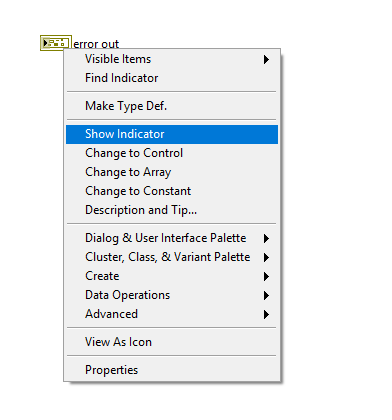

 altenbach

07-11-2018 11:11 AM
- Mark as New
- Bookmark
- Subscribe
- Mute
- Subscribe to RSS Feed
- Permalink
- Report to a Moderator
@nyc_(is_out_of_here) wrote:
I am not sure how it is "hidden", but I cannot find it to edit it.
Double-clicking in the Block Diagram doesn't do anything.
You probably already got the right answer above, but what does "doesn't do anything" actually mean? Does it at least pop the front panel when you double-click the terminal (that would already be "something" :D). Does it show an outline? Especially if the indicator is on another tab or covered with something else, LabVIEW sometimes has problems showing the control, even if it is not set to hidden.
 nyc_(is_out_of_
07-11-2018 12:07 PM
- Mark as New
- Bookmark
- Subscribe
- Mute
- Subscribe to RSS Feed
- Permalink
- Report to a Moderator
@Gregory wrote:
Can you do this? If not, please post the VI
Interestingly enough, when I right-click on the cluster, I get the Hide Indicator option.
So it looks like the indicator is not hidden and should be somewhere on the Front Panel.
nyc_(is_out_of_07-11-2018 12:09 PM - edited 07-11-2018 12:20 PM
- Mark as New
- Bookmark
- Subscribe
- Mute
- Subscribe to RSS Feed
- Permalink
- Report to a Moderator
@altenbach wrote:
@nyc_(is_out_of_here) wrote:
I am not sure how it is "hidden", but I cannot find it to edit it.
Double-clicking in the Block Diagram doesn't do anything.
You probably already got the right answer above, but what does "doesn't do anything" actually mean? Does it at least pop the front panel when you double-click the terminal (that would already be "something" :D). Does it show an outline? Especially if the indicator is on another tab or covered with something else, LabVIEW sometimes has problems showing the control, even if it is not set to hidden.
Yes, double-clicking on it, pops the Front Panel, but no outline or anything.
I am guessing that the indicator is somewhere on the front panel.
edit: no scrollbars on the front panel.
So I can't scroll anywhere.
I don't see the enable/disable scrollbar option in VI Properties.
edit #2:
It looks like he's got 4 panes set up on the front panel.
1. top
2. bottom
3. right
4. main
.
.
.

 GerdW
GerdW
07-11-2018 12:19 PM
- Mark as New
- Bookmark
- Subscribe
- Mute
- Subscribe to RSS Feed
- Permalink
- Report to a Moderator
Hi nyc,
I had something very similar with this XControl: fp items didn't pop up when double-clicking their terminal in the block diagram.
I solved the problem by making the scrollbars visible in the VI properties (and switching off the autoscaling set by the OP), then unhiding the controls, then unlocking them, then ungrouping them…
GerdW
using LV2016/2019/2021 on Win10/11+cRIO, TestStand2016/2019

 billko
07-11-2018 12:24 PM - edited 07-11-2018 12:26 PM
- Mark as New
- Bookmark
- Subscribe
- Mute
- Subscribe to RSS Feed
- Permalink
- Report to a Moderator
Theoretically, double-clicking the terminal should select the front panel object, even if it doesn't seem like it visually. What happens if you double-click the terminal, then when the front panel is displayed, use the arrow keys to try to move the object around?
Edit:
Oops, I'm late.
(Mid-Level minion.)
My support system ensures that I don't look totally incompetent.
Proud to say that I've progressed beyond knowing just enough to be dangerous. I now know enough to know that I have no clue about anything at all.
Humble author of the CLAD Nugget.
altenbach
07-11-2018 12:30 PM
- Mark as New
- Bookmark
- Subscribe
- Mute
- Subscribe to RSS Feed
- Permalink
- Report to a Moderator
What happens if you drag that terminal to the diagram of a new, empty VI? Can you see the control there?
altenbach
07-11-2018 12:33 PM
- Mark as New
- Bookmark
- Subscribe
- Mute
- Subscribe to RSS Feed
- Permalink
- Report to a Moderator
Does the front panel exceed the allowable range for the coordinates?
nyc_(is_out_of_07-11-2018 12:35 PM - edited 07-11-2018 12:36 PM
- Mark as New
- Bookmark
- Subscribe
- Mute
- Subscribe to RSS Feed
- Permalink
- Report to a Moderator
He's sized the front panel to 640x480.
There are at least 3 splitters dividing up the front panel.
This cluster indicator is in the top pane.
The top pane is sized to be about 10-20 pixels in height.
So, how I do minimal damage to this?
I want to change this cluster indicator. It isn't set up as TypeDef.
Sigh.
