- Subscribe to RSS Feed
- Mark Topic as New
- Mark Topic as Read
- Float this Topic for Current User
- Bookmark
- Subscribe
- Mute
- Printer Friendly Page
- « Previous
-
- 1
- 2
- Next »
send control image programmatically to clipboard

 RnDMonkey
05-22-2014 03:55 PM - edited 05-22-2014 03:57 PM
- Mark as New
- Bookmark
- Subscribe
- Mute
- Subscribe to RSS Feed
- Permalink
- Report to a Moderator
@tst wrote:
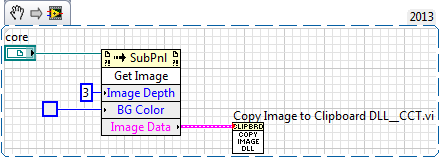
We used some free VIs from Rolf Kalbermatter to do this in the Code Capture Tool. The tool itself is released in 7.0 format, but the VIs will also work on older versions if back saved.
Yes, this was useful for me. I was banging my head against the problem until it occured to me that there must be a VI I could pull from the CCT to handle the saving of a LV Image to clipboard. The format is device-independant bitmap, which is just fine.
The VI is named "Copy Image to Clipboard DLL_CCT.vi".
Ryan R.
Ryan R.
R&D

 BowenM
05-22-2014 04:04 PM
- Mark as New
- Bookmark
- Subscribe
- Mute
- Subscribe to RSS Feed
- Permalink
- Report to a Moderator
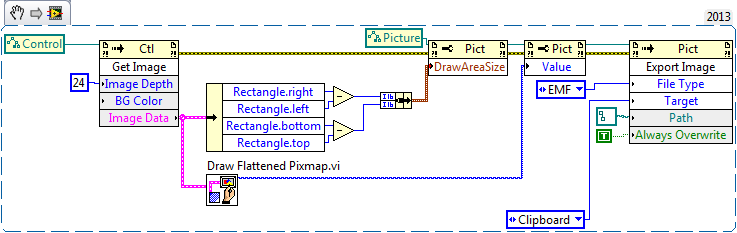
That should work for any control (or indicator) to capture the image and dump it to clipboard. It doesn't call the Windows API at all, or rely on any external DLLs.

 usrfrnly
07-18-2014 08:48 AM
- Mark as New
- Bookmark
- Subscribe
- Mute
- Subscribe to RSS Feed
- Permalink
- Report to a Moderator
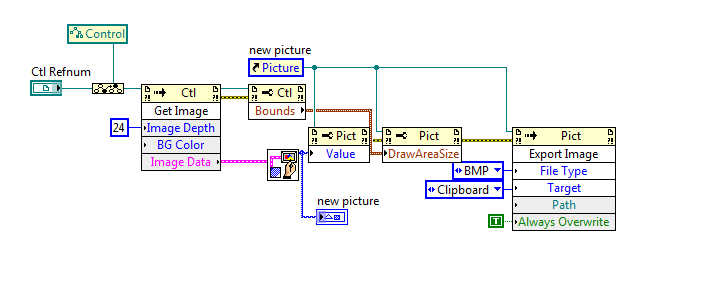
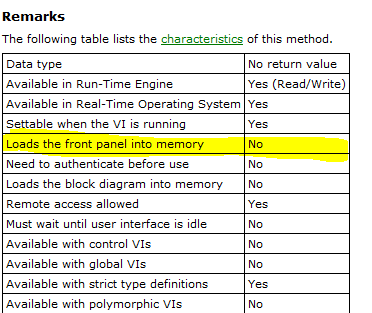
so I am using some very similar code but it won't function in a sub VI unless the front panel is opened. It works every time if the same code is in the top level VI, or if the front panel of the sub VI is open, but almost never works in a sub VI. High CPU load seems to decrease the likelihood of it working in a sub.
Anyone want to harbor a guess as to why?

 JÞB
JÞB
07-18-2014 09:31 AM
- Mark as New
- Bookmark
- Subscribe
- Mute
- Subscribe to RSS Feed
- Permalink
- Report to a Moderator
Anyone want to harbor a guess as to why?
Sure
.png)
"Should be" isn't "Is" -Jay
usrfrnly
07-18-2014 09:34 AM
- Mark as New
- Bookmark
- Subscribe
- Mute
- Subscribe to RSS Feed
- Permalink
- Report to a Moderator
Thanks. I knew it was indicative of some fundamental lack of knowledge on my part but if you can't reveal your ignorance, no one will bother to alleviate you of it.

 zou
zou
07-18-2014 10:45 AM
- Mark as New
- Bookmark
- Subscribe
- Mute
- Subscribe to RSS Feed
- Permalink
- Report to a Moderator
@BowenM wrote:
That should work for any control (or indicator) to capture the image and dump it to clipboard. It doesn't call the Windows API at all, or rely on any external DLLs.
However, this is NOT a true VECTOR image, but a EMF wrapped BMP file.
Get Image method returns PIXELs.
- « Previous
-
- 1
- 2
- Next »
