ni.com is currently undergoing scheduled maintenance.
Some services may be unavailable at this time. Please contact us for help or try again later.
- Subscribe to RSS Feed
- Mark Topic as New
- Mark Topic as Read
- Float this Topic for Current User
- Bookmark
- Subscribe
- Mute
- Printer Friendly Page
send F2 key using serial com connection
Solved!
 hod77
hod77
03-28-2018 06:39 AM
- Mark as New
- Bookmark
- Subscribe
- Mute
- Subscribe to RSS Feed
- Permalink
- Report to a Moderator
Hi ,
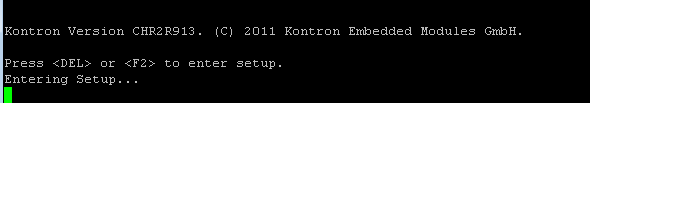
To enter to Bios in need press "F2" key .
how to enter F2 key using serial ?
is it string ?
Solved! Go to Solution.

 RavensFan

03-28-2018 06:58 AM
- Mark as New
- Bookmark
- Subscribe
- Mute
- Subscribe to RSS Feed
- Permalink
- Report to a Moderator
I don't think you can. An F2 key is not a byte or character you can send over the serial port. It is a special key that only the PC that is connected to that keyboard through a keyboard interface will know what to do with it.
You could try sending the byte 127 (decimal) which according to the ASCII table in the following link is the DEL byte:
What is this device you are connected to giving you this screen? I have doubts that even that would work. You are trying to enter the BIOS which is happening at the lowest levels of this PC. I don't think serial drivers would even be loaded yet. At the BIOS stage, just enough drivers have been loaded to handle the screen and the keyboard connected to it.
03-28-2018 07:05 AM - edited 03-28-2018 07:09 AM
- Mark as New
- Bookmark
- Subscribe
- Mute
- Subscribe to RSS Feed
- Permalink
- Report to a Moderator
I am trying to enter to Bios of Linux machine (CPU).
By SERIAL from my computer (7WIN)
RavensFan
03-28-2018 08:23 AM
- Mark as New
- Bookmark
- Subscribe
- Mute
- Subscribe to RSS Feed
- Permalink
- Report to a Moderator
And how would you do it if you weren't using the Win7 computer?
It would be by using a keyboard plugged into the Linux PC.
Serial <> Keyboard.

 RTSLVU
03-28-2018 09:14 AM - edited 03-28-2018 09:16 AM
- Mark as New
- Bookmark
- Subscribe
- Mute
- Subscribe to RSS Feed
- Permalink
- Report to a Moderator
@hod77 wrote:
I am trying to enter to Bios of Linux machine (CPU).
By SERIAL from my computer (7WIN)
Um...
I did your research for you and found this PS/2 Mouse/Keyboard Protocol the rest is up to you.
=== Engineer Ambiguously ===
========================
03-28-2018 09:29 AM
- Mark as New
- Bookmark
- Subscribe
- Mute
- Subscribe to RSS Feed
- Permalink
- Report to a Moderator
yes
i have 2 options :
1. Win7 -> serial ->linux
2. linux key board
RTSLVU
03-28-2018 09:38 AM - edited 03-28-2018 09:41 AM
- Mark as New
- Bookmark
- Subscribe
- Mute
- Subscribe to RSS Feed
- Permalink
- Report to a Moderator
@hod77 wrote:
yes
i have 2 options :
1. Win7 -> serial ->linux
2. linux key board
What's a "linux" keyboard and how does that differ from a "Windows" keyboard?
Another idea I just had would be to use an Arduino Leonardo configured as a USB HID keyboard, you might be able to use the Arduino softserial library to talk "through" the Arduino from your computer serial port.
=== Engineer Ambiguously ===
========================
04-09-2018 04:13 AM
- Mark as New
- Bookmark
- Subscribe
- Mute
- Subscribe to RSS Feed
- Permalink
- Report to a Moderator
i still have no solution 
 pincpanter
04-09-2018 04:31 AM
- Mark as New
- Bookmark
- Subscribe
- Mute
- Subscribe to RSS Feed
- Permalink
- Report to a Moderator
If the keyboard is an old PS/2 model, you need something like this product (disclaimer: it's only an example: I never heard any info about it).
I found it by searching "serial to ps2 keyboard converter" on Internet.
This is an example for an equivalent product converting to USB keyboard (not sure if it supports function keys).
I'm curious about what you would like to do once you entered the BIOS menu.
-------------------
LV 7.1, 2011, 2017, 2019, 2021
04-09-2018 06:54 AM
- Mark as New
- Bookmark
- Subscribe
- Mute
- Subscribe to RSS Feed
- Permalink
- Report to a Moderator
The solution is:
Change in the Putty settings to VT100.
Press the F2 key and then I got "OQ"
It should be added at the beginning 27 or 0x1B (ESC)

