- Subscribe to RSS Feed
- Mark Topic as New
- Mark Topic as Read
- Float this Topic for Current User
- Bookmark
- Subscribe
- Mute
- Printer Friendly Page
replace button dialog

 jspaarg
07-07-2008 07:05 PM
- Mark as New
- Bookmark
- Subscribe
- Mute
- Subscribe to RSS Feed
- Permalink
- Report to a Moderator
This is a large application with many sub VIs as well.
I am having no luck finding them programatically and have to search manually.
Does anyone know of a way to find them?
Thanks

 falkpl
07-07-2008 07:29 PM
- Mark as New
- Bookmark
- Subscribe
- Mute
- Subscribe to RSS Feed
- Permalink
- Report to a Moderator

 Karissa
07-07-2008 07:51 PM
- Mark as New
- Bookmark
- Subscribe
- Mute
- Subscribe to RSS Feed
- Permalink
- Report to a Moderator
Make sure you back up your project before running it though.
Systems Test Engineer
Certified LabVIEW Architect (CLA)
07-08-2008 08:40 AM
- Mark as New
- Bookmark
- Subscribe
- Mute
- Subscribe to RSS Feed
- Permalink
- Report to a Moderator
That seemed like it should work, but the NI core one-button dialog does not appear in the availablie VIs using the find function.
Thanks karissa, but I am using 7.1 and don't have a project.
I might try the script though.
Any other thoughts?
Thanks
07-08-2008 08:45 AM
- Mark as New
- Bookmark
- Subscribe
- Mute
- Subscribe to RSS Feed
- Permalink
- Report to a Moderator
If I search for the text "One", some of the one button dialogs appear in the results box, but others do not.
I can only assume that the search would yield the same issue.
Thanks anyway.

 Dennis_Knutson
07-08-2008 08:50 AM - edited 07-08-2008 08:51 AM
- Mark as New
- Bookmark
- Subscribe
- Mute
- Subscribe to RSS Feed
- Permalink
- Report to a Moderator
The find works for me with 7.1.
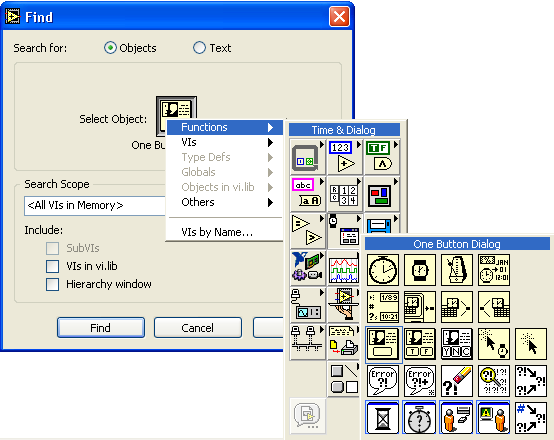
Message Edited by Dennis Knutson on 07-08-2008 07:51 AM

07-08-2008 08:54 AM
- Mark as New
- Bookmark
- Subscribe
- Mute
- Subscribe to RSS Feed
- Permalink
- Report to a Moderator
Dennis_Knutson
07-08-2008 09:09 AM
- Mark as New
- Bookmark
- Subscribe
- Mute
- Subscribe to RSS Feed
- Permalink
- Report to a Moderator
jspaarg wrote:
Thanks Dennis, I was foolishly looking under VIs and not functions (I guess that I qualify for the "Duh" award).
 falkpl
07-08-2008 10:33 AM
- Mark as New
- Bookmark
- Subscribe
- Mute
- Subscribe to RSS Feed
- Permalink
- Report to a Moderator
