- Subscribe to RSS Feed
- Mark Topic as New
- Mark Topic as Read
- Float this Topic for Current User
- Bookmark
- Subscribe
- Mute
- Printer Friendly Page
property node
Solved!
 ivymerci
06-29-2011 02:36 PM
- Mark as New
- Bookmark
- Subscribe
- Mute
- Subscribe to RSS Feed
- Permalink
- Report to a Moderator
Hi,
I have a question about the property node. The class is light blue and what does it mean? My Labview is 2010 and I can't find open VI object scripting. Do I need add-ons?
Thank you!

Solved! Go to Solution.

06-29-2011 02:39 PM
- Mark as New
- Bookmark
- Subscribe
- Mute
- Subscribe to RSS Feed
- Permalink
- Report to a Moderator
Light blue on properties and methods means that it is a LabVIEW scripting property that is not normally exposed. In LabVIEW 2010 and later, you can turn these nodes on by an option in the Tools>>Options>>VI Server dialog. You do not need another add-in.
Note that VIs which contain scripting properties will continue to show them, even if the LabVIEW they are being viewed in does not have the feature turned on.
- Tags:
- Property_Node
06-29-2011 02:52 PM
- Mark as New
- Bookmark
- Subscribe
- Mute
- Subscribe to RSS Feed
- Permalink
- Report to a Moderator
Thank you DFGray.
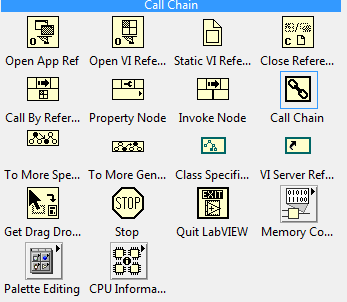
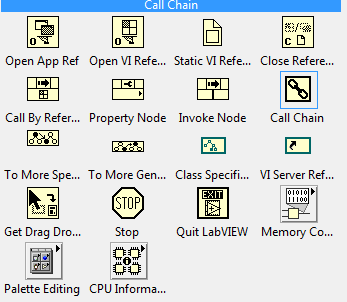
I am new to Labview. I have turned it on(figure 1). Now I can find the light blue property. But I still can't find the Open VI Object(figure 2). Could you please help me with that?


06-29-2011 02:53 PM
- Mark as New
- Bookmark
- Subscribe
- Mute
- Subscribe to RSS Feed
- Permalink
- Report to a Moderator
I get it. Thank you!


 Darin.K
06-29-2011 02:55 PM
- Mark as New
- Bookmark
- Subscribe
- Mute
- Subscribe to RSS Feed
- Permalink
- Report to a Moderator
Open VI object is inside the LV Scripting Subpalette at the bottom of your figure 2.

 paul_a_cardinal
06-30-2011 08:44 AM
- Mark as New
- Bookmark
- Subscribe
- Mute
- Subscribe to RSS Feed
- Permalink
- Report to a Moderator
There are also tan and red property nodes (see attachment).
I don't know what tan means, but red means the use of that property is deprecated.

 RavensFan

06-30-2011 09:35 AM
- Mark as New
- Bookmark
- Subscribe
- Mute
- Subscribe to RSS Feed
- Permalink
- Report to a Moderator
Actually, I would call those yellow property nodes.
Yellow is the color for normal property nodes.
paul_a_cardinal06-30-2011 10:03 AM
- Mark as New
- Bookmark
- Subscribe
- Mute
- Subscribe to RSS Feed
- Permalink
- Report to a Moderator
Yes, I am aware that yellow is the color for normal property nodes.
I also know the difference between yellow and tan.


 tst
tst
06-30-2011 10:24 AM
- Mark as New
- Bookmark
- Subscribe
- Mute
- Subscribe to RSS Feed
- Permalink
- Report to a Moderator
Brown is for properties which are marked as private.
___________________
Try to take over the world!
RavensFan
06-30-2011 10:57 AM - edited 06-30-2011 11:00 AM
- Mark as New
- Bookmark
- Subscribe
- Mute
- Subscribe to RSS Feed
- Permalink
- Report to a Moderator
I had never seen the brown nodes before.
In the VI you posted, it only showed blue, yellow, and red when I opened it on my PC. That's why I thought you were calling the yellow nodes tan. I don't know why the nodes have a different color on mine.

![Property_Colors[1]_BD.png 3 KB](/ni/attachments/ni/170/585863/1/Property_Colors%5B1%5D_BD.png)
