- Subscribe to RSS Feed
- Mark Topic as New
- Mark Topic as Read
- Float this Topic for Current User
- Bookmark
- Subscribe
- Mute
- Printer Friendly Page
progress bar [case flat sequence]
 hlod
hlod
12-26-2011 12:45 PM
- Mark as New
- Bookmark
- Subscribe
- Mute
- Subscribe to RSS Feed
- Permalink
- Report to a Moderator
I have case and inside this "flat sequence"; I need that progress bar will 'started' when I started case strocture and 'finish' when program comes to end of flat sequence; Any example for this; I was looking for MarqueeProgressBar...but it's not for me; I want bar like it's installing software...
Rookie; LV 2011 on WIN 7

 altenbach

12-26-2011 12:49 PM
- Mark as New
- Bookmark
- Subscribe
- Mute
- Subscribe to RSS Feed
- Permalink
- Report to a Moderator
Show us some actual code instead of ambiguous words. How many frames?
(Maybe you cound ditch the flat sequence and replace it with a FOR loop iterating over the sequential states.)

12-26-2011 01:03 PM - edited 12-26-2011 01:06 PM
- Mark as New
- Bookmark
- Subscribe
- Mute
- Subscribe to RSS Feed
- Permalink
- Report to a Moderator
Ok, no I cannot change anything, because this operating with some device via rs232 and it's now working perfect;
I delete some block, you see just structure, for test purpose you can add simple time delay;
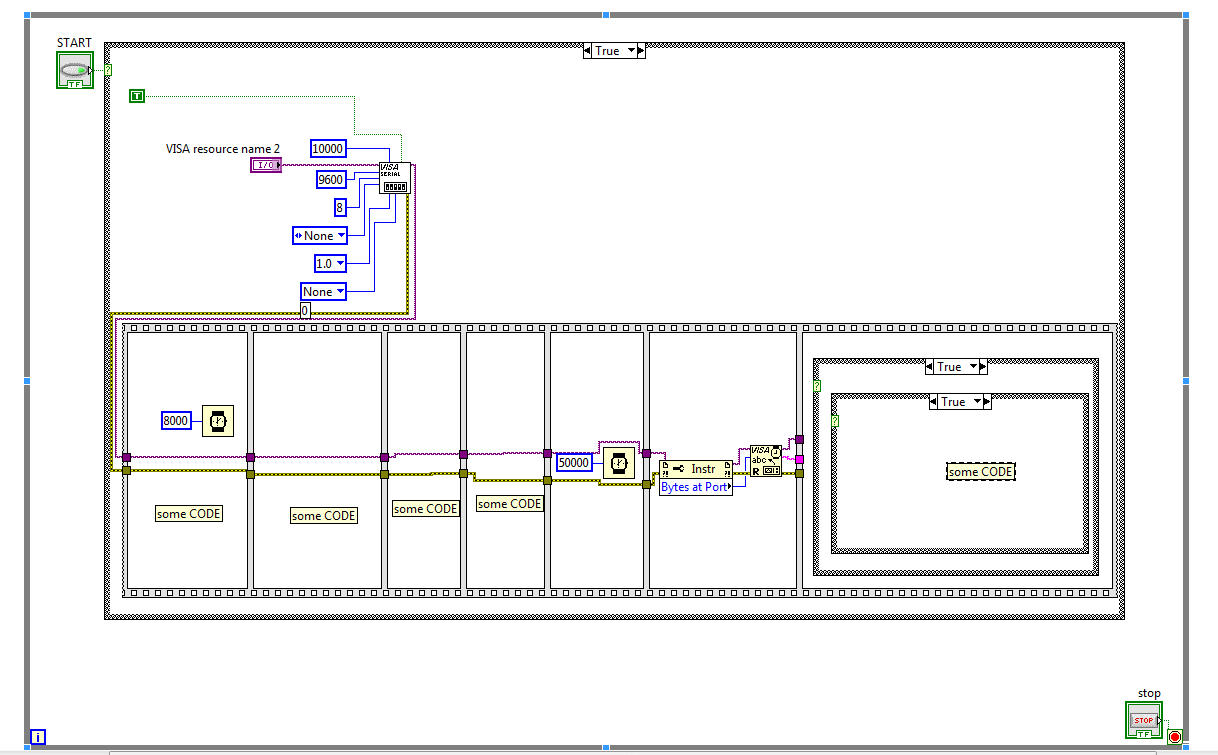
Rookie; LV 2011 on WIN 7
altenbach
12-26-2011 01:10 PM
- Mark as New
- Bookmark
- Subscribe
- Mute
- Subscribe to RSS Feed
- Permalink
- Report to a Moderator
It is typically a really bad idea to block the main loop with long delays. Right now, the VI is unresponsive for extended time periods and cannot be stopped.
@hlod wrote:
Ok, no I cannot change anything, beacuse this operating with some device via rs232 and it's now working perfect;
It would be easy to re-architect the code without changing the basic operations. Even if it is working perfectly, it does not mean that the code is perfect. 😄
A dumb bandaid solution would be to place diagram constants and write to local variables of the progress bar in each frame.
