- Subscribe to RSS Feed
- Mark Topic as New
- Mark Topic as Read
- Float this Topic for Current User
- Bookmark
- Subscribe
- Mute
- Printer Friendly Page
pressure sensor with arduino and labview

 ihebz1
04-19-2022 07:16 PM
- Mark as New
- Bookmark
- Subscribe
- Mute
- Subscribe to RSS Feed
- Permalink
- Report to a Moderator
heyyy i got a project with a pressure sensor using labview and arduino and i'am still new with it anyone made a project like that before i just need some code examples

 GerdW
GerdW

04-20-2022 01:10 AM
- Mark as New
- Bookmark
- Subscribe
- Mute
- Subscribe to RSS Feed
- Permalink
- Report to a Moderator
Hi ihebz,
@ihebz1 wrote:
heyyy i got a project with a pressure sensor using labview and arduino and i'am still new with it anyone made a project like that before i just need some code examples
Did you search the forum for relevant threads? There are lots of threads about communicating with an Arduino or using LINX…
What have you tried so far?
Where are you stuck?
Which LabVIEW version (year, bitness, license type) do you use?
Do you know how to connect your sensor to your Arduino?
Does that sensor work as expected? Did you verify this using other measurements devices (like DMM)?
GerdW
using LV2016/2019/2021 on Win10/11+cRIO, TestStand2016/2019

 LLindenbauer
04-20-2022 07:32 AM - edited 04-20-2022 07:33 AM
- Mark as New
- Bookmark
- Subscribe
- Mute
- Subscribe to RSS Feed
- Permalink
- Report to a Moderator
@ihebz1 wrote:
heyyy i got a project with a pressure sensor using labview and arduino and i'am still new with it anyone made a project like that before i just need some code examples
Cut the project in half:
- Read a sensor using Arduino and send the value over a serial communication line
- Read a serial communication line using LabVIEW and display it to a human being
The first task is easily accomplished by searching the part number of the sensor and perusing the Arduino example code that is almost certainly offered there. The Arduino IDE contains example code for sensors and serial communication IIRC.
In its path to the solution, the second task is almost identical, since LabVIEW contains a code example library where you can find well-documented examples for most common tasks. However, for serial communication, I would recommend heading over to LabVIEW Wiki and check out this talk: https://labviewwiki.org/wiki/VIWeek_2020/Proper_way_to_communicate_over_serial

 RTSLVU
04-20-2022 09:08 AM - edited 04-20-2022 09:14 AM
- Mark as New
- Bookmark
- Subscribe
- Mute
- Subscribe to RSS Feed
- Permalink
- Report to a Moderator
Honestly the easiest way to achieve this is to:
- Write the Arduino code using the Arduino native language to read the sensor and send the value out the Arduino's serial port.
- There are probably plenty of example Arduino code out there for this
- Get it working using the Arduino IDE serial monitor or any other serial terminal like Terra-Term
- Write a LabVIEW program to receive and display the data using VISA just like any other instrument on a serial port.
- This video will help with that part VIWeek 2020/Proper way to communicate over serial
- Take it further...
- Instead of the Arduino just constantly spitting out values make it respond to a query
- Add other sensors
If you want or must use LINX then there might not be a library for your exact sensor, but most sensors output a voltage proportional to the value of what they are sensing. Use an analog input and the analog read vi in LINX and scale the voltage to pressure. The scaling factor should be in the manual for the sensor.
=== Engineer Ambiguously ===
========================
04-21-2022 06:43 PM
- Mark as New
- Bookmark
- Subscribe
- Mute
- Subscribe to RSS Feed
- Permalink
- Report to a Moderator
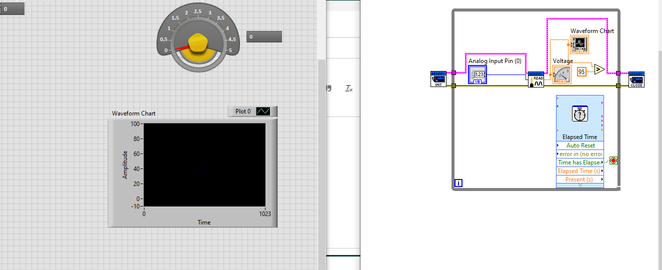
i'am trying to see a pressure of a pump it it is higher or below 95KPA
LLindenbauer
04-22-2022 03:35 AM
- Mark as New
- Bookmark
- Subscribe
- Mute
- Subscribe to RSS Feed
- Permalink
- Report to a Moderator
i'am trying to see a pressure of a pump it it is higher or below 95KPA
What is your sensor? The number of the item or the ordering information.
