ni.com is currently undergoing scheduled maintenance.
Some services may be unavailable at this time. Please contact us for help or try again later.
- Subscribe to RSS Feed
- Mark Topic as New
- Mark Topic as Read
- Float this Topic for Current User
- Bookmark
- Subscribe
- Mute
- Printer Friendly Page
number presentation
Solved!
 Brainiac91
02-20-2018 04:35 AM
- Mark as New
- Bookmark
- Subscribe
- Mute
- Subscribe to RSS Feed
- Permalink
- Report to a Moderator
Hi everyone
currently i'm working on a project with a high measurement resolution , and i'm facing an issue that labview does not take in consideration all of the digits. i changed the indicator representation to extend precision but nothing changed. here's an exemple , when the measuremet is 512,0029875 the labview take only 512.003 , is there a solution to manipulate all of the digits?? thnks
Solved! Go to Solution.
- Tags:
- Measurement

 GerdW
GerdW

02-20-2018 04:38 AM
- Mark as New
- Bookmark
- Subscribe
- Mute
- Subscribe to RSS Feed
- Permalink
- Report to a Moderator
Hi Brainiac,
maybe all you need to do is to change the formatting of the indicator?
("Formatting" is a different setting than "representation"!)
GerdW
using LV2016/2019/2021 on Win10/11+cRIO, TestStand2016/2019
02-20-2018 04:54 AM - edited 02-20-2018 04:56 AM
- Mark as New
- Bookmark
- Subscribe
- Mute
- Subscribe to RSS Feed
- Permalink
- Report to a Moderator
Hi GerdW,
what do u mean by formatting?? the function in the string palette??? i need the measurement as a number not as a string

 Yamaeda
02-20-2018 04:58 AM
- Mark as New
- Bookmark
- Subscribe
- Mute
- Subscribe to RSS Feed
- Permalink
- Report to a Moderator
R-click numeric Indicator -> Properties -> Display format tab.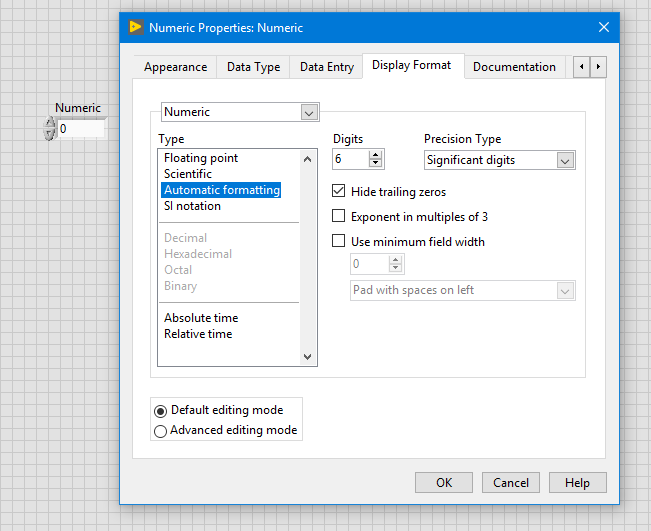
/Y

