ni.com is currently undergoing scheduled maintenance.
Some services may be unavailable at this time. Please contact us for help or try again later.
- Subscribe to RSS Feed
- Mark Topic as New
- Mark Topic as Read
- Float this Topic for Current User
- Bookmark
- Subscribe
- Mute
- Printer Friendly Page
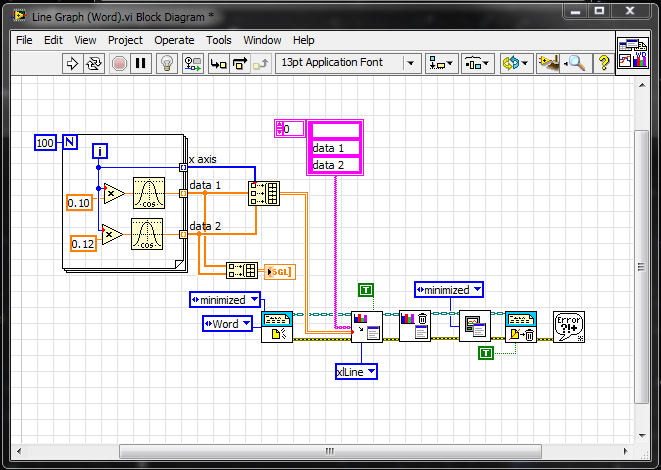
minimize word graph

 JimN
JimN
12-12-2014 04:38 PM
- Mark as New
- Bookmark
- Subscribe
- Mute
- Subscribe to RSS Feed
- Permalink
- Report to a Moderator

 natasftw
12-12-2014 04:49 PM
- Mark as New
- Bookmark
- Subscribe
- Mute
- Subscribe to RSS Feed
- Permalink
- Report to a Moderator
I was willing to help until you decided to split your question into 4 different spoilers to hide it from me.
If you want help, you should make it your mission to make it as easy as possible for others to help you.

 altenbach

12-12-2014 05:35 PM
- Mark as New
- Bookmark
- Subscribe
- Mute
- Subscribe to RSS Feed
- Permalink
- Report to a Moderator
Since you posted in the LabVIEW forum, your post should be related to LabVIEW in some way.
I don't see it. Please explain.

12-12-2014 06:38 PM
- Mark as New
- Bookmark
- Subscribe
- Mute
- Subscribe to RSS Feed
- Permalink
- Report to a Moderator
labview report generation. word update graph. I do not want to see it on the screen while it updates.

 RTSLVU
12-12-2014 08:39 PM
- Mark as New
- Bookmark
- Subscribe
- Mute
- Subscribe to RSS Feed
- Permalink
- Report to a Moderator
=== Engineer Ambiguously ===
========================
12-12-2014 11:11 PM
- Mark as New
- Bookmark
- Subscribe
- Mute
- Subscribe to RSS Feed
- Permalink
- Report to a Moderator
Thanks, i just added a close graph after each update graph instead of once at the end.
thanks for the help.
