- Subscribe to RSS Feed
- Mark Topic as New
- Mark Topic as Read
- Float this Topic for Current User
- Bookmark
- Subscribe
- Mute
- Printer Friendly Page
- « Previous
-
- 1
- 2
- Next »
labview runtime unwork


10-22-2014 10:10 AM
- Mark as New
- Bookmark
- Subscribe
- Mute
- Subscribe to RSS Feed
- Permalink
- Report to a Moderator
that true abut Ohm's law.
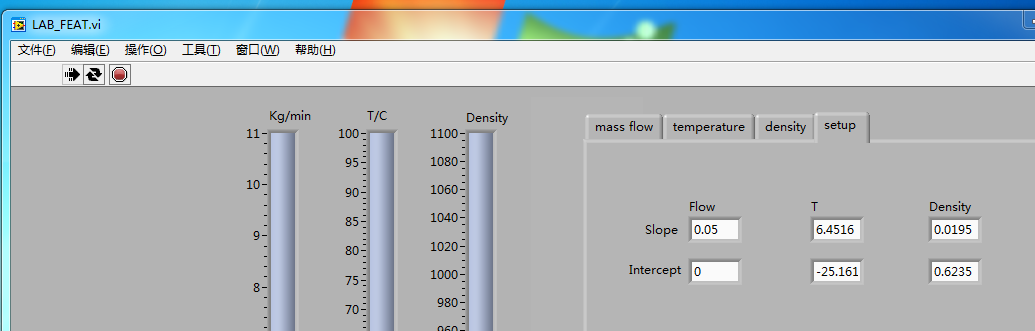
but the linear function analytic, y=ax + b.
it says one 4~20mA means 4~100℃ temperature , one 4~20mA means 700~1100kg/l density.
4≈6.4516*4-25,161 ,100≈6.4516*20-25.161
There nothing show about ohm, besides current signal 4~20mA tramsfor to physical value 4~100℃ ,that's my question
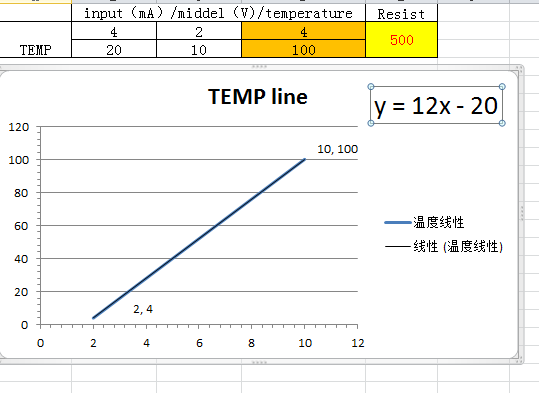
If the vi scaling voltage to temperature value ,the line should be like this

 JÞB
JÞB
10-22-2014 10:34 AM - edited 10-22-2014 10:37 AM
- Mark as New
- Bookmark
- Subscribe
- Mute
- Subscribe to RSS Feed
- Permalink
- Report to a Moderator
So, Why not apply the DAQmx Scale to the Channel? Right in MAX!
And WHAT ARE YOU DOING?  Run Contineuosly is a debugging tool! do not use this for a built exe. things just plain won't work right.
"Should be" isn't "Is" -Jay
10-22-2014 11:11 AM
- Mark as New
- Bookmark
- Subscribe
- Mute
- Subscribe to RSS Feed
- Permalink
- Report to a Moderator
sorry, this builds can't be used for application?
but I only got this. what is needed if the application equipmets go to running? can you give some more details?


 dkfire
10-22-2014 11:25 AM
- Mark as New
- Bookmark
- Subscribe
- Mute
- Subscribe to RSS Feed
- Permalink
- Report to a Moderator
Who made this application for you?
And why are you not asking these question the whom that developed the application?
10-22-2014 06:16 PM
- Mark as New
- Bookmark
- Subscribe
- Mute
- Subscribe to RSS Feed
- Permalink
- Report to a Moderator
hi Jeff·Þ·Bohrer:
can you give any advice about this VI? I just need it works correct. On monday, i have run the flow meter sending out signals ,but on PC the bar chart isn't response real value of temp of density.
and is there something else my co-worker overseas need to offer me ? except the install EXE programe.
tanks a lot.

 Hooovahh

10-23-2014 07:22 AM
- Mark as New
- Bookmark
- Subscribe
- Mute
- Subscribe to RSS Feed
- Permalink
- Report to a Moderator
Oh where to start.
@ggou wrote:
can you give any advice about this VI?
You don't have a VI or at least after reading it sounds like you just have an installer, no source so there isn't really anything we can give you advice about other than to work with who ever has the source code.
@ggou wrote:
I just need it works correct. On monday,
Again talk to someone who has the source or has a clue on what the program is doing.
@ggou wrote:
i have run the flow meter sending out signals ,but on PC the bar chart isn't response real value of temp of density.
How are the values incorrect? Are they too high too low? Do they always read 0? Does it not update at all? Is there errors? Is there error handling in the program? Is the hardware working properly in MAX?
@ggou wrote:
and is there something else my co-worker overseas need to offer me ? except the install EXE programe.
tanks a lot.
Yes your co-worker overseas needs to offer you support. You are giving us very little information. If I asked a mechanic to fix my car, I'm obligated to give him my car. Without the source code we can offer very little other than ask questions about your setup.
Also you may want to read this, particularly the Posting a Question section.
Unofficial Forum Rules and Guidelines
Get going with G! - LabVIEW Wiki.
17 Part Blog on Automotive CAN bus. - Hooovahh - LabVIEW Overlord
JÞB
10-23-2014 10:00 AM
- Mark as New
- Bookmark
- Subscribe
- Mute
- Subscribe to RSS Feed
- Permalink
- Report to a Moderator
@ggou wrote:
hi @JÞB:
can you give any advice about this VI? I just need it works correct. On monday, i have run the flow meter sending out signals ,but on PC the bar chart isn't response real value of temp of density.
and is there something else my co-worker overseas need to offer me ? except the install EXE programe.
tanks a lot.
Yes I can offer advice, if you need it up and running by Monday abandon your overseas co-worker. He is not a trained developer and has too much to unlearn to get you going in the right direction.
Next install LabVIEW and NI Device drivers. An evaluation version would work fine Monday is much closer than 45 days away!
Launch the LabVIEW Development enviornment and you'll see the Getting Started Window:
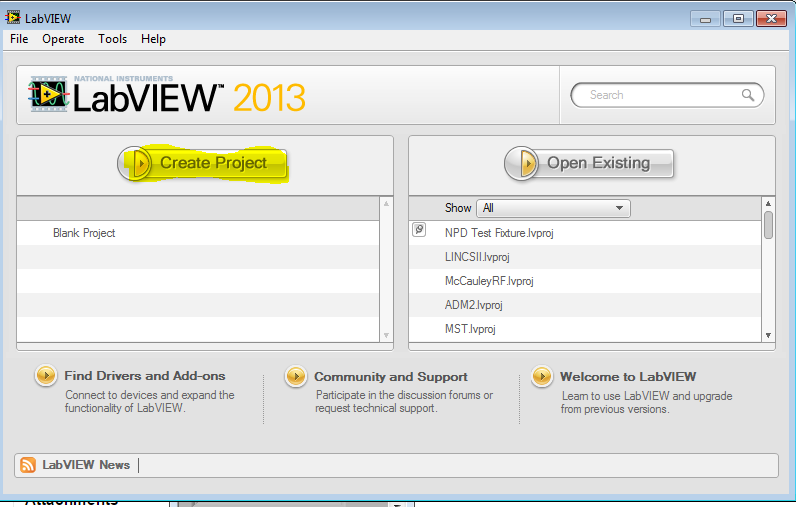
Select Create Project:
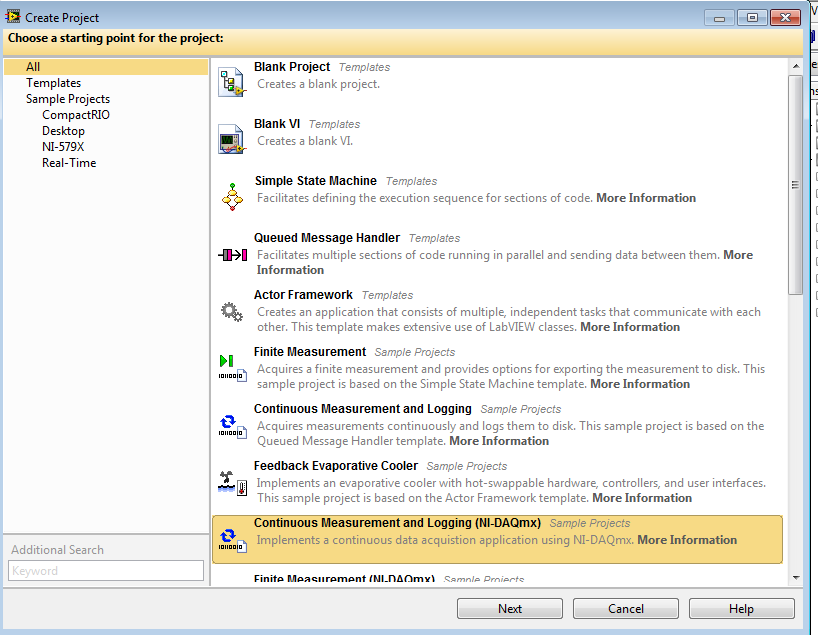
Select Continuous Measurement and Logging (NI-DAQmx)
See that Bold "More Information" Click it so you will learn the concepts your coworker did not understand.
Add your DAQmx Tasks and Scales to the new project
Use the bookmark manager (Menu View>>Bookmark Manager) to find the bookmarks in the project read the comments and follow those instructions.
Install +4 Hrs If you don't know LabVIEW. My best time is 25 minutes from the Getting Started Window to finished project with exe build spec and installer build spec (I had hardware on my desk)
"Should be" isn't "Is" -Jay
JÞB
10-23-2014 10:36 AM - edited 10-23-2014 10:38 AM
- Mark as New
- Bookmark
- Subscribe
- Mute
- Subscribe to RSS Feed
- Permalink
- Report to a Moderator
I'll even sweeten the deal.
Install LabVIEW, Device Drivers
Create the project from template.
Add the DAQmx Tasks and Scales you need to the project.
Add some documentation to the project containing what hardware is attached to your system, a *.txt file is fine!
Zip it up and attach it to this thread.
I'll take the few minutes to integrate the DAQmx stuff into the rest of the code this weekend and send it back to you polished "Jinging" it with comentary.
The Jing will make a nice intro to the next LabVIEW User's Group meeting I attend! it should be valuable for other posters to this forum and the project (done on time and with little effort) should give your boss a good idea about the business benift to investing in training and certification.
"Should be" isn't "Is" -Jay
10-23-2014 06:53 PM
- Mark as New
- Bookmark
- Subscribe
- Mute
- Subscribe to RSS Feed
- Permalink
- Report to a Moderator
thank you very much . your warmheart , professional impressed me .thanks agian
Hooovahh
10-24-2014 07:22 AM - edited 10-24-2014 07:22 AM
- Mark as New
- Bookmark
- Subscribe
- Mute
- Subscribe to RSS Feed
- Permalink
- Report to a Moderator
Thanks are given with Kudos and Marking solutions. Read the When You Get the Help You Want section.
Unofficial Forum Rules and Guidelines
Get going with G! - LabVIEW Wiki.
17 Part Blog on Automotive CAN bus. - Hooovahh - LabVIEW Overlord
- « Previous
-
- 1
- 2
- Next »
