ni.com is currently undergoing scheduled maintenance.

Some services may be unavailable at this time. Please contact us for help or try again later.

LabVIEW

cancel
Showing results for 
Search instead for 
Did you mean: 

labels locked by default (feature?)

Solved!
Go to solution

Just upgraded to LV 2010 and forgot to uncheck this option for block diagrams. I created an indicator and could not move its label to the side, so I went back to Tools>>Options>>Block Diagram and unchecked it...

but the label would still not move!

I then created a new indicator, and the label was of course movable.

That sounds like a strange "feature". You either want ALL labels to be locked or none, not just the new ones. Or at least offer an option!

My 2 cts,

X.


PS: I did not check whether that was the case in previous versions but I assume so.

0 Kudos
Message 1 of 2
(2,738 Views)
Solution
Accepted by topic author X.

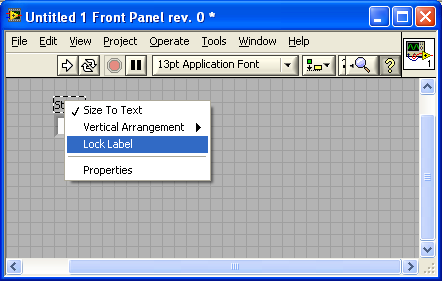
The state of locking of a label's position is persistant.  However you can change the setting by selecting the label and right click for this pop-up.


Lock.PNG


"Should be" isn't "Is" -Jay
Message 2 of 2
(2,707 Views)