ni.com is currently undergoing scheduled maintenance.
Some services may be unavailable at this time. Please contact us for help or try again later.
- Subscribe to RSS Feed
- Mark Topic as New
- Mark Topic as Read
- Float this Topic for Current User
- Bookmark
- Subscribe
- Mute
- Printer Friendly Page
intensity graph

 aguechmed
01-26-2017 04:03 PM
- Mark as New
- Bookmark
- Subscribe
- Mute
- Subscribe to RSS Feed
- Permalink
- Report to a Moderator
Hey, I'm new to labview and am hoping someone can help me, i need to draw this using only the intensity graph please if someone know how to draw if leave a comment

 GerdW
GerdW

01-27-2017 01:27 AM
- Mark as New
- Bookmark
- Subscribe
- Mute
- Subscribe to RSS Feed
- Permalink
- Report to a Moderator
Hi aguemech,
i need to draw this using only the intensity graph
Who gave you this order/requirement? Can't you ask them?
General advice on your screenshot:
- I would use a XY graph or a 2DPictureIndicator, both allow to "draw" lines and circles.
- Do you also need to draw those axis and "80mm" texts? Then use a 2DPictureIndicator as it provide ready-to-use functions…
- If you insist on using an intensity graph: create a 2D array with your "image" and set the elements as needed. You need to implement your own "drawing" routines!
GerdW
using LV2016/2019/2021 on Win10/11+cRIO, TestStand2016/2019

 Henrik_Volkers
01-27-2017 02:12 AM
- Mark as New
- Bookmark
- Subscribe
- Mute
- Subscribe to RSS Feed
- Permalink
- Report to a Moderator
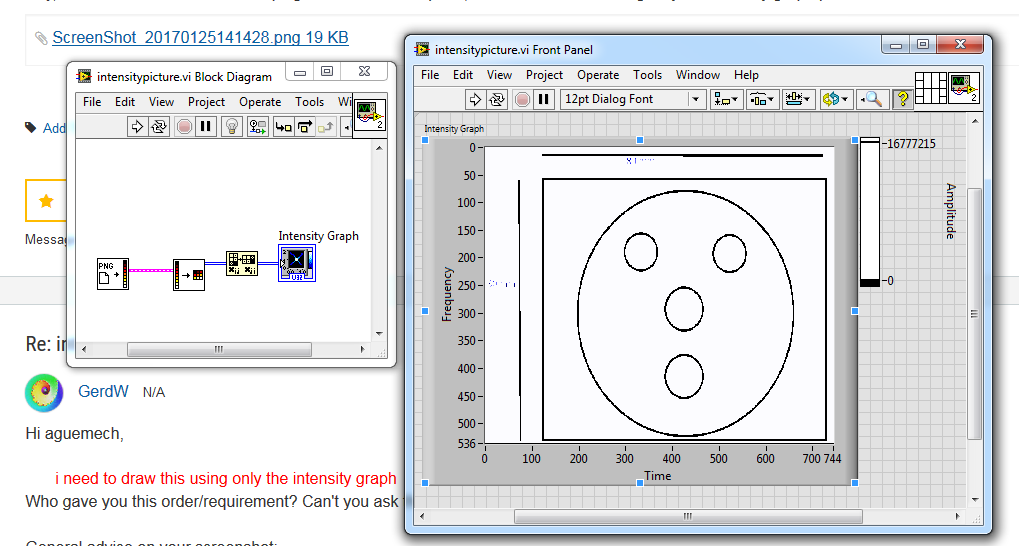
Use the 2D picture vis to create the picture (or use the one provided as a constant or load it 🙂 )
and wire it into the intensity graph, use the properties of the graph to scale it 🙂
(bonus: read the screen properties and really scale it to 80mm :D)
and no need to cut the picture , just change the xy ranges 😄

Henrik
LV since v3.1
“ground” is a convenient fantasy
'˙˙˙˙uıɐƃɐ lɐıp puɐ °06 ǝuoɥd ɹnoʎ uɹnʇ ǝsɐǝld 'ʎɹɐuıƃɐɯı sı pǝlɐıp ǝʌɐɥ noʎ ɹǝqɯnu ǝɥʇ'
