ni.com is currently undergoing scheduled maintenance.
Some services may be unavailable at this time. Please contact us for help or try again later.
- Subscribe to RSS Feed
- Mark Topic as New
- Mark Topic as Read
- Float this Topic for Current User
- Bookmark
- Subscribe
- Mute
- Printer Friendly Page
increment HOW TO help
 hlod
hlod
08-05-2010 09:16 AM - edited 08-05-2010 09:17 AM
- Mark as New
- Bookmark
- Subscribe
- Mute
- Subscribe to RSS Feed
- Permalink
- Report to a Moderator
Well can anyone help me:
need to increase number from 1 to 10, for each 1 second delay; and output must be double("orange wire")!
Can anyone make scheme?
Rookie; LV 2011 on WIN 7

 johnsold
08-05-2010 09:21 AM
- Mark as New
- Bookmark
- Subscribe
- Mute
- Subscribe to RSS Feed
- Permalink
- Report to a Moderator
This should be fairly straightforward. What have you tried? What else is going on in your program during the delays?
Hint: shift register.
Lynn
08-05-2010 09:26 AM - edited 08-05-2010 09:27 AM
- Mark as New
- Bookmark
- Subscribe
- Mute
- Subscribe to RSS Feed
- Permalink
- Report to a Moderator
I will set with voltage from 0-10 (V), then in each 1 second i will measure current.
I only need double "output", so from 0-10, and 1 second time between numbers...
Rookie; LV 2011 on WIN 7
smercurio_fc
08-05-2010 09:27 AM
- Mark as New
- Bookmark
- Subscribe
- Mute
- Subscribe to RSS Feed
- Permalink
- Report to a Moderator
Please post your code. You will learn more by finding out what you did wrong rather than just being given the solution.

 tbob
tbob
08-05-2010 12:02 PM - edited 08-05-2010 12:05 PM
- Mark as New
- Bookmark
- Subscribe
- Mute
- Subscribe to RSS Feed
- Permalink
- Report to a Moderator
This is so basic that no one wants to write it for you. We get bombarded by such basic questions way too much. You really need to learn Labview. There are free tutorials online at the NI website.
In a text based language:
For i = 0 to 10
Write i to power supply
Wait 1 second
i = i + 1
Next i
Or in C:
for (i=0;i<=10;i++)
{ WriteToPS(i);
Delay(1000) } /*Delay is in mS.*/
Labview has an increment function to do i++.
Labview has a For Loop. Use the shift register hint.
Labview has a Wait function.
Put them all together. You can do it.
08-05-2010 12:12 PM
- Mark as New
- Bookmark
- Subscribe
- Mute
- Subscribe to RSS Feed
- Permalink
- Report to a Moderator
Well is not problem that I didn't try, I have problem because need for ouput 64 bit double
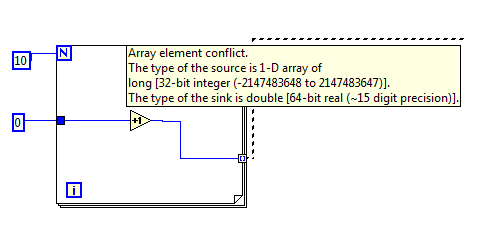
Any help wit this..?
Rookie; LV 2011 on WIN 7
 NIquist
08-05-2010 12:13 PM
- Mark as New
- Bookmark
- Subscribe
- Mute
- Subscribe to RSS Feed
- Permalink
- Report to a Moderator
Right-click the blue '0' constant. Change representation to DBL.
08-05-2010 12:16 PM
- Mark as New
- Bookmark
- Subscribe
- Mute
- Subscribe to RSS Feed
- Permalink
- Report to a Moderator
You mean this? I cannot change it 😞
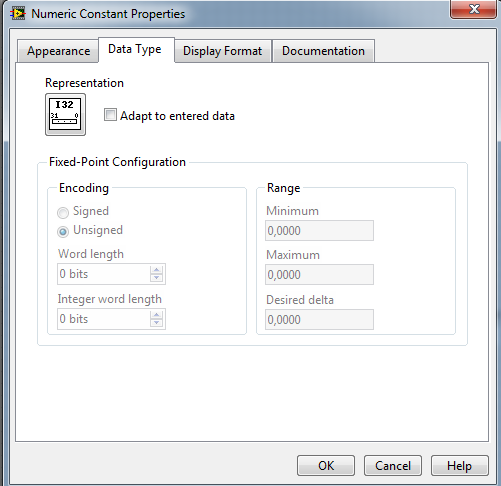
Rookie; LV 2011 on WIN 7

 Dennis_Knutson
08-05-2010 12:18 PM - edited 08-05-2010 12:19 PM
- Mark as New
- Bookmark
- Subscribe
- Mute
- Subscribe to RSS Feed
- Permalink
- Report to a Moderator
Changing to DBL will not fix the problem that the for loop is creating an array and you are trying to connect to an input that expects a scalar. What are you trying to connect to? Your image does not show this critical part. Why post a partial image instead of the actual VI? Trying to help when you provide information in small bits and pieces is not an efficient way to get help. Most of us are volunteers that may stop volunteering if we have to keep guessing.
As far as changing the data type, you really don't know the fundamentals. Right click on a constant and select 'Representation'.
NIquist
08-05-2010 12:31 PM - edited 08-05-2010 12:36 PM
- Mark as New
- Bookmark
- Subscribe
- Mute
- Subscribe to RSS Feed
- Permalink
- Report to a Moderator
There is something you haven't posted that is causing issues but we can't see it. Also, you still have a fundamental problem because you're not using a shift register to pass your incremented value around to the next loop iteration. Here is one solution (see pic).
EDIT: Yuck, I should have de-selected the loop before I took a screenshot but I'm sure you get the idea.
Please take tbob's advice and do some LV tutorials. You have to know this basic stuff like the back of your hand before you can go on to more advanced coding. Good Luck!

