how to trigger value change in event structure
已解决!
 yee0722
已解决! 转到解答。

 crossrulz

No VI attached. Maybe try zipping it up to post the code.
My gut feel is that you want to make an event case to handle both controls' value change. Have the terminals inside of the event case, do whatever comparison you need and show the dialog if the comparisons pass.
There are only two ways to tell somebody thanks: Kudos and Marked Solutions
Unofficial Forum Rules and Guidelines
"Not that we are sufficient in ourselves to claim anything as coming from us, but our sufficiency is from God" - 2 Corinthians 3:5
Hi sorryyyyy that didn't upload the vi.. here there are.. So like you said, I want to handle both controls to trigger the event and show pop up msg without interrupt the main vi.. how should I do it?? thank you..
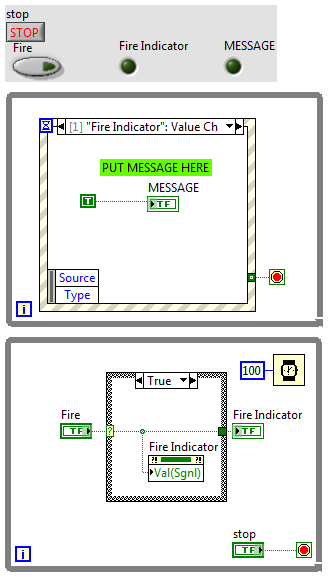
Hiii thanks sooo much for the correction! I would like to do a pop up msg to the event using sub vi.. how should I connect through it? thank you!

 apok
apok
@yee0722 wrote:
Hiii thanks sooo much for the correction! I would like to do a pop up msg to the event using sub vi.. how should I connect through it? thank you!
maybe instead of me writing, "PUT MESSAGE HERE"...I should have correctly stated,"PUT SUB.VI HERE". I hope that is clear enough?
Hi first of all sorry for that lousy question. I actually means how to create a pop up sub vi that will not interrupt the main vi.. Because Itry to use dialog box, and it make the main vi stop until the button press.. can you give me some hint on it?
Hi as attached, I make the pop up msg using sub vi, but the pop up result was wrong, it continue to pop up even in false case.. how should I modified at the false case? thank you..

 MarcDub
There are several ways you can do it. First you have to configure your sub-vi so that it does whatever you want when it runs (in the vi properties, top most window for example) and to make sure that it closes completely when finished (when clicking the "OK" button for example).
You than need to make an asynchronous call to the sub-vi. There are several ways to do it. My favorite one is shown below. You go in the "Application control" sub-palette and select Static VI reference. I like this approach because it keeps track of the sub-vi path for you, as long as the sub-vi is in the same project. You then drag the sub-vi onto the empty square that will changes to your sub-vi icon. You then connect to an invoke node from the same sub-palette and select run VI. Set "Wait Until Done" to false and the main VI will keep running after starting the Sub vi. Set "Auto Dispose Ref" is the easiest way to go. Otherwise you have to keep track of the sub-vi reference and close it yourself when you're done.
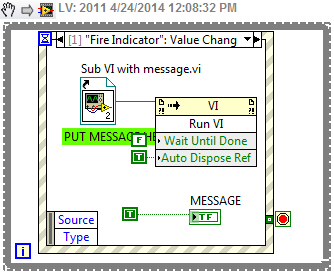

Hi first of all really thank you so much for the solution. I just put the sub vi with build text inside, somehow the event still not able to execute it..
