- Subscribe to RSS Feed
- Mark Topic as New
- Mark Topic as Read
- Float this Topic for Current User
- Bookmark
- Subscribe
- Mute
- Printer Friendly Page
how to read *.dat type file

 buldog
05-27-2005 07:56 PM
- Mark as New
- Bookmark
- Subscribe
- Mute
- Subscribe to RSS Feed
- Permalink
- Report to a Moderator
Can anyone help me with reading *.dat file using labview functions. Previously I've read them via matlab script, but after compiling to executable I could not read *.dat files. It might be because I'm working on LV 6i and in order to be able to read via matlab 6.5 I've paste matlabscript.dll from LV 7 to the main 6i place. However now I want to load this dats by using LV function and I can not achieve it.
I've already tried to use some examples from the help base and it doesn't work. There are slightly more then 2 milion samples in one coloumn in tis file.
Can anyone show me how to do that? I will appraciate
thanks
michal m
05-28-2005 09:16 AM
- Mark as New
- Bookmark
- Subscribe
- Mute
- Subscribe to RSS Feed
- Permalink
- Report to a Moderator
to make myself more clear I also enclose two vi
One is reading this dat file via matlab script and it works correctly.
The resault is one column wektor with 2097150 elemnts.
The other is reading using LV funktions from advanced pallete, and it doesn't work.
I receive error number 71 that means datalog type conflict.
I know from matlab that the data in that wektor are cardinal numbers, so I input to open file function this type of datalog.
Please help, I must not use matlab script because after making it executable reading via matlab doen't work, or it might be that someone can help with it.
I appriaciate any suggestion
thnaks

 altenbach

05-28-2005 10:52 AM - edited 05-28-2005 10:52 AM
- Mark as New
- Bookmark
- Subscribe
- Mute
- Subscribe to RSS Feed
- Permalink
- Report to a Moderator
If you want the same output as from your matlab script, simply read it as string, then convert it to byte array, (then convert it to DBL if needed).

Are you really sure the matlab script gives you the right result?
Message Edited by altenbach on 05-28-2005 08:56 AM

 altenbach
05-28-2005 11:14 AM - edited 05-28-2005 11:14 AM
- Mark as New
- Bookmark
- Subscribe
- Mute
- Subscribe to RSS Feed
- Permalink
- Report to a Moderator
Compare the two outputs in the attached image (only first 200 points shown).
Upper graph: the way you read it as 2097150 size U8 array.
Lower graph: the same dat file read as 1048575 size I16 array.
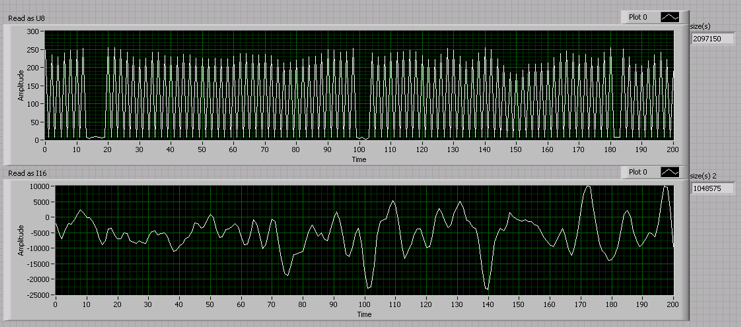
What kind of data is this?
Message Edited by altenbach on 05-28-2005 09:14 AM

05-30-2005 08:12 AM
- Mark as New
- Bookmark
- Subscribe
- Mute
- Subscribe to RSS Feed
- Permalink
- Report to a Moderator
Now I can manage to read this file using LV functions, but another problem araised.
I've figure out that data type is U16. When I read using LV functions data differs completely from the data the way matlab reads. BTW it looks again very strange. Changeging from U16 to I16 makes the signal look more likely real, but it's still different from matlab.
Picture shows:
Upper: LV graph I16 (U16 is more likely your upper graph)
Lower: Matlab U16 graph wich is correct !!!
I'm realy confused
michal m
I apraciate any suggestion
PS don't get mad about my spelling

05-30-2005 08:14 AM
- Mark as New
- Bookmark
- Subscribe
- Mute
- Subscribe to RSS Feed
- Permalink
- Report to a Moderator

 Donald
05-30-2005
09:23 AM
- last edited on
10-19-2025
01:32 PM
by
 Content Cleaner
- Mark as New
- Bookmark
- Subscribe
- Mute
- Subscribe to RSS Feed
- Permalink
- Report to a Moderator
buldog,
Use a U16 and the 'Swap Bytes' function (Advanced pallette>>Data Manipulation) and you'll get what you want I think (see attached jpg). It's a Big Endian vs Little Endian thing.
You may want to take a look at Writing Binary Files with LabVIEW That Can Be Read by Other Applications even though you're reading.
Fading out. " ... J. Arthur Rank on gong."
 altenbach
05-30-2005
11:13 AM
- last edited on
10-19-2025
01:33 PM
by
Content Cleaner
- Mark as New
- Bookmark
- Subscribe
- Mute
- Subscribe to RSS Feed
- Permalink
- Report to a Moderator
LabVIEw is always big endian (on any platform), but most other programs are little endian on intel machines (windows). See also the link Donald posted.
Your particular code still has a few bugs. Since you are reading U16, the number of data points is half the number of bytes in the file. You are trying to read twice as many and always get Error 4 (EOF encountered). To avoid this error, you need to divide the bytes by two for reading. Also watch out for correct representations, your record(s) indicator is I32 instead of U16, causing unecessary extra memory usage. ... and don't forget to close your file when done reading. 😉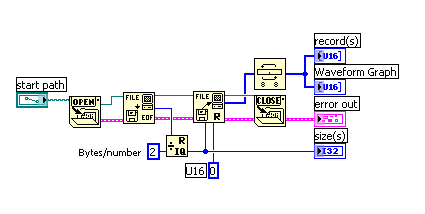
Message Edited by altenbach on 05-30-2005 09:19 AM
Message Edited by Support on 05-31-2005 08:59 AM

05-30-2005 12:04 PM
- Mark as New
- Bookmark
- Subscribe
- Mute
- Subscribe to RSS Feed
- Permalink
- Report to a Moderator
Now I feel much wiser 😉
michal m
PS You know that I did realy forget to close the file
