- RSS フィードを購読する
- トピックを新着としてマーク
- トピックを既読としてマーク
- このスレッドを最上位に表示
- {0}にこのスレッドを追加する
- 購読
- ミュート
- 印刷用ページに変更
how to get specific range of data from csv file

 DMR12
DMR12
11-16-2021 08:47 AM
- 新着としてマーク
- {0}にこのメッセージを追加する。
- 購読
- ミュート
- RSS フィードを購読する
- このメッセージをハイライトする
- このメッセージを印刷する
- 管理者に不正使用を報告する
Hello
i have a CSV file that im importing with a read delimiter spreadsheet
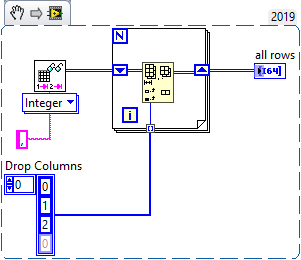
the file contains more than 100 rows and 6 columns and i want to access every row 4, 5, and 6 cols.
its all in numbers and no string involved
how can i do this?
thanks

 RTSLVU
11-16-2021 09:12 AM - 編集済み 11-16-2021 09:12 AM
- 新着としてマーク
- {0}にこのメッセージを追加する。
- 購読
- ミュート
- RSS フィードを購読する
- このメッセージをハイライトする
- このメッセージを印刷する
- 管理者に不正使用を報告する
- Read the entire file into a numeric Array
- Index the rows/columns you are interested in out of the Array
=== Engineer Ambiguously ===
========================
11-16-2021 09:21 AM
- 新着としてマーク
- {0}にこのメッセージを追加する。
- 購読
- ミュート
- RSS フィードを購読する
- このメッセージをハイライトする
- このメッセージを印刷する
- 管理者に不正使用を報告する
hello
i understand the idea but i don't know how to do it
i used index array and tried to set the indexes of each row and column by using a for loop but it didn't work.
RTSLVU
11-16-2021 09:24 AM
- 新着としてマーク
- {0}にこのメッセージを追加する。
- 購読
- ミュート
- RSS フィードを購読する
- このメッセージをハイライトする
- このメッセージを印刷する
- 管理者に不正使用を報告する
@DMR12 wrote:
hello
i understand the idea but i don't know how to do it
i used index array and tried to set the indexes of each row and column by using a for loop but it didn't work.
Well without seeing your code all I can says is, you are doing it wrong...
=== Engineer Ambiguously ===
========================

 altenbach

11-16-2021 11:08 AM - 編集済み 11-16-2021 11:11 AM
- 新着としてマーク
- {0}にこのメッセージを追加する。
- 購読
- ミュート
- RSS フィードを購読する
- このメッセージをハイライトする
- このメッセージを印刷する
- 管理者に不正使用を報告する
A CSV file is nothing by one long string. In order to get numbers, you need to parse it and LabVIEW has all the tools you need for that. Seems you are unsig read from spreadsheet file and that's not the problem. Are the number floating point or integers?
This leaves us with a smallish 2D array that you want to process in some way, but it is not clear at all.
What do you mean by "access"? That's a very ambiguous term! If you just want the 2D array containing only rows 4,5,6, you don't even need a loop.
@DMR12 wrote:
i used index array and tried to set the indexes of each row and column by using a for loop but it didn't work.
There a millions of ways something does not work and probably hundreds of ways where it works perfectly. You are not really narrowing down the problem. Typically you would auto-index the full array, then get the three column elements, either with index array resized to three output, or as a subset with three element. Again, it all depends what you mean by "access".
To get help, do the following two things:
- Exactly define what you are trying to do.
- Attach your failed attempt, preferably not in the newest LabVIEW version. Make sure we have a typical array, e.g. as diagram constant.

 Beut
Beut
11-17-2021 04:23 PM
- 新着としてマーク
- {0}にこのメッセージを追加する。
- 購読
- ミュート
- RSS フィードを購読する
- このメッセージをハイライトする
- このメッセージを印刷する
- 管理者に不正使用を報告する
You should explore the 'Read Delimited Spreadsheet.vi' that is built into LabVIEW.