- Subscribe to RSS Feed
- Mark Topic as New
- Mark Topic as Read
- Float this Topic for Current User
- Bookmark
- Subscribe
- Mute
- Printer Friendly Page
how do you do math?

 itesla43
07-28-2014 12:46 PM
- Mark as New
- Bookmark
- Subscribe
- Mute
- Subscribe to RSS Feed
- Permalink
- Report to a Moderator
titel says it
my specs are
intel i5
240gb phantom ssd
16x blu-ray burner
16g ram
600w power supply
thx

 altenbach

07-28-2014 12:58 PM
- Mark as New
- Bookmark
- Subscribe
- Mute
- Subscribe to RSS Feed
- Permalink
- Report to a Moderator
Is this a LabVIEW question? If so, in what way?
... And why would it depend on the computer hardware?
(16 grams of RAM? how much is that in GB? How much is 240gb? What does a burner have to do with the math capabilities?)


 aputman
07-28-2014 01:08 PM
- Mark as New
- Bookmark
- Subscribe
- Mute
- Subscribe to RSS Feed
- Permalink
- Report to a Moderator
Hey Altenbach....c'mon man....the "titel" says it all.
2+2=4
8-5=3

07-28-2014 01:14 PM
- Mark as New
- Bookmark
- Subscribe
- Mute
- Subscribe to RSS Feed
- Permalink
- Report to a Moderator
for labview. to calulate some expressions. like altenbach said. how do I make it into a labview file?
aputman
07-28-2014 01:17 PM
- Mark as New
- Bookmark
- Subscribe
- Mute
- Subscribe to RSS Feed
- Permalink
- Report to a Moderator
Have you attempted to create any expressions? Look on the numeric menu and you will see all kinds of nodes for addition, subtraction, etc. The best way to learn is to experiment.

 Dennis_Knutson
07-28-2014 01:21 PM
- Mark as New
- Bookmark
- Subscribe
- Mute
- Subscribe to RSS Feed
- Permalink
- Report to a Moderator
Please take one of the many free tutorials or classes. It doesn't seem that you haven't done anything to learn something so basic.
07-28-2014 01:29 PM
- Mark as New
- Bookmark
- Subscribe
- Mute
- Subscribe to RSS Feed
- Permalink
- Report to a Moderator
altenbach
07-28-2014 01:31 PM
- Mark as New
- Bookmark
- Subscribe
- Mute
- Subscribe to RSS Feed
- Permalink
- Report to a Moderator
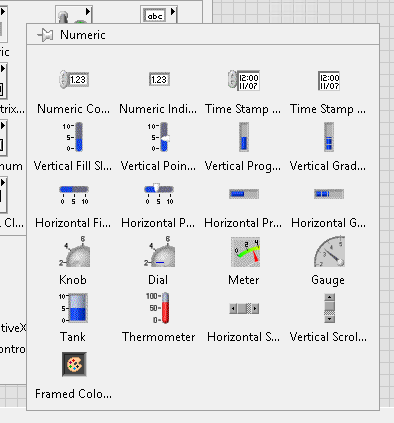
You are looking at controls of the front panel. Try the palettes of the block diagram instead.
aputman
07-28-2014 01:31 PM
- Mark as New
- Bookmark
- Subscribe
- Mute
- Subscribe to RSS Feed
- Permalink
- Report to a Moderator
Right click the block diagram, not the front panel.


 MrHappyAsthma
07-28-2014 01:33 PM - edited 07-28-2014 01:38 PM
- Mark as New
- Bookmark
- Subscribe
- Mute
- Subscribe to RSS Feed
- Permalink
- Report to a Moderator
@itesla43 wrote:
which one?
You are looking at the Front Panel... Try pressing "ctrl + e" to bring up the Block Diagram. This is where you compose the "expressions" to do your "math". The Front Panel is just to display the results in controls and indicators:
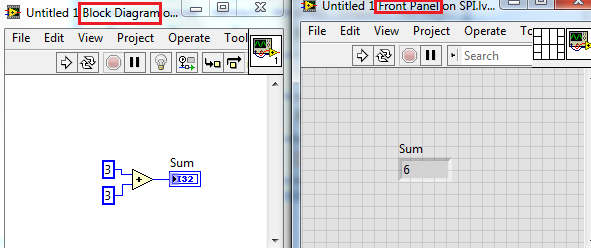
You may find the following helpful: http://www.ni.com/gettingstarted/labviewbasics/
If someone helped you out, please select their post as the solution and/or give them Kudos!
